Sender ID Dashboard
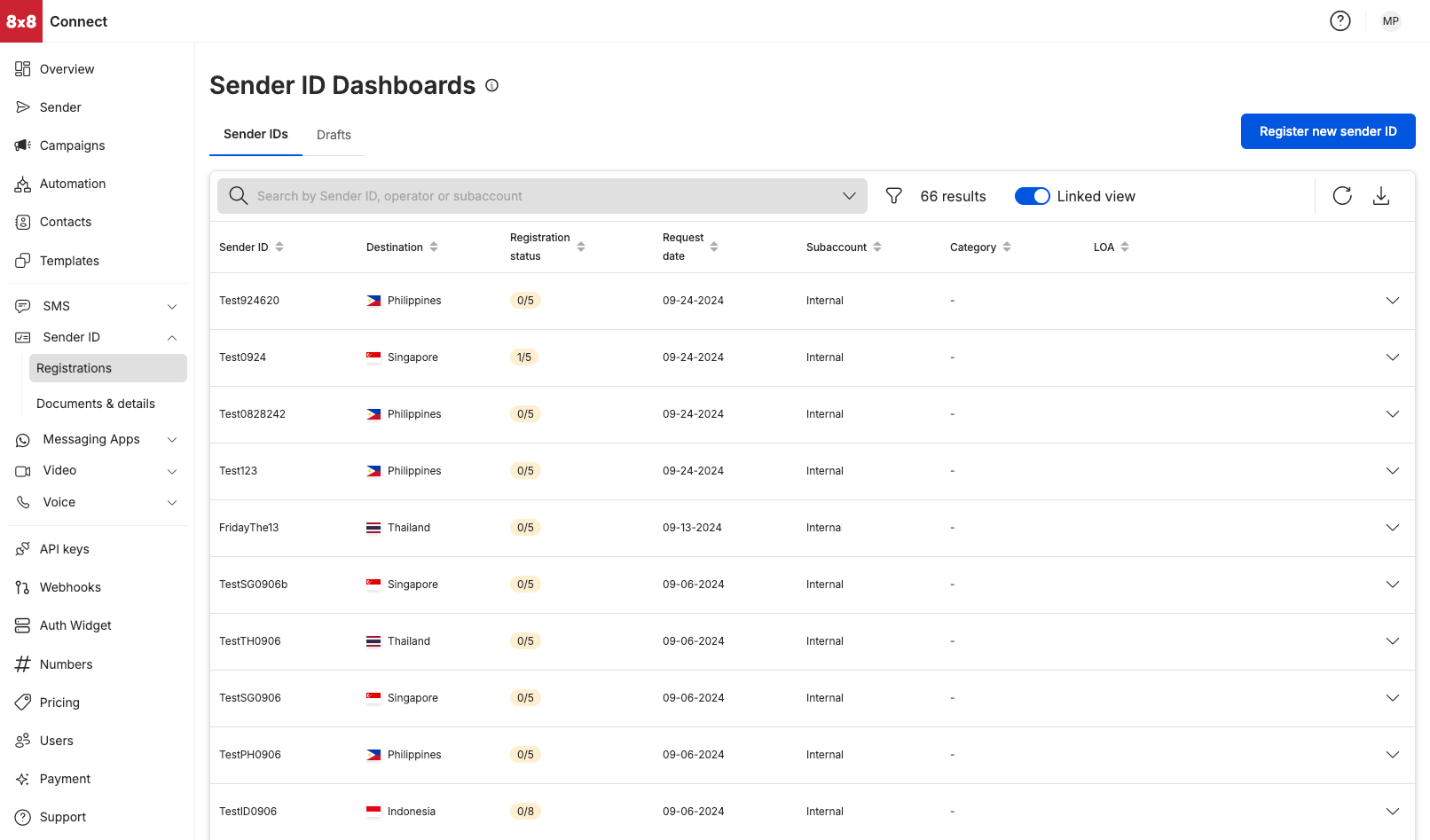
Finding your Sender ID Dashboard
- Select
Registrationsunder the Sender ID module on your left hand side menu - Alternatively, you can access the Sender ID Dashboard via URL: https://connect.8x8.com/messaging/sender-id
Sender IDs Tab
View Sender ID registration by:
- Sender ID (name of sender ID that had been chosen to be registered)
- Country (destination where the sender ID needed to be registered at)
- Subaccount (the subaccount chosen for the Sender ID registration, this would most often be a subaccount that has the SMS product enabled)
Sorting filters
- Sender ID (sort in ascending order [a-z] or in descending order [z-a] of the Sender ID name)
- Destination (sort in ascending order [a-z] or in descending order [z-a] of the destination name)
- Registration Status (sort by the number of operators in the registration status)
- Request Date sort in ascending order [earliest date - latest date] or in descending order [latest date - earlier date]
- Category (sort in ascending order [a-z] or in descending order [z-a] of the category name)
LOA (Sort by the registration status of the LOA)
Source: https://developer.8x8.com/connect/docs/sender-id-dashboard · 8x8 CPaaS Developer Docs. Synced for support deflection.

Please sign in to leave a comment.
0 Comments