See Details
Logo CPaaS Help Center Developer Premium Support Status
Sign in Contact Support
  1. 8x8 CPaaS Help Center
  2. Webhooks, Callbacks & Events

Webhooks, Callbacks & Events

  • Trigger workflows using an external event

    Trigger workflows using an external event

    POST https://automation.8x8.com/api/v1/accounts/:accountId/triggers/http_request

    Use this resource to trigger workflows from an external system. Inbound SMS and chat apps message triggers are managed by the automation service. However, if you would like to trigger workflows from an external system like your CRM or ERP application or even a 3rd party system, you can use the http_request trigger to do so.

    Request

    Path Parameters

      accountId stringrequired

      Account id

    Query Parameters

      subAccountId string

      Subaccount id to trigger definitions that must be run only for specific subaccounts.

    Body

      objectobject

      Workflow data. Request body can be any JSON containing data required by your workflow. This data will be saved to the workflow context when a workflow is triggered. You can access that data from the workflow using the data.

    An event to trigger workflows is successfully raised.


    Source: https://developer.8x8.com/connect/reference/http-request-trigger · 8x8 CPaaS Developer Docs. Synced for support deflection.

  • Get webhook information for your account

    Get webhook information for your account

    GET https://voice.8x8.com/api/v1/subaccounts/:subAccountId/webhooks

    Get webhook information for your account

    Request

    Path Parameters

      subAccountId stringrequired

      Possible values: >= 3 characters and <= 50 characters, Value must match regular expression ^[A-Za-z0-9\-._&]{3,50}$

      You must replace {subAccountId} with the subaccountid that you want to use. By default this is generated once you have completed the voice onboarding.

    Request succeeded

    Schema

      subAccountIdstring
      countinteger

      webhooks object[]

    • Array [
    • typestring
      urlstring
      enabledboolean
      httpAuthHeaderAvailableboolean
    • ]
    • statusCodeinteger
      statusMessagestring
    {
    "subAccountId":"XXXX",
    "count":1,
    "webhooks":[
    {
    "type":"VCA",
    "url":"https://sample.com/test",
    "enabled":true,
    "httpAuthHeaderAvailable":true
    }
    ],
    "statusCode":0,
    "statusMessage":"ok"
    }

    API key not found or invalid

    Resource not accessible

    Resource not found

    Server error


    Source: https://developer.8x8.com/connect/reference/get-webhooks-information · 8x8 CPaaS Developer Docs. Synced for support deflection.

  • Get all Webhooks for Account

    Get all Webhooks for Account

    GET https://chatapps.8x8.com/api/v1/accounts/:accountId/webhooks

    Sending a GET request on this endpoint allows to retrieve a list of all the webhooks or a specific webhook configured for an account.

    Request

    Path Parameters

      accountId stringrequired

      Possible values: >= 32 characters and <= 36 characters, Value must match regular expression ^[0-9A-Fa-f]{8}[-]?(?:[0-9A-Fa-f]{4}[-]?){3}[0-9A-Fa-f]{12}$

      You must replace {accountId} with the accountid that you want to use.

    Schema

    • Array [
    • subAccountIdstringrequired
      • Sets the subaccount scope of the webhook.
      • Use * to receive events across all subAccounts.
      • Use the subAccountId to receive events for a specific subaccount.
      Example: Onion_Marketing
      urlstring<uri>required

      The url to use for the webhook (8x8 platform will send events to this URL).

      Example: http://example.com
      httpAuthorizationstring

      The static HTTP Authorization header value sent with every webhook request. Masked as *** in GET responses.

      Example: ***
      enabledboolean

      Use this flag to enable or disable a Webhook.

      Default value: true
      Example: false

      oauth object

      OAuth 2.0 Client Credentials configuration for webhook authentication. When configured, the platform will obtain an access token from the specified token endpoint and include it in the webhook request. The clientSecret is masked (***) in GET responses.

      urlstring<uri>required

      The token endpoint URL used to obtain the OAuth access token.

      Example: https://auth.example.com/oauth/token
      clientIdstringrequired

      The client ID for OAuth authentication.

      Example: my-client-id
      clientSecretstringrequired

      The client secret for OAuth authentication. Masked as *** in GET responses.

      Example: ***
      credentialsLocationstringrequired

      Specifies where the client credentials are sent: header (HTTP Basic Auth) or body (form body).

      Possible values: [header, body]

      Example: header
      scopestring

      Optional space-separated list of OAuth scopes to request.

      Example: read write
    • ]
    [
    {
    "subAccountId":"Onion_Marketing",
    "url":"http://example.com",
    "httpAuthorization":"***",
    "enabled":false,
    "oauth":{
    "url":"https://auth.example.com/oauth/token",
    "clientId":"my-client-id",
    "clientSecret":"***",
    "credentialsLocation":"header",
    "scope":"read write"
    }
    }
    ]
    [
    {
    "type":"CADR",
    "subAccountId":"Onion_Marketing",
    "url":"http://example.com/dr/marketing",
    "enabled":true,
    "oauth":{
    "url":"https://auth.example.com/oauth/token",
    "clientId":"my-client-id",
    "clientSecret":"***",
    "credentialsLocation":"header",
    "scope":"read write"
    }
    },
    {
    "type":"MSG",
    "subAccountId":"Onion_Marketing",
    "url":"http://example.com/dr/sales",
    "enabled":true,
    "httpAuthorization":"***"
    },
    {
    "type":"MSG",
    "subAccountId":"*",
    "url":"http://example.com/dr/general",
    "enabled":true
    },
    {
    "type":"CABM",
    "subAccountId":"*",
    "url":"http://example.com/mo/general",
    "enabled":false
    }
    ]

    Bad request error response

    Schema

      codeintegerrequired

      Error code

      messagestring

      Error description

      errorIdstring<uuid>required

      Unique id of error. You can use it as reference when sending enquiries to 8x8 support

      timestampstring<date-time>required

      Data and time of the error occurence

    {
    "code":1001,
    "message":"Provided subAccountId doesn't belongs to your account",
    "errorId":"91b106f0-c0da-4aba-a43a-7af9c5893a80",
    "timestamp":"2017-04-19T02:31:19.4297387+00:00"
    }
    {
    "code":1002,
    "message":"Invalid MSISDN format (not E.164 international number)",
    "errorId":"b4478860-b76c-e811-814e-022a35cc1c71",
    "timestamp":"2018-08-04T09:25:40.9235752+00:00"
    }

    Request was not authenticated response

    Schema

      codeintegerrequired

      Error code

      messagestring

      Error description

      errorIdstring<uuid>required

      Unique id of error. You can use it as reference when sending enquiries to 8x8 support

      timestampstring<date-time>required

      Data and time of the error occurence

    {
    "code":1001,
    "message":"Provided subAccountId doesn't belongs to your account",
    "errorId":"91b106f0-c0da-4aba-a43a-7af9c5893a80",
    "timestamp":"2017-04-19T02:31:19.4297387+00:00"
    }
    {
    "code":1200,
    "message":"Request was not authenticated properly",
    "errorId":"db9dced4-3534-4d86-9d18-6b448af0d621",
    "timestamp":"2018-08-02T09:42:38.8988997+00:00"
    }

    Internal server error

    Schema

      codeintegerrequired

      Error code

      messagestring

      Error description

      errorIdstring<uuid>required

      Unique id of error. You can use it as reference when sending enquiries to 8x8 support

      timestampstring<date-time>required

      Data and time of the error occurence

    {
    "code":1001,
    "message":"Provided subAccountId doesn't belongs to your account",
    "errorId":"91b106f0-c0da-4aba-a43a-7af9c5893a80",
    "timestamp":"2017-04-19T02:31:19.4297387+00:00"
    }
    {
    "code":2000,
    "message":"Internal server error",
    "errorId":"db9dced4-3534-4d86-9d18-6b448af0d621",
    "timestamp":"2018-07-02T09:42:38.8988997+00:00"
    }

    Source: https://developer.8x8.com/connect/reference/get-webhooks-1 · 8x8 CPaaS Developer Docs. Synced for support deflection.

  • Delete webhooks

    Delete webhooks

    DELETE https://sms.8x8.com/api/v1/accounts/:accountId/webhooks

    Sending a DELETE request on this endpoint allows to remove a configured webhook for an account or a subaccount .

    Request

    Path Parameters

      accountId stringrequired

      Possible values: >= 32 characters and <= 36 characters, Value must match regular expression ^[0-9A-Fa-f]{8}[-]?(?:[0-9A-Fa-f]{4}[-]?){3}[0-9A-Fa-f]{12}$

      You must replace {accountId} with the accountid that you want to use.

    Body array

    For this request, the subaccount and type (both required) are used to identify which webhook to target and delete.

    NB: the * character will only be used for targeting webhooks configured with a global subaccount or global product scope: it does not act as a wild-card to delete all webhooks.

    • Array [
    • subAccountIdstringrequired
      • Used to target which webhook to deactivate based on the subaccount it is configured for.
      • Use the subaccountid of the webhook to target a webhook set for a specific subaccount.
      • Use * to target a webhook with a subAccount-wide scope.
      Example: Onion_Marketing
      typeWebhook Type (string)required

      Specifies the type of events received on the webhook. The possible values are:

      • * : events of all types
      • DR: delivery receipts only
      • MO: SMS inbound messages only
      • MSG: SMS and ChatApps inbound messages only
      • EV: Events only (Whatsapp group created, user joined WA group, user left WA group)

      Possible values: [DR, MO, MSG, EV]

    • ]

    The webhook was deleted successfully

    Bad request error response

    Schema

      codeintegerrequired

      Error code

      messagestring

      Error description

      errorIdstring<uuid>required

      Unique id of error. You can use it as reference when sending enquiries to 8x8 support

      timestampstring<date-time>required

      Data and time of the error occurence

    {
    "code":1001,
    "message":"Provided subAccountId doesn't belongs to your account",
    "errorId":"91b106f0-c0da-4aba-a43a-7af9c5893a80",
    "timestamp":"2017-04-19T02:31:19.4297387+00:00"
    }
    {
    "code":1002,
    "message":"Invalid MSISDN format (not E.164 international number)",
    "errorId":"b4478860-b76c-e811-814e-022a35cc1c71",
    "timestamp":"2018-08-04T09:25:40.9235752+00:00"
    }

    Request was not authenticated response

    Schema

      codeintegerrequired

      Error code

      messagestring

      Error description

      errorIdstring<uuid>required

      Unique id of error. You can use it as reference when sending enquiries to 8x8 support

      timestampstring<date-time>required

      Data and time of the error occurence

    {
    "code":1001,
    "message":"Provided subAccountId doesn't belongs to your account",
    "errorId":"91b106f0-c0da-4aba-a43a-7af9c5893a80",
    "timestamp":"2017-04-19T02:31:19.4297387+00:00"
    }
    {
    "code":1200,
    "message":"Request was not authenticated properly",
    "errorId":"db9dced4-3534-4d86-9d18-6b448af0d621",
    "timestamp":"2018-08-02T09:42:38.8988997+00:00"
    }

    Internal server error

    Schema

      codeintegerrequired

      Error code

      messagestring

      Error description

      errorIdstring<uuid>required

      Unique id of error. You can use it as reference when sending enquiries to 8x8 support

      timestampstring<date-time>required

      Data and time of the error occurence

    {
    "code":1001,
    "message":"Provided subAccountId doesn't belongs to your account",
    "errorId":"91b106f0-c0da-4aba-a43a-7af9c5893a80",
    "timestamp":"2017-04-19T02:31:19.4297387+00:00"
    }
    {
    "code":2000,
    "message":"Internal server error",
    "errorId":"db9dced4-3534-4d86-9d18-6b448af0d621",
    "timestamp":"2018-07-02T09:42:38.8988997+00:00"
    }

    Source: https://developer.8x8.com/connect/reference/delete-webhooks · 8x8 CPaaS Developer Docs. Synced for support deflection.

  • Delete a specific type of webhook

    Delete a specific type of webhook

    DELETE https://voice.8x8.com/api/v1/subaccounts/:subAccountId/webhooks/:webhook-type

    Delete a specific type of webhook

    Request

    Path Parameters

      subAccountId stringrequired

      Possible values: >= 3 characters and <= 50 characters, Value must match regular expression ^[A-Za-z0-9\-._&]{3,50}$

      You must replace {subAccountId} with the subaccountid that you want to use. By default this is generated once you have completed the voice onboarding.

      webhook-type stringrequired

      Possible values: [VCS, VCA, VSS, VRU]

      webhook type to delete

    Request succeeded

    Schema

      allOf object

      typestring
      urlstring
      enabledboolean
      httpAuthHeaderAvailableboolean
      statusCodeinteger
      statusMessagestring
    {
    "subAccountId":"subAccountId",
    "type":"VSS",
    "url":"https://sample.com/test",
    "enabled":false,
    "httpAuthHeaderAvailable":true,
    "statusCode":0,
    "statusMessage":"deleted"
    }

    API key not found or invalid

    Resource not accessible

    Resource not found

    Server error


    Source: https://developer.8x8.com/connect/reference/delete-a-specific-type-of-webhook · 8x8 CPaaS Developer Docs. Synced for support deflection.

  • Create a new webhook

    Create a new webhook

    POST https://voice.8x8.com/api/v1/subaccounts/:subAccountId/webhooks

    Create a new webhook

    Request

    Path Parameters

      subAccountId stringrequired

      Possible values: >= 3 characters and <= 50 characters, Value must match regular expression ^[A-Za-z0-9\-._&]{3,50}$

      You must replace {subAccountId} with the subaccountid that you want to use. By default this is generated once you have completed the voice onboarding.

    Bodyrequired

    Create webhooks params

      typestring

      Webhook type:

      • VCA (Voice Call Action) - Webhook Guide
      • VCS (Voice Call Status) - Webhook Guide
      • VSS (Voice Session Summary) - Overview | IVR | Voice Messaging | Number Masking
      • VRU (Voice Recording Uploaded) - Webhook Guide
      • VNU (Virtual Number Updated) - Webhook Guide

      Possible values: [VCS, VCA, VSS, VRU, VNU]

      urlstring

      URL configured for the webhook. (POST)

      httpAuthHeaderstringnullable

      Add authentification header.

      enabledbooleannullable

      enables the webhook.

      Default value: true

    Request succeeded

    Schema

      subAccountIdstring
      countinteger

      webhooks object[]

    • Array [
    • typestring
      urlstring
      enabledboolean
      httpAuthHeaderAvailableboolean
    • ]
    • statusCodeinteger
      statusMessagestring
    {
    "subAccountId":"XXXX",
    "count":1,
    "webhooks":[
    {
    "type":"VCA",
    "url":"https://sample.com/test",
    "enabled":true,
    "httpAuthHeaderAvailable":true
    }
    ],
    "statusCode":0,
    "statusMessage":"ok"
    }

    API key not found or invalid

    Resource not accessible

    Resource not found

    Invalid param

    Schema

      errorIdstring<uuid>
      Example: 1aa1fc32-8e07-11ea-864e-1961d882f548
      statusCodestring
      Example: 1001
      statusMessagestring
      Example: Invalid JSON request body
      timestampstring
      Example: {}
    {
    "errorId":"1aa1fc32-8e07-11ea-864e-1961d882f548",
    "statusCode":"1001",
    "statusMessage":"Invalid JSON request body",
    "timestamp":{}
    }

    Server error


    Source: https://developer.8x8.com/connect/reference/create-a-new-webhook · 8x8 CPaaS Developer Docs. Synced for support deflection.

  • Create or Replace webhooks

    Create or Replace webhooks

    POST https://chatapps.8x8.com/api/v1/accounts/:accountId/webhooks

    Sending a POST request on this endpoint allows to add a new webhook for an account or modify the configuration of an existing one .

    Webhooks can be given an account-wide and/or a type-wide scope using the * character

    For example: if a webhook is created with subAccount=* , this webhook will receive events across all the subaccounts of an account.

    Request

    Path Parameters

      accountId stringrequired

      Possible values: >= 32 characters and <= 36 characters, Value must match regular expression ^[0-9A-Fa-f]{8}[-]?(?:[0-9A-Fa-f]{4}[-]?){3}[0-9A-Fa-f]{12}$

      You must replace {accountId} with the accountid that you want to use.

    Body array

    • Array [
    • subAccountIdstringrequired
      • Sets the subaccount scope of the webhook.
      • Use * to receive events across all subAccounts.
      • Use the subAccountId to receive events for a specific subaccount.
      Example: Onion_Marketing
      urlstring<uri>required

      The url to use for the webhook (8x8 platform will send events to this URL).

      Example: http://example.com
      httpAuthorizationstring

      A static value sent as the HTTP Authorization header with every webhook request. Use this for static credentials such as API keys or pre-shared tokens.

      Example — Basic Authorization:

      • Encode user:password in base64 (e.g. dXNlcjpwYXNzd29yZA==)
      • Set this field to Basic dXNlcjpwYXNzd29yZA==

      For OAuth 2.0 Client Credentials flow, leave this field empty and use the oauth property instead.

      Example: Bearer 9QQhlsEb8VY
      enabledboolean

      Use this flag to enable or disable a Webhook.

      Default value: true
      Example: false
      typestring

      This parameter is not mandatory.

      • Sets the type of webhook to be added/updated.
      • Possible values are:
        • CADR for delivery receipts
        • MSG for inbound messages
        • CABM for Messaging Apps Business Management Updates
      • When not provided, webhooks will be added/updated for only CADR and MSG.

      Possible values: [CADR, MSG, CABM]

      oauth object

      OAuth 2.0 Client Credentials configuration for webhook authentication. When configured, the platform will obtain an access token from the specified token endpoint and include it in the webhook request.

      urlstring<uri>required

      The token endpoint URL used to obtain the OAuth access token.

      Example: https://auth.example.com/oauth/token
      clientIdstringrequired

      The client ID for OAuth authentication.

      Example: my-client-id
      clientSecretstringrequired

      The client secret for OAuth authentication.

      Example: my-client-secret
      credentialsLocationstringrequired

      Specifies where the client credentials are sent: header (HTTP Basic Auth) or body (form body).

      Possible values: [header, body]

      Example: header
      scopestring

      Optional space-separated list of OAuth scopes to request.

      Example: read write
    • ]

    The webhook was created or updated successfully

    Bad request error response

    Schema

      codeintegerrequired

      Error code

      messagestring

      Error description

      errorIdstring<uuid>required

      Unique id of error. You can use it as reference when sending enquiries to 8x8 support

      timestampstring<date-time>required

      Data and time of the error occurence

    {
    "code":1001,
    "message":"Provided subAccountId doesn't belongs to your account",
    "errorId":"91b106f0-c0da-4aba-a43a-7af9c5893a80",
    "timestamp":"2017-04-19T02:31:19.4297387+00:00"
    }
    {
    "code":1002,
    "message":"Invalid MSISDN format (not E.164 international number)",
    "errorId":"b4478860-b76c-e811-814e-022a35cc1c71",
    "timestamp":"2018-08-04T09:25:40.9235752+00:00"
    }

    Request was not authenticated response

    Schema

      codeintegerrequired

      Error code

      messagestring

      Error description

      errorIdstring<uuid>required

      Unique id of error. You can use it as reference when sending enquiries to 8x8 support

      timestampstring<date-time>required

      Data and time of the error occurence

    {
    "code":1001,
    "message":"Provided subAccountId doesn't belongs to your account",
    "errorId":"91b106f0-c0da-4aba-a43a-7af9c5893a80",
    "timestamp":"2017-04-19T02:31:19.4297387+00:00"
    }
    {
    "code":1200,
    "message":"Request was not authenticated properly",
    "errorId":"db9dced4-3534-4d86-9d18-6b448af0d621",
    "timestamp":"2018-08-02T09:42:38.8988997+00:00"
    }

    Internal server error

    Schema

      codeintegerrequired

      Error code

      messagestring

      Error description

      errorIdstring<uuid>required

      Unique id of error. You can use it as reference when sending enquiries to 8x8 support

      timestampstring<date-time>required

      Data and time of the error occurence

    {
    "code":1001,
    "message":"Provided subAccountId doesn't belongs to your account",
    "errorId":"91b106f0-c0da-4aba-a43a-7af9c5893a80",
    "timestamp":"2017-04-19T02:31:19.4297387+00:00"
    }
    {
    "code":2000,
    "message":"Internal server error",
    "errorId":"db9dced4-3534-4d86-9d18-6b448af0d621",
    "timestamp":"2018-07-02T09:42:38.8988997+00:00"
    }

    Source: https://developer.8x8.com/connect/reference/add-webhooks-1 · 8x8 CPaaS Developer Docs. Synced for support deflection.

  • Zendesk - Notifications Webhook

    Zendesk - Notifications Webhook

    Learn how to send Zendesk notifications via SMS or Messaging Apps from 8x8

    You can send SMS or Messaging Apps notifications automatically from Zendesk using Webhooks + Triggers. This guide outlines precisely how you can achieve this.


    What you’ll build

    Turn Zendesk into an auto-notify engine that keeps customers updated without agent busywork.

    Business outcomes

    • Fewer “any update?” tickets via proactive SMS/WhatsApp.
    • Faster resolutions with clear, timely status pings.
    • Consistent, compliant messaging using templates + placeholders.
    • Low effort for agents (tag/macro triggers do the sending).

    How it works

    1. Define the moments that matter (status change, public comment, or a “notify” tag).
    2. A Zendesk Trigger calls a Zendesk Webhook that posts to the 8x8 SMS or Messaging API endpoint.
    3. Zendesk renders the message template and 8x8 delivers it.
    • A Zendesk Webhook that posts JSON to 8x8 CPaaS.
    • A Trigger that calls the webhook when ticket conditions are met (e.g., status change, public comment, or tag added).
    • A JSON payload that Zendesk renders with placeholders (like {{ticket.id}}) before sending to 8x8.

    Prerequisites

    1. 8x8 Connect

      • Subaccount ID with SMS API enabled for SMS use along with registered Sender ID/Virtual Number for the destination countries you intend to send SMS to.
      • Subaccount ID with a WhatsApp channel onboarded + pre-approved templates that you intend to use
      • API Key
    2. Zendesk

      • Admin access to Admin Center (to create Webhooks and Triggers).
      • Optional: Help Center enabled if you plan to use {{ticket.link}} for end-user links.

    Choose the correct 8x8 endpoint

    8x8 provides region-specific base URLs. If your tenant is bound to a region, use that region’s host. When in doubt, start with the global host and consult your 8x8 representative.

    Channel Base URL (regional) Send endpoint (append to base)
    SMS https://sms.8x8.com /api/v1/subaccounts/{subAccountId}/messages
    Messaging https://chatapps.8x8.com /api/v1/subaccounts/{subAccountId}/messages

    Examples (final URL):

    • SMS: https://sms.8x8.com/api/v1/subaccounts/{subAccountId}/messages

    • Messaging: https://chatapps.8x8.com/api/v1/subaccounts/{subAccountId}/messages

    📘 Ensure your endpoint base url is accurate

    Platform Deployment Regions: /connect/docs/platform-deployment-regions


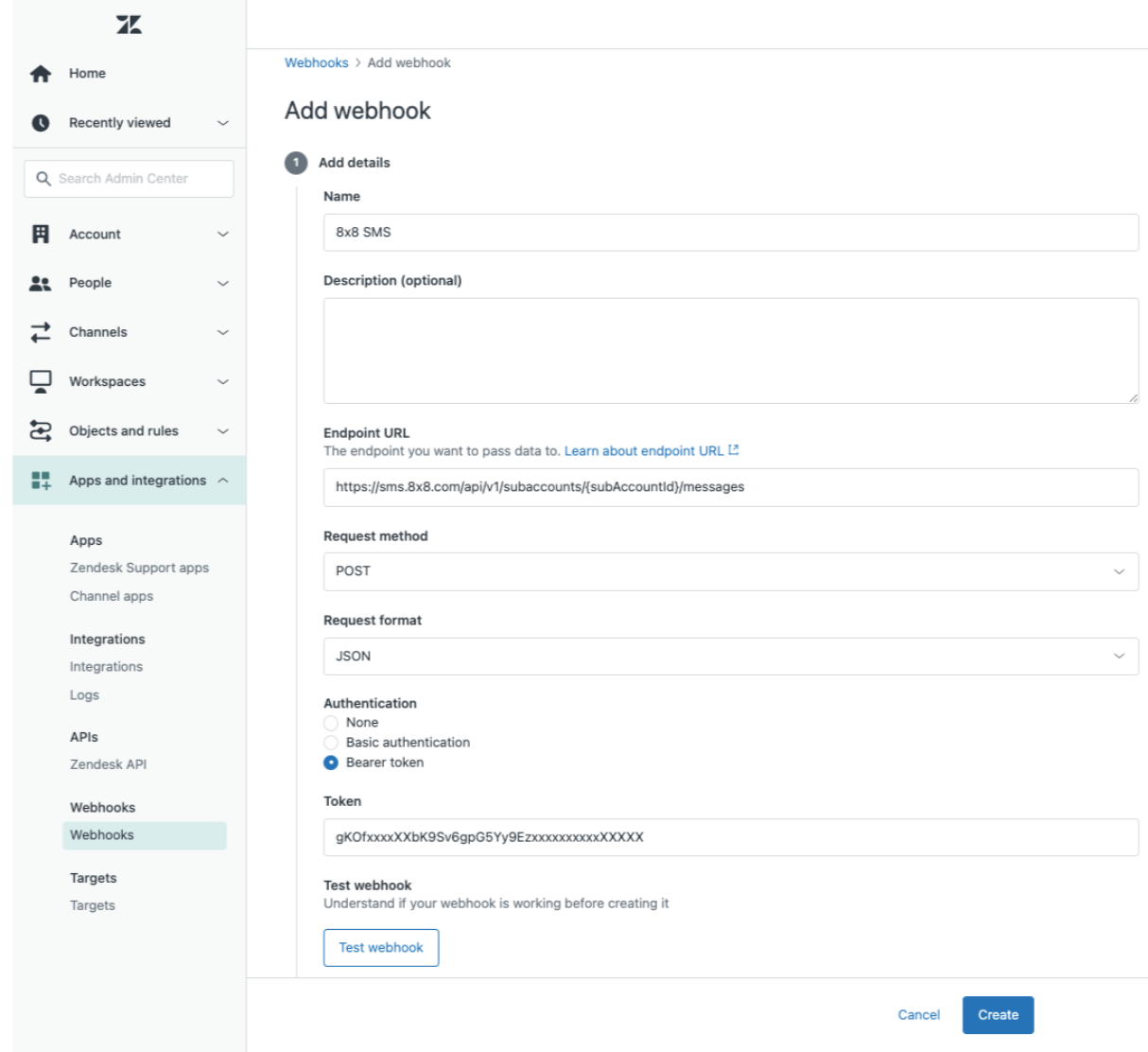
    Step 1: Create the Zendesk Webhook

    Create one webhook per channel (one for SMS, one for WhatsApp).

    1. In Zendesk Admin Center → Apps and integrations → Webhooks → Create webhook.
    2. Name: 8x8 SMS Send (and/or 8x8 WhatsApp Send).
    3. Endpoint URL:
      • SMS: https://sms.8x8.com/api/v1/subaccounts/{subAccountId}/messages
      • WhatsApp: https://chatapps.8x8.com/api/v1/subaccounts/{subAccountId}/messages
    4. Request method: POST
    5. Request format: JSON
    6. Authentication: choose Bearer token and paste your 8x8 API key (Zendesk will send Authorization: Bearer <token>).
    7. (Optional) Custom headers:
      • Accept: application/json
        (Zendesk sets Content-Type: application/json automatically for JSON format.)
    8. Click Create (and you may Test with a sample body later).

    image

    Repeat for the WhatsApp webhook, and ensure you replace the subAccountId placeholder with actual values.


    Step 2: Create a Trigger that calls the webhook

    1. In Zendesk Admin Center → Objects and rules → Business rules → Triggers → Add trigger.
    2. Name: e.g. Notify via SMS when ticket is solved or Notify via WhatsApp on public comment.
    3. Conditions (example – adjust to taste):
      • ALL:
        • Ticket | Is | Updated
        • Comment | Is | Public
        • (Optional) Requester | Phone number | Present (for SMS)
    4. Actions:
      • Notify active webhook → Select your 8x8 webhook.
      • JSON body → paste one of the payloads below (SMS or WhatsApp).

    Zendesk will render placeholders (like {{ticket.id}}) before sending, so 8x8 receives concrete values.


    Payloads

    Option A: SMS (8x8 SMS API)

    Use when you want a plain text SMS to the ticket requester’s phone.

    Webhook: 8x8 SMS Send
    JSON body:

    {
    "source":"<Your Approved Sender ID or Number>",
    "destination":"{{ticket.requester.phone}}",
    "text":"Update for ticket #{{ticket.id}} ({{ticket.status}}). View: {{ticket.link}}"
    }

    Notes

    • source: use an approved sender ID/number for the destination country. If country rules prevent alphanumeric sender IDs, use a numeric source.
    • destination: prefer international format (e.g., +12025550123). If you store national format in Zendesk, ensure your 8x8 route/country settings are configured accordingly.
    • Keep messages concise to avoid multi-part SMS billing.

    Option B: WhatsApp (8x8 Messaging API)

    Use when you want to send a WhatsApp message (template, or freeform within the customer service window).

    Webhook: 8x8 WhatsApp Send
    JSON body : Example template message with a single text parameter
    (Replace <Template Name> and set the language, e.g., en_GB and any other content you may have). Refer to this page for other sample JSON body for template messages. Ensure the JSON body is as per the approved template.

    {
    "user":{
    "msisdn":"{{ticket.requester.phone}}"
    },
    "type":"template",
    "content":{
    "template":{
    "language":"en_GB",
    "name":"<Template Name>",
    "components":[
    {
    "type":"body",
    "parameters":[
    {
    "type":"text",
    "text":"{{ticket.id}}"
    }
    ]
    }
    ]
    }
    }
    }

    Alternate freeform (inside WhatsApp’s customer service window)

    {
    "user":{
    "msisdn":"{{ticket.requester.phone}}"
    },
    "type":"text",
    "content":{
    "text":"We updated your ticket #{{ticket.id}} ({{ticket.status}}). View: {{ticket.link}}"
    }
    }

    Notes

    • Templates are required outside the WhatsApp customer service window. Ensure your WhatsApp templates are approved.
    • msisdn: use the customer’s phone number in international format.
    • You can enrich templates (images, documents, CTA buttons) by adding header/body/button components as per the Messaging API capabilities. Learn more here.

    Testing

    • In Webhooks, open your webhook and use Test webhook with a sample payload (hardcode a test number).
    • In Triggers, temporarily loosen conditions so it’s easy to fire the trigger, then revert.
    • Check Webhook Activity in Zendesk if calls are failing.
    • Check 8x8 API response codes in the webhook logs (2xx = success). If you enabled 8x8 delivery callbacks/logs, verify downstream delivery there.

    Troubleshooting

    • 401/403 from 8x8: wrong/missing API key or subaccount; ensure the webhook auth uses Bearer token and the endpoint URL has the correct subaccountId.
    • 400 from 8x8: invalid phone format, missing required field (e.g., text for SMS, or template name for WhatsApp template). Validate your JSON and field names exactly.
    • No phone on requester: add a trigger condition such as Requester → Phone number → Present or add a fallback (e.g., email) via a separate trigger.
    • {{ticket.link}} doesn’t render: Help Center may be disabled. Use a different placeholder or craft your own URL pattern if needed.
    • WhatsApp message rejected: using freeform outside the service window, or the template is unapproved / mis-named / wrong language. Switch to a valid template and resend.

    FAQ

    Do I need two webhooks?
    Yes. Create one for SMS and one for WhatsApp. Point your triggers to the right one.

    Which placeholders are safe?
    Conservative defaults: {{ticket.id}}, {{ticket.status}}, {{ticket.requester.name}}, {{ticket.requester.phone}}, {{ticket.assignee.name}}, {{ticket.link}}. If a field is blank in Zendesk, the rendered value will be blank.


    Appendix: Example end-to-end flows

    A. Notify by SMS when ticket is solved

    • Trigger conditions: Ticket → Status → Changed to → Solved
    • Action: Notify active webhook → 8x8 SMS Send
    • Body: use the SMS payload above

    B. Notify by WhatsApp when a public comment is added

    • Trigger conditions: Ticket → Is → Updated; Comment → Is → Public
    • Action: Notify active webhook → 8x8 WhatsApp Send
    • Body: use the WhatsApp template payload above

    C. Notify when a specific tag is added (fires once)

    Use this when you want Zendesk to notify via 8x8 the first time a tag appears on a ticket (e.g., notify_customer_sms or notify_customer_wa).
    We’ll guard against re-firing by adding a sent tag after we send.

    Example tags

    • Business tag you add to a ticket (manually or via another rule): notify_customer_sms
    • Sent tag that this trigger will add after notification is sent: notify_customer_sms__sent

    Trigger conditions

    • ALL

      • Ticket | Is | Updated
      • Tags | Contains at least one of the following | notify_customer_sms
      • Tags | Contains none of the following | notify_customer_sms__sent
      • (Optional) Requester | Phone number | Present ← prevents attempts without a number

    Trigger actions

    • Notify active webhook → select your 8x8 SMS Send webhook
      JSON body (SMS example):

      {
      "source":"<Your Approved Sender ID or Number>",
      "destination":"{{ticket.requester.phone}}",
      "text":"Update for ticket #{{ticket.id}} ({{ticket.status}}). View: {{ticket.link}}"
      }

      (If you are using WhatsApp, select your 8x8 WhatsApp Send webhook and use the WhatsApp payload from Option B.)

    • Add tags → notify_customer_sms__sent
      (ensures this trigger won’t fire again for the same ticket/tag)

    • (Optional) Remove tags → notify_customer_sms
      (use this if you want the “business tag” cleared after the notification is sent)

    Notes

    • To run WhatsApp on tag instead, replace the business tag names accordingly (e.g., notify_customer_wa / notify_customer_wa__sent) and use the WhatsApp template payload
    • If you have the need to send the same notification to your users multiple times across a long lifecycle, omit the sent tag/condition or use versioned sent tags (e.g., notify_customer_sms__sent_v2), then update the trigger conditions accordingly.

    Source: https://developer.8x8.com/connect/docs/zendesk-notifications-webhooks · 8x8 CPaaS Developer Docs. Synced for support deflection.

  • Webhook object structure

    Webhook object structure

    8x8 platform sends webhooks for a different event using the following common structure for request body:

    Property name Property type Description
    namespace string* A generic namespace for a webhook.
    eventType string* The type of the event for webhook.
    description string Human-readable description of the event
    payload object* The event information object

    Where namespace is one of the following:

    • SMS
    • ChatApps

    The eventType is one of the following:

    • inbound_message_received
    • outbound_message_status_changed

    Webhook payload

    • Inbound SMS
    • Delivery receipts for outbound SMS
    • Inbound ChatApps message
    • Delivery receipts for outbound ChatApps

    Source: https://developer.8x8.com/connect/docs/webhook-object-structure · 8x8 CPaaS Developer Docs. Synced for support deflection.

  • Webhook migration guide

    Webhook migration guide

    The Webhook configuration API is available for SMS and for [Chat Apps] (/connect/reference/get-webhooks-2).

    This allows you to manage your webhooks and to receive the object documented here such as your Delivery Receipts and Inbound Messages.

    These Configuration API and object are different from the deprecated Wavecell versions.

    This means that you might need to migrate to the new version, which is the goal of this guide.

    The main difference is the new API doesn't have webhook types, as the objects structure now contains namespace and eventType.

    1. Check which version you are on

    The easiest way to check if you have any old webhook setup is to insert new record using the new API at your account level.

    You can do this using this Webhook Configuration API

    curl --request POST \
    --url https://sms.8x8.com/api/v1/accounts/{mySubAccountId}/webhooks \
    --header 'Accept: application/json' \
    --header 'Authorization: Bearer {yourApiKey}' \
    --header 'Content-Type: application/json' \
    --data '
    [
    {
    "enabled": true,
    "subAccountId": "*",
    "url": "http://example.com"
    }
    ]
    '

    If this doesn't return an error, you are all set and can focus on using the new API.

    If you get an error like this, then you need to migrate from the old version:

    🚧

    Unable to setup the webhook of the new format, while the webhook with an old format exists for this subaccount. Please delete the current webhook first and try again. Existing webhook details: Type = MO, SubAccountId: mySubAccountId_hq, Version = V1, Url = http://example.com

    2. Delete old webhook

    If the step #1 returned you an error, you will need to use the old API to delete a webhook.

    In the example above, your subaccount is mySubAccountId_hq and already has an old webhook setup.

    To delete it, you can use the old API, for example:

    curl --request DELETE \
    --url https://api.wavecell.com/config/v1/webhook \
    --header 'authorization: Bearer {yourApiKey}' \
    --header 'content-type: application/json' \
    --data '[{"subAccountId":"mySubAccountId_hq","type":"*"}'

    If you want to delete all your old webhook at once, you can do this:

    curl --request DELETE \
    --url https://api.wavecell.com/config/v1/webhook \
    --header 'authorization: Bearer {yourApiKey}' \
    --header 'content-type: application/json' \
    --data '[{"subAccountId":"*","type":"*"}]'

    3. Add new webhook

    Now that you have delete your old webhook, or at least some, we can insert new ones.

    For example for a specific subaccount:

    curl --request POST \
    --url https://sms.8x8.com/api/v1/accounts/sfdsfsfsfs/webhooks \
    --header 'Accept: application/json' \
    --header 'Authorization: Bearer {yourApiKey}' \
    --header 'Content-Type: application/json' \
    --data '
    [
    {
    "enabled": true,
    "subAccountId": "mySubAccountId_hq",
    "url": "http://example.com"
    }
    ]
    '

    Or for all your subaccounts:

    curl --request POST \
    --url https://sms.8x8.com/api/v1/accounts/sfdsfsfsfs/webhooks \
    --header 'Accept: application/json' \
    --header 'Authorization: Bearer {yourApiKey}' \
    --header 'Content-Type: application/json' \
    --data '
    [
    {
    "enabled": true,
    "subAccountId": "*",
    "url": "http://example.com"
    }
    ]
    '

    Common errors:

    🚧 When trying to use the old api to manage webhook of new format

    Unable to setup the webhook of the old format with the new API. Please use https://api.wavecell.com endpoint for this operation.

    🚧 When trying to use the new api to manage the webhook of old format

    Unable to setup the webhook of the new format with the old API. Please use a new API for this operation.

    🚧 When there're webhooks format conflict

    Unable to setup the webhook of the new format, while the webhook with an old format exists for this subaccount. Please delete the current webhook first and try again. Existing webhook details: Type = MO, SubAccountId: *, Version = V1, Url = http://example.com

    or

    🚧 When there're webhooks format conflict

    Unable to setup the webhook of the old format, while the webhook with a new format exists for this subaccount. Please delete the current webhook first and try again. Existing webhook details: SubAccountId: *, Url = http://example.com

    Source: https://developer.8x8.com/connect/docs/webhook-migration-guide · 8x8 CPaaS Developer Docs. Synced for support deflection.

  • Webhooks Overview

    Webhooks Overview

    8x8 CPaaS Voice provides webhook types to notify your application about call events and outcomes. Configure these webhooks at the subaccount level to receive HTTP POST callbacks.

    Webhook Types

    VSS — Voice Session Summary

    When to use: End-of-session outcome for monitoring, reporting, retries, and reconciliation.

    VSS is sent after a voice session ends with details about the call outcome, duration, participants, and any errors encountered.

    What it contains:

    • Session outcome (completed, failed, no-answer, busy, etc.)
    • Call duration and timestamps
    • Participant information
    • Error details (if the session failed)

    Payload schemas by product:

    • Session Summary (IVR) - IVR session outcomes including DTMF input and menu navigation
    • Session Status (Voice Messaging) - Voice message delivery status
    • Session Summary (Number Masking) - Masked call session details

    General webhook guide:

    • Voice Session Summary (VSS) webhook - Common VSS webhook structure

    VCA — Voice Call Action

    When to use: In-call decisions for dynamic callflow control (for example, IVR branching, custom call routing).

    VCA is sent during an active call when the platform requires your application to decide the next step. Your endpoint can return a callflow response to control what happens next. Use this to build dynamic voice applications with custom business logic.

    References:

    • Voice Call Action webhook guide
    • IVR Call Action Handling
    • Number Masking Call Action Handling
    • Webhook setup guide for IVR

    VCS — Voice Call Status

    When to use: Real-time call status updates and progress telemetry.

    Reference:

    • Call Status (Number Masking)

    VRU — Voice Recording Uploaded

    When to use: Recording availability notifications when call recording is enabled.

    Reference:

    • Number Masking Call Recordings

    VNU — Virtual Number Updated

    When to use: Virtual number lifecycle events and configuration changes.

    Reference:

    • Virtual Number Updated

    Error Codes and Status Codes

    Understanding the difference between error codes and status codes is crucial for effective debugging:

    API Response Status Codes

    When you see them: Immediately after making an API request (e.g., Send Callflow API)

    What they indicate: Whether the API request was accepted, rejected, or encountered an error

    Common scenarios:

    • 200 OK - Request accepted, session created
    • 400 Bad Request - Invalid request payload
    • 401 Unauthorized - Authentication failed
    • 404 Not Found - Invalid subaccount or endpoint

    Reference:

    • Voice Status Codes and Status Messages - Complete API response codes

    Session Error Codes (in VSS webhooks)

    When you see them: In the Voice Session Summary (VSS) webhook payload after a session ends

    What they indicate: Why a voice session failed or what happened during the call

    Common scenarios:

    • Session completed successfully (no error)
    • Call rejected (busy, no answer, invalid number)
    • Audio playback failed
    • Network or routing errors

    References by product:

    • Voice Error Codes - General voice session errors (IVR, Voice Messaging)
    • Number Masking Error Codes - Number Masking-specific errors

    Key Differences

    Type Timing Source Purpose
    API Status Codes Immediate (synchronous) API response Validate request acceptance
    Session Error Codes After session ends (asynchronous) VSS webhook payload Diagnose call outcome

    Example workflow:

    1. You send a Send Callflow API request → Receive 200 OK status code (request accepted)
    2. Call is placed and fails → Receive VSS webhook with error code -1004 (invalid destination)

    Configuration

    Configure webhooks using the Webhooks API (per subaccount):

    • Create webhook: POST /api/v1/subaccounts/{subaccountId}/webhooks
    • List webhooks: GET /api/v1/subaccounts/{subaccountId}/webhooks
    • Delete webhook: DELETE /api/v1/subaccounts/{subaccountId}/webhooks/{webhookType}

    API Reference:

    • Create a new webhook
    • Get webhooks information
    • Delete a specific type of webhook

    Security Best Practices

    • Use HTTPS endpoints
    • Validate inbound requests (for example, allowlist source IPs if your environment supports it) - See Voice IP Addresses for the list of outbound IPs used by 8x8 Voice services
    • Implement idempotency (assume duplicate deliveries can occur)
    • Return HTTP 200 OK quickly and process asynchronously where possible

    Next Steps

    • Webhook setup guide for IVR
    • Voice Call Action webhook guide
    • Voice Session Summary (VSS) webhook

    Support Channels

    • Technical support: support@cpaas.8x8.com
    • Sales inquiries: Contact your account manager or visit cpaas.8x8.com/en/contact-us
    • Support Portal: https://support.cpaas.8x8.com/hc/en-us

    Source: https://developer.8x8.com/connect/docs/voice/webhook-guides/webhooks-overview · 8x8 CPaaS Developer Docs. Synced for support deflection.

  • Virtual Number Updated Event

    Virtual Number Updated Event

    Notifies customers that a change in either Virtual Number or Virtual Number Health has occurred

    A webhook will be sent to your endpoint each time Virtual Numbers are updated in the Virtual Number pool associated with your subaccount.

    If you need to restrict inbound traffic to your webhook endpoints, see Voice IP Addresses for the list of outbound IPs used by 8x8 Voice services.

    The JSON object will contain the following values:

    Name Type Description
    namespace String 8x8 product channel definition
    eventType String Webhook event type. The default value for the "Virtual Number Updated" event is VIRTUAL_NUMBER_UPDATE
    description String Description of the event. The default value for the "Virtual Number Updated" event is "Status of account virtual number(s) updated"
    payload Object It contains information about the updated Virtual Numbers.
    subAccountId String Unique id for your subaccount
    totalNumbers Integer Number of Virtual Number(s) assigned to your subaccount
    updateEventType String Type of "Virtual Number Updated" event. The possible values are: "SNAPSHOT" or "UPDATES"
    virtualNumbers Object It contains detailed information about Virtual Numbers assigned to your subaccount.
    msisdn String Virtual Number in E.164 format
    updatedTimestamp Timestamp Timestamp of the last update of the given Virtual Number
    countryCode String Country code of the Virtual Number
    operationalStatus String Current status of the Virtual Number. Possible values are:
    - Active - Virtual Number is active and ready to be used for new sessions
    - Unhealthy - Virtual Number with degraded calling services. Unhealthy Numbers should not be used for new sessions. You may still receive calls from previous allocations.
    - Expiring - Virtual Number that will soon be excluded from the Virtual Number pool. Should not be used for new sessions. You may still receive calls from previous allocations.
    - Inactive - Inactive Virtual Number. Should not be used for new sessions.
    referenceId String Unique identifier for the number range the Virtual number belongs to
    rentalPrice Number Recurring monthly fee for the Virtual Number
    incomingRate Number Minute based inbound fee for calls made to the Virtual Number
    billingUnit Integer Billing increment for inbound call duration. Applied to all inbound calls to the Virtual Number
    billingCurrency String Currency for all prices applied to the subaccount.
    numberHealthCheckEnabled Boolean Boolean check if Number Health services are enabled for this Virtual Number
    updateStatus String Update status for the given Virtual Number. Values indicate if the Virtual Number status has been changed in this event. Possible values are "NO_CHANGE" and "UPDATED"

    Example of a JSON object sent to your webhook:

    {
    "namespace":"VOICE",
    "eventType":"VIRTUAL_NUMBER_UPDATE",
    "description":"Status of account virtual number(s) updated",
    "payload":{
    "subAccountId":"MySubAccount",
    "totalNumbers":2,
    "updateEventType":"UPDATES",
    "virtualNumbers":[
    {
    "msisdn":"+65123456789",
    "updatedTimestamp":"2023-02-17T05:10:14.760Z",
    "countryCode":"SG",
    "operationalStatus":"Active",
    "referenceId":"MyVirtualNumber-1",
    "rentalPrice":5.0,
    "incomingRate":0.05,
    "billingUnit":1,
    "billingCurrency":"USD",
    "numberHealthCheckEnabled":false,
    "updateStatus":"UPDATED"
    },
    {
    "msisdn":"+65987654321",
    "updatedTimestamp":"2023-04-11T09:34:18.780Z",
    "countryCode":"SG",
    "operationalStatus":"Active",
    "referenceId":"MyVirtualNumber-2",
    "rentalPrice":5.0,
    "incomingRate":0.05,
    "billingUnit":60,
    "billingCurrency":"USD",
    "numberHealthCheckEnabled":true,
    "updateStatus":"UPDATED"
    }
    ]
    }
    }

    Source: https://developer.8x8.com/connect/docs/virtual-number-updated-event · 8x8 CPaaS Developer Docs. Synced for support deflection.

8x8 Logo
  • 8x8 YouTube
  • 8x8 Facebook
  • 8x8 Twitter
  • 8x8 Blog
  • 8x8 LinkedIn
  • 8x8 Instagram

Company

  • About Us
  • Careers
  • Contact Us

Our Products

  • SMS
  • Chat Apps
  • Video Interaction
  • Voice
  • Pricing

Media

  • Customer Success Stories
  • News
  • Events
  • Blog

Resources

  • Documentation
  • Service Status
  • Ask for support
Privacy Policy | Terms of Use | Acceptable Use Policy
© 2025 8x8, Inc. All rights reserved.