See Details
Logo CPaaS Help Center Developer Premium Support Status
Sign in Contact Support
  1. 8x8 CPaaS Help Center
  2. Verification (Verif8/OTP)

Verification (Verif8/OTP)

  • Initiate verification

    Initiate verification

    POST https://verify.8x8.com/api/v2/subaccounts/:subAccountId/sessions

    This method allows you to:

    • Generate and send a message containing a one-time password
    • Place a Voice call containing a one-time password
    • Initiate Silent Mobile Authentication (SMA) verification

    Request

    Path Parameters

      subAccountId stringrequired

      Possible values: >= 3 characters and <= 50 characters, Value must match regular expression ^[A-Za-z0-9\-._&]{3,50}$

      You must replace {subAccountId} with the subaccountid that you want to use. By default this is generated once you signed up with a new account at https://connect.8x8.com.

    Body

      destinationstring<phone>required

      This parameter is mandatory.

      • The destination phone number to be verified.
      • The destination can be provided in 2 formats:
        • National format: a phone number without the international dialing prefix. When using this format, the country parameter must be provided. Without it, 8x8 cannot determine the country of origin and the request cannot be routed.
        • International format: a phone number including the international dialing prefix, for example 65 for Singapore. The number may be provided with or without a leading +. Any leading 0 after the country code must be removed.
      • All non-relevant formatting characters such as spaces, brackets, and dashes are automatically removed. You may safely provide unformatted user input.
      Example: +1 (987) 654-3210
      countrystring

      Optional parameter.

      • Required when the destination phone number is provided in national format.
      • Must contain the ISO Alpha-2 country code of the destination number.
      • When provided, 8x8 automatically formats the number for international routing by adding the country dialing prefix and removing any leading 0 if present.
      • If omitted for a national format number, the request cannot be routed to the mobile network operator.

      Possible values: <= 2 characters

      Example: US
      channelstring

      This parameter is not mandatory.

      • It designates which channel should be used to send the verify request.
      • The default value is sms

      Possible values: [sms, call, whatsapp, viber, sma]

      Example: sms
      brandstring

      This parameter is not mandatory.

      • If used, the brand parameter can be inserted as a placeholder in the text of the message defined in the template object. The brand could be inserted in plain-text in the text but using placeholders allows you to maintain a single request method while enabling Verify request across a wide range of products or brands.

      Possible values: <= 30 characters

      codeLengthinteger

      This parameter is not mandatory.

      • It designates the length the code that will be generated and inserted in your message.
      • The value should be greater or equal to 3 and less or equal to 10.
      • The default value is 4

      Possible values: >= 3 and <= 10

      Example: 4
      codeValidityinteger

      This parameter is not mandatory.

      • It designates the expiry period after which the generated code will not be valid for verification anymore.
      • This value represents seconds.
      • The value should be greater or equal to 30 and less or equal to 7200.
      • The default value is 300

      Possible values: >= 30 and <= 7200

      Example: 300
      codeTypestring

      This parameter is not mandatory

      • It can be set to the following standard modes:
        • NUMERIC
          • regex: ^[0-9]{3,10}$)
          • example: 123456
        • NUMERIC_WITH_DASH
          • regex ==> ^[0-9-]{3,10}$)
          • example: 234-3294 or 231-461
          • remarks:
            • if codeLength == 3 then no dash sign will be used (=NUMERIC)
            • only one dash will be used in the code and located at the center of the code or moved one character to the left of the center of the code if the code cannot be split into 2 halves of digits of same length (see example)
        • ALPHANUMERIC
          • regex ==> ^[a-zA-Z0-9]{3,10}$)
          • example: fiQdAsr315
        • ALPHANUMERIC_CAPITALS
          • regex ==> ^[A-Z0-9]{3,10}$)
          • example: FIQDASR315
        • ALPHANUMERIC_EASY
          • (regex: ^((?![IOQSZ])[A-Z0-9]){3,10}$)
          • example: FDAR315
          • remark: same as ALPHANUMERIC_CAPITALS but excluding I, O, Q, S and Z

      Possible values: [NUMERIC, NUMERIC_WITH_DASH, ALPHANUMERIC, ALPHANUMERIC_CAPITALS, ALPHANUMERIC_EASY]

      Example: NUMERIC
      templatestring

      This parameter is not mandatory.

      • It is only used for sms and call channels.
      • It defines the content of your message, it can be customized for each request using the placeholders {code} and {brand}.
      • NB: if personalizing the text of the template, make sure to include the {code} placeholder or your Verify SMS/CALL will not contain any code. The same goes with the {brand} placeholder, if not provided but used in the template, it will be empty.
      • Default text (if no value is provided):
        • If brand is specified:
          • {brand}: Your verification code is {code}
        • If brand is not specified:
          • Your verification code is {code}
      languagestring

      This parameter is not mandatory.

      • For call channel

        • It designates the language of voice to read the text to the end user.
        • The language should be provided if the template value specified for call channel.
        • The default value is en-US
      • For whatsapp channel

        • It designates the language of template to be used.
        • If not provided, the default value is the first available language of the requested template.
      • Possible case-sensitive values are:

        • ar-EG
        • ar-SA
        • bg-BG
        • ca-ES
        • cs-CZ
        • da-DK
        • de-AT
        • de-CH
        • de-DE
        • el-GR
        • en-AU
        • en-CA
        • en-GB
        • en-IE
        • en-IN
        • en-US
        • es-ES
        • es-MX
        • fi-FI
        • fr-CA
        • fr-CH
        • fr-FR
        • he-IL
        • hi-IN
        • hr-HR
        • hu-HU
        • id-ID
        • it-IT
        • ja-JP
        • ko-KR
        • ms-MY
        • nb-NO
        • nl-NL
        • pl-PL
        • pt-BR
        • pt-PT
        • ro-RO
        • ru-RU
        • sk-SK
        • sl-SI
        • sv-SE
        • ta-IN
        • th-TH
        • tr-TR
        • vi-VN
        • zh-CN
        • zh-HK
        • zh-TW
      Example: en-US
      resetSessionboolean

      This parameter is not mandatory.

      • This value defines the API behavior when it comes to code generation in the case of multiple requests sent to the same destination during the period of validity of a code sent previously.
      • If the value is set to true: a new code will be generated and the verification request will be reinitialized. Be aware that it can lead to some confusion if the 2 SMS reach the destination device at the same time.
      • If the value is set to false: as long as the verification is still in pending state, the same code will be re-sent and the validity will be extended.
      • The default behavior (if the parameter is left empty) is to keep existing session with same OTP.
      resendingIntervalinteger

      This parameter is not mandatory.

      • It defines the API behavior when it comes to multiple requests to send a code to the same destination phone number during the validity time of a verification process.
      • This value represents seconds.
      • If the value is specified, the system will compare the timing of the current request with the last one for the same destination number. If the time difference between the two is less then resending interval, the OTP request will not be re-sent to the customer and the API will throw a 403 (forbidden) error.
      • The value should be greater or equal to 10 and less or equal to 7200.
      • The default value is 10

      Possible values: >= 10 and <= 7200

      Example: 10
      callbackUrlstring<uri>

      This parameter is not mandatory.

      • It defines the Webhook URL where status of verification attempts will be posted.
      Example: http://example.com

      sms object

      SMS channel-specific settings in Mobile Verification.

      • This object is not mandatory
      • This object is taken into account only when the channel property is set to sms
      sourcestring

      This parameter is not mandatory.

      • The source value can also be called senderID or TPOA.
      • It is the "from" address that will be used when delivering the SMS to the handset.
      • It can take different formats:
        • Alphanumeric (example: MyBrand): this is the case when a source is composed of an alphanumeric string (max 11 characters: letters from the ASCII character set, digits, and the space character). Alphanumeric sources are generally used for branded SMS to help the SMS receiver to identify the brand or services which originated the SMS.
        • Numeric (example: +6512345678): this the case when a source is composed of a string made purely of digits (max 16 chars). It can also start with the + sign. Numeric sources are generally used when the originator intends to receive an answer to the SMS as it is interpreted as a regular phone number by the destination handset.
      • NB - Limitations: According to the country where the SMS is sent to, sources can be overwritten in order to ensure a better delivery. If you have some specific inquiries related to the type of source available for your account towards a specific destination, please contact your account manager.
      • The default value is SMS
      Example: SMS
      encodingstring

      This parameter is not mandatory.

      • The defaults encoding value is AUTO.
      • This parameter defines the character set to use for this SMS among the following:

      AUTO - GSM7 - UCS2

      • AUTO: the API will analyze the content of your SMS text and select the correct encoding according to the characters used: if your SMS text contains UNICODE characters, then UNICODE will be selected, otherwise it will be ASCII
      • GSM7: by using GSM7, you are forcing the encoding in use to be GSM 7 bit: it will render correctly any of the characters from the character set (See a complete list there).
      • UCS2: by using UCS2, you are forcing the encoding in use to be UCS2 encoding: it will render correctly any of the characters from the UNICODE character set (See a complete list there).

      Possible values: [AUTO, GSM7, UCS2]

      Example: AUTO

      call object

      Call channel-specific settings in Mobile Verification.

      • This object is not mandatory
      • This object is taken into account only when the channel property is set to call
      sourcestring

      This parameter is not mandatory.

      • It designates your CallerID (caller).
      Example: +6598765432
      speednumber

      This parameter is not mandatory.

      • It designates the speed of speech in the resulting message.
      • Accepted values range from 0.5 to 2, as a two digit number.
      • The default value is 0.8.

      Possible values: >= 0.5 and <= 2

      Example: 0.8
      repetitioninteger<int32>

      This parameter is not mandatory.

      • It designated the amount of times to repeat the text content.
      • Accepted values are 1, 2 or 3.
      • The default value is 2

      Possible values: >= 1 and <= 3

      Example: 2
      voiceProfilestring

      This parameter is not mandatory.

      • It designates the voice, gender and accent for the message you are sending.
      • All available voice profiles can be found at https://developer.8x8.com/connect/reference/vm-voice-languages-and-profiles.
      • The default value will be chosen based on the language parameter value.

      Possible values: <= 50 characters

      whatsapp object

      WhatsApp channel-specific settings in Mobile Verification.

      • This object is mandatory and is only taken into account when the channel property is set to whatsapp
      templateNamestring

      This parameter is mandatory.

      • It designates the name of the WhatsApp Authentication Template to be used.
      clientIpstring

      Optional parameter.

      • For OTP-based channels, this value is used to apply rate limiting based on the client IP address.
      • For the SMA channel, this value may be used to immediately validate the request when the IP address belongs to a supported mobile network gateway.
      • If the request is forwarded by one or more proxies, you should extract the original client IP from the X-Forwarded-For header and provide it in this field.
      • Refer to IP Spoofing for additional details.

    The response returned is the following:

    Schema

      sessionIdstring

      Unique id associated with the verification request.

      It should used to verify the status of a request or check a code sent back by a user.

      If several codes are generated for the same request, the sessionId will remain the same.

      verifyUristring

      This is the prefix and the path to the verify request, it allows you to locate it easily.

      destinationstring<phone>

      Destination phone number to which the verification code was sent in international format (containing the international dialing prefix).

      statusstring

      The current status of the verify request.

      It can take the following values:

      • WAITING (intermediary): it means that the verify request did not reach its expiry time and the API did not receive a token yet.
      • VERIFIED (final): it means that the last token has been successfully checked against the mobile verification request within the validity time.
      • FAILED (final): it means that the token verification has failed: the API accepts up to 5 attempts to provide the right code, if the fifth tentative is unsuccessful, the status is set to FAILED and cannot be reversed.
      • EXPIRED (final): it means that the verification request reached its expiry time without receiving a token matching the one originally generated.

      Possible values: [WAITING, VERIFIED, FAILED, EXPIRED]

      attemptinteger

      Shows the count of unsuccessful attempts to verify a code for the current mobile verification request.

      Possible values: >= 0 and <= 255

      Default value: 0
      expiresAtstring<date-time>

      Shows the time at which the mobile verification request will expire.

      retryAfterstring<date-time>

      Indicates how long the user should wait before resending the verification request for current session.

      sma object

      SMA channel-specific response object.

      verificationUrlstring

      URL to be invoked in the background of client's mobile device to verify phone number via mobile data network.

    {
    "sessionId":"18b526ad-d063-48c0-bb93-4e71f042f047",
    "verifyUri":"https://verify.8x8.com/api/v2/subaccounts/demo-account-123/sessions/18b526add06348c0bb934e71f042f047",
    "destination":"6598765432",
    "status":"WAITING",
    "attempt":0,
    "expiresAt":"2025-12-18T14:05:00.1254323+00:00",
    "retryAfter":"2025-12-18T14:00:20.1254323+00:00"
    }
    {
    "sessionId":"a44a91be5ea5ea118169020897df5459",
    "verifyUri":"/api/v2/subaccounts/demo-account-123/sessions/a44a91be5ea5ea118169020897df5459",
    "destination":"+198765432",
    "status":"WAITING",
    "attempt":0,
    "expiresAt":"2025-12-18T05:59:54.09Z",
    "retryAfter":"2025-12-18T05:55:04.09Z"
    }
    {
    "sessionId":"a44a91be5ea5ea118169020897df5459",
    "verifyUri":"/api/v2/subaccounts/demo-account-123/sessions/a44a91be5ea5ea118169020897df5459",
    "destination":"+198765432",
    "status":"WAITING",
    "attempt":0,
    "expiresAt":"2025-06-03T05:59:54.09Z",
    "retryAfter":"2025-06-03T05:55:04.09Z",
    "sma":{
    "verificationUrl":"https://verify.8x8.com/sma/a44a91be5ea5ea118169020897df5459"
    }
    }

    Bad request error response

    Schema

      codeintegerrequired

      Error code

      messagestring

      Error description

      errorIdstring<uuid>required

      Unique id of error. You can use it as reference when sending enquiries to 8x8 support

      timestampstring<date-time>required

      Date and time of the error occurrence

    {
    "code":1001,
    "message":"Provided subAccountId doesn't belong to your account",
    "errorId":"91b106f0-c0da-4aba-a43a-7af9c5893a80",
    "timestamp":"2025-12-18T10:31:19.4297387+00:00"
    }
    {
    "code":1001,
    "message":"Provided subAccountId doesn't belong to your account",
    "errorId":"91b106f0-c0da-4aba-a43a-7af9c5893a80",
    "timestamp":"2025-12-18T02:31:19.4297387+00:00"
    }
    {
    "code":1002,
    "message":"Invalid MSISDN format (not E.164 international number)",
    "errorId":"b4478860-b76c-e811-814e-022a35cc1c71",
    "timestamp":"2025-12-18T09:25:40.9235752+00:00"
    }

    Request was not authenticated response

    Schema

      codeintegerrequired

      Error code

      messagestring

      Error description

      errorIdstring<uuid>required

      Unique id of error. You can use it as reference when sending enquiries to 8x8 support

      timestampstring<date-time>required

      Date and time of the error occurrence

    {
    "code":1001,
    "message":"Provided subAccountId doesn't belong to your account",
    "errorId":"91b106f0-c0da-4aba-a43a-7af9c5893a80",
    "timestamp":"2025-12-18T10:31:19.4297387+00:00"
    }
    {
    "code":1200,
    "message":"Request was not authenticated properly",
    "errorId":"db9dced4-3534-4d86-9d18-6b448af0d621",
    "timestamp":"2025-12-18T09:42:38.8988997+00:00"
    }

    Upgrade Required — client is using an unsupported TLS version

    Response Headers

      Upgrade
      Example: TLS/1.3

    Schema

      codeintegerrequired

      Error code

      messagestring

      Error description

      errorIdstring<uuid>required

      Unique id of error. You can use it as reference when sending enquiries to 8x8 support

      timestampstring<date-time>required

      Date and time of the error occurrence

    {
    "code":1001,
    "message":"Provided subAccountId doesn't belong to your account",
    "errorId":"91b106f0-c0da-4aba-a43a-7af9c5893a80",
    "timestamp":"2025-12-18T10:31:19.4297387+00:00"
    }
    {
    "code":1014,
    "message":"TLS 1.3+ is required for Singapore-bound messages. Detected: TLSv1.2",
    "errorId":"b4478860-b76c-e811-814e-022a35cc1c71",
    "timestamp":"2025-12-18T09:25:40.9235752+00:00"
    }

    Internal server error

    Schema

      codeintegerrequired

      Error code

      messagestring

      Error description

      errorIdstring<uuid>required

      Unique id of error. You can use it as reference when sending enquiries to 8x8 support

      timestampstring<date-time>required

      Date and time of the error occurrence

    {
    "code":1001,
    "message":"Provided subAccountId doesn't belong to your account",
    "errorId":"91b106f0-c0da-4aba-a43a-7af9c5893a80",
    "timestamp":"2025-12-18T10:31:19.4297387+00:00"
    }
    {
    "code":2000,
    "message":"Internal server error",
    "errorId":"db9dced4-3534-4d86-9d18-6b448af0d621",
    "timestamp":"2025-12-18T09:42:38.8988997+00:00"
    }

    Source: https://developer.8x8.com/connect/reference/verify-request-v-2 · 8x8 CPaaS Developer Docs. Synced for support deflection.
  • Verification API
    Version: 2

    Verification API

    Verification API supports phone number verification through OTP delivery via SMS, WhatsApp, Viber, or voice call, and silent mobile authentication, which verifies the number through the mobile network without user interaction.

    Authentication

    Security Scheme Type:

    http

    HTTP Authorization Scheme:

    bearer

    Contact

    8x8 Inc: cpaas-support@8x8.com

    URL: https://cpaas.8x8.com

    Terms of Service

    https://cpaas.8x8.com/en/terms-and-conditions/

    Source: https://developer.8x8.com/connect/reference/verification-api · 8x8 CPaaS Developer Docs. Synced for support deflection.
  • Validate verification

    Validate verification

    GET https://verify.8x8.com/api/v2/subaccounts/:subAccountId/sessions/:sessionId

    This method allows you to check the status of a verification request or to validate a code submitted by one of your user.

    Request

    Path Parameters

      subAccountId stringrequired

      Possible values: >= 3 characters and <= 50 characters, Value must match regular expression ^[A-Za-z0-9\-._&]{3,50}$

      You must replace {subAccountId} with the subaccountid that you want to use. By default this is generated once you signed up with a new account at https://connect.8x8.com.

      sessionId stringrequired

      SessionId generated on verification request

    Query Parameters

      code string

      Possible values: >= 3 characters and <= 10 characters

      This is the code that you are trying to validate against the initial request. Most likely, it is coming from your user input and you want to check whether it is the code that was generated by the API

    Verification session status retrieved successfully

    Schema

      sessionIdstring

      Unique id associated with the verification request.

      It should used to verify the status of a request or check a code sent back by a user.

      If several codes are generated for the same request, the sessionId will remain the same.

      verifyUristring

      This is the prefix and the path to the verify request, it allows you to locate it easily.

      destinationstring<phone>

      Destination phone number to which the verification code was sent in international format (containing the international dialing prefix).

      statusstring

      The current status of the verify request.

      It can take the following values:

      • WAITING (intermediary): it means that the verify request did not reach its expiry time and the API did not receive a token yet.
      • VERIFIED (final): it means that the last token has been successfully checked against the mobile verification request within the validity time.
      • FAILED (final): it means that the token verification has failed: the API accepts up to 5 attempts to provide the right code, if the fifth tentative is unsuccessful, the status is set to FAILED and cannot be reversed.
      • EXPIRED (final): it means that the verification request reached its expiry time without receiving a token matching the one originally generated.

      Possible values: [WAITING, VERIFIED, FAILED, EXPIRED]

      attemptinteger

      Shows the count of unsuccessful attempts to verify a code for the current mobile verification request.

      Possible values: >= 0 and <= 255

      Default value: 0
      expiresAtstring<date-time>

      Shows the time at which the mobile verification request will expire.

      retryAfterstring<date-time>

      Indicates how long the user should wait before resending the verification request for current session.

      sma object

      SMA channel-specific response object.

      verificationUrlstring

      URL to be invoked in the background of client's mobile device to verify phone number via mobile data network.

    {
    "sessionId":"18b526ad-d063-48c0-bb93-4e71f042f047",
    "verifyUri":"https://verify.8x8.com/api/v2/subaccounts/demo-account-123/sessions/18b526add06348c0bb934e71f042f047",
    "destination":"6598765432",
    "status":"WAITING",
    "attempt":0,
    "expiresAt":"2025-12-18T14:05:00.1254323+00:00",
    "retryAfter":"2025-12-18T14:00:20.1254323+00:00"
    }
    {
    "sessionId":"a44a91be5ea5ea118169020897df5459",
    "verifyUri":"/api/v2/subaccounts/demo-account-123/sessions/a44a91be5ea5ea118169020897df5459",
    "destination":"+19876543210",
    "status":"VERIFIED",
    "attempt":0,
    "expiresAt":"2025-12-18T05:59:54.09Z",
    "retryAfter":"2025-12-18T05:55:04.09Z"
    }

    Bad request error response

    Schema

      codeintegerrequired

      Error code

      messagestring

      Error description

      errorIdstring<uuid>required

      Unique id of error. You can use it as reference when sending enquiries to 8x8 support

      timestampstring<date-time>required

      Date and time of the error occurrence

    {
    "code":1001,
    "message":"Provided subAccountId doesn't belong to your account",
    "errorId":"91b106f0-c0da-4aba-a43a-7af9c5893a80",
    "timestamp":"2025-12-18T10:31:19.4297387+00:00"
    }

    Request was not authenticated response

    Schema

      codeintegerrequired

      Error code

      messagestring

      Error description

      errorIdstring<uuid>required

      Unique id of error. You can use it as reference when sending enquiries to 8x8 support

      timestampstring<date-time>required

      Date and time of the error occurrence

    {
    "code":1001,
    "message":"Provided subAccountId doesn't belong to your account",
    "errorId":"91b106f0-c0da-4aba-a43a-7af9c5893a80",
    "timestamp":"2025-12-18T10:31:19.4297387+00:00"
    }

    Session not found

    Schema

      codeintegerrequired

      Error code

      messagestring

      Error description

      errorIdstring<uuid>required

      Unique id of error. You can use it as reference when sending enquiries to 8x8 support

      timestampstring<date-time>required

      Date and time of the error occurrence

    {
    "code":1001,
    "message":"Provided subAccountId doesn't belong to your account",
    "errorId":"91b106f0-c0da-4aba-a43a-7af9c5893a80",
    "timestamp":"2025-12-18T10:31:19.4297387+00:00"
    }
    {
    "code":1404,
    "message":"Session not found",
    "errorId":"a1b2c3d4-e5f6-7890-1234-567890abcdef",
    "timestamp":"2025-12-18T10:00:00.000Z"
    }

    Internal server error

    Schema

      codeintegerrequired

      Error code

      messagestring

      Error description

      errorIdstring<uuid>required

      Unique id of error. You can use it as reference when sending enquiries to 8x8 support

      timestampstring<date-time>required

      Date and time of the error occurrence

    {
    "code":1001,
    "message":"Provided subAccountId doesn't belong to your account",
    "errorId":"91b106f0-c0da-4aba-a43a-7af9c5893a80",
    "timestamp":"2025-12-18T10:31:19.4297387+00:00"
    }

    Source: https://developer.8x8.com/connect/reference/code-validation-v-2 · 8x8 CPaaS Developer Docs. Synced for support deflection.
  • Getting started with Verification API

    Getting started with Verification API

    The Verify API enables customers to implement 2FA (two-factor authentication) into their applications. It is often used to provide an extra layer of security for the user.

    The most common use cases are:

    • Phone number verification - usually, during the user registration process, service will ask customers to insert the phone number. To verify the provided number, a PIN is generated and sent to that phone number. By entering the PIN back into the application, the user can verify the ownership of the phone number.
    • User Identity Confirmation - During the login process, after successfully entering username and password, the application sends out a PIN to the customer’s phone number.
    • Fraud Prevention - Track malicious login attempts on your applications.

    This API offers two different ways of PIN delivery, that can be set up in the <channel> parameter of the Verify API:

    • SMS - PIN is sent in a text message to the end user’s phone
    • Voice - PIN is delivered in a phone call to the end user’s phone
    • WhatsApp - PIN is sent via WhatsApp to the end user

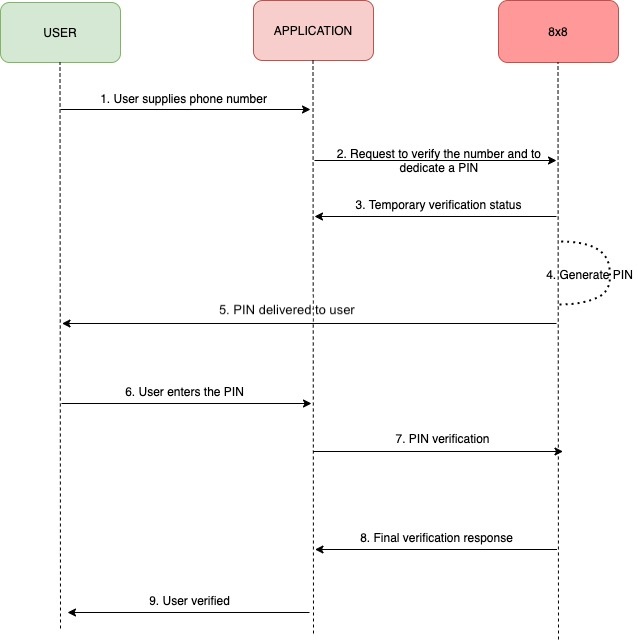
    The general workflow is shown in the following sequence diagram:

    Verify Diagram

    Demo Video of 8x8 Verif8 Service and 8x8 Verification API

    This video shows:

    • The API Keys page on 8x8 Connect and how a user can get the API Key and Verif8 Subaccount details.
    • The Verif8 dashboard upon onboarding can be shown using the Dry-run account.
    • This shows Verif8 Logs the delivery status (Delivered/Read) of the OTP and the Conversion status (Non-Converted / Converted)

    This shows the API Keys page on getting the API Key and Verif8 Subaccount.
    The Verif8 dashboard upon onboarding can be shown using the Dry-run account.
    This shows Verif8 Logs the delivery status (Delivered/Read) of the OTP and the Conversion status (Non-Converted / Converted)

    Server Regions

    To ensure the use of the correct platform deployment region, it is necessary to modify the base URL to correspond with the provisioned region of your account. Refer to the table below for the appropriate base URL associated with each platform region.

    For more information on platform regions, please visit the following page.

    List of server URLs:

    API Region Base URL
    Asia (default) https://verify.8x8.com
    Europe https://verify.8x8.uk
    North America https://verify.us.8x8.com
    Indonesia https://verify.8x8.id

    Source: https://developer.8x8.com/connect/docs/verification-api-get-started · 8x8 CPaaS Developer Docs. Synced for support deflection.
  • Guide: Verif8

    Guide: Verif8

    Introduction

    Verif8 is designed as a turnkey, self-service solution for sending One-Time Passwords (OTPs). It centralizes the entire OTP lifecycle - Sender ID management, OTP generation, multi-channel delivery, and validation - into a single platform with a simplified onboarding process.

    Core Attributes

    • No documentation or registration required
    • Pre-approved templates mean no moderation delays
    • Shared Sender ID (no dedicated branding) by default
    • Sign-up directly through 8x8 Connect portal

    Key Features

    1. Out-of-the-box Localisation
    • Supports multiple languages
    • Pre-built templates ensure consistency and compliance
    1. Multi-Channel OTP Delivery via SMS and Viber
    2. Insightful Analytics: Dashboards for tracking delivery success, conversion rates, and performance
    3. Analytics & Logs

    A dedicated dashboard (shown on page 14) includes:

    • Conversion rate, delivery metrics
    • Logs showing OTP status, costs, delivery channels

    Verif8 subaccounts, which you can identify by their '_verif8' suffix, are purpose-built and can only be used with our Verification API. These subaccounts cannot interact with other APIs in the 8x8 Connect platform, including the SMS API, and are not compatible with Campaign Manager. This specialization allows us to optimize the verification experience by pre-configuring templates, sender IDs, and routing rules specifically for verification use cases.

    For example, if your application needs to send both verification codes and marketing messages, you'll need to use separate subaccounts:

    • Use your Verif8 subaccount (ending in '_verif8') for all verification-related communication
    • Use your standard 8x8 Connect subaccount for marketing messages and other communication types

    Pricing

    Each verification attempt through Verif8 involves two potential cost components:

    Message Fee

    This is charged when your verification request is submitted and varies based on the destination country and channel used. For example, sending an SMS verification to the United States might have a different message fee than sending one to Singapore. This fee is charged regardless of whether the end user successfully completes the verification process.

    Think of this like postage - you pay to send the letter whether or not the recipient reads it.

    Conversion Fee

    The conversion fee is what makes Verif8 unique - it's only charged when a verification is successful. Success means your end user correctly validated the OTP code they received. This success-based pricing model aligns our service with your verification goals. The conversion fee is standardised per successful verification, making it easy to forecast costs for successful verifications across all destinations.

    For a complete breakdown of message fees for each country and channel, please visit the 8x8 Connect Pricing page in your dashboard.

    Prerequisites

    • Command line interface compatible with CURL
    • 8x8 CPaaS account
    • apiKey (Bearer token)
    • Verif8 subaccountid (you can find this in your account dashboard - it will end with '_verif8')
    • Destination phone number

    You'll notice that Message Body and Brand name (SMS SenderID) are no longer required. This is because Verif8 operates as a fully managed service, handling these aspects automatically on your behalf. When you send a verification request, our system selects pre-approved message templates and sender IDs that have been carefully optimized for each destination country. This approach ensures maximum deliverability and compliance with local regulations while simplifying the integration process for you.


    Account and credentials

    You will need to sign up to use the API. The following steps will guide you through this process and highlight the information to keep aside.

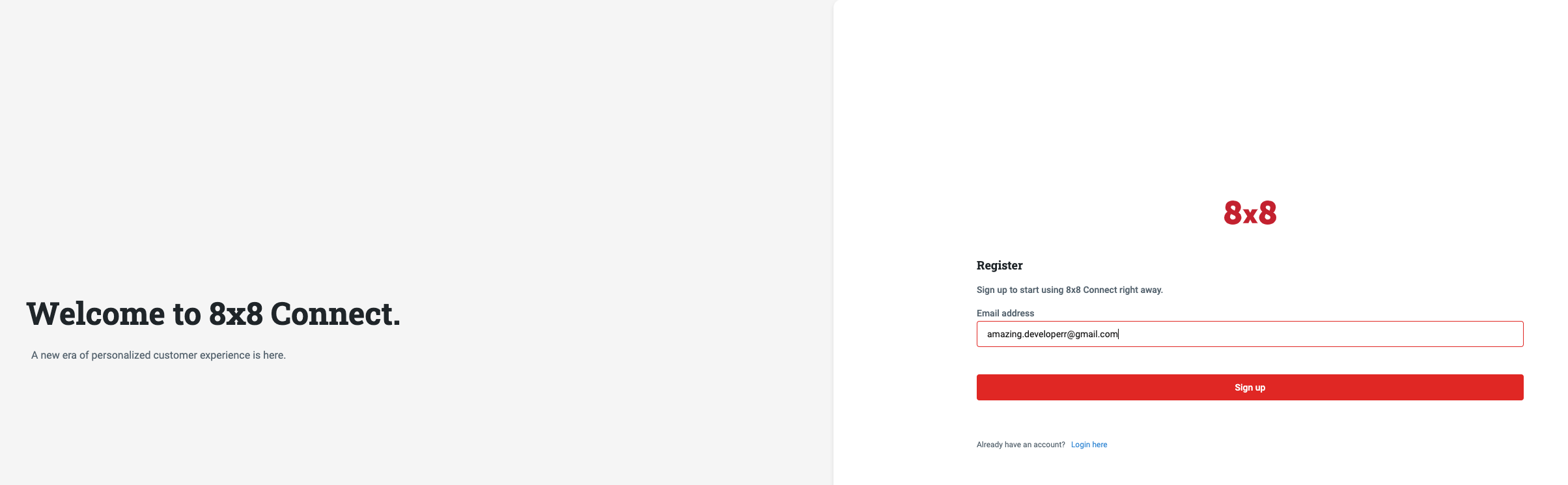
    I. Signing-up for Connect

    1. Head to 8x8 Connect sign-up page
    2. Enter your email and follow the instructions to define your password and finalise your account (by default, API password and account password are the same, you can modify this from your account settings)
    3. Confirm your email address by clicking on the validation link you received in the activation email to activate your account.

    Signup 8x8 connect

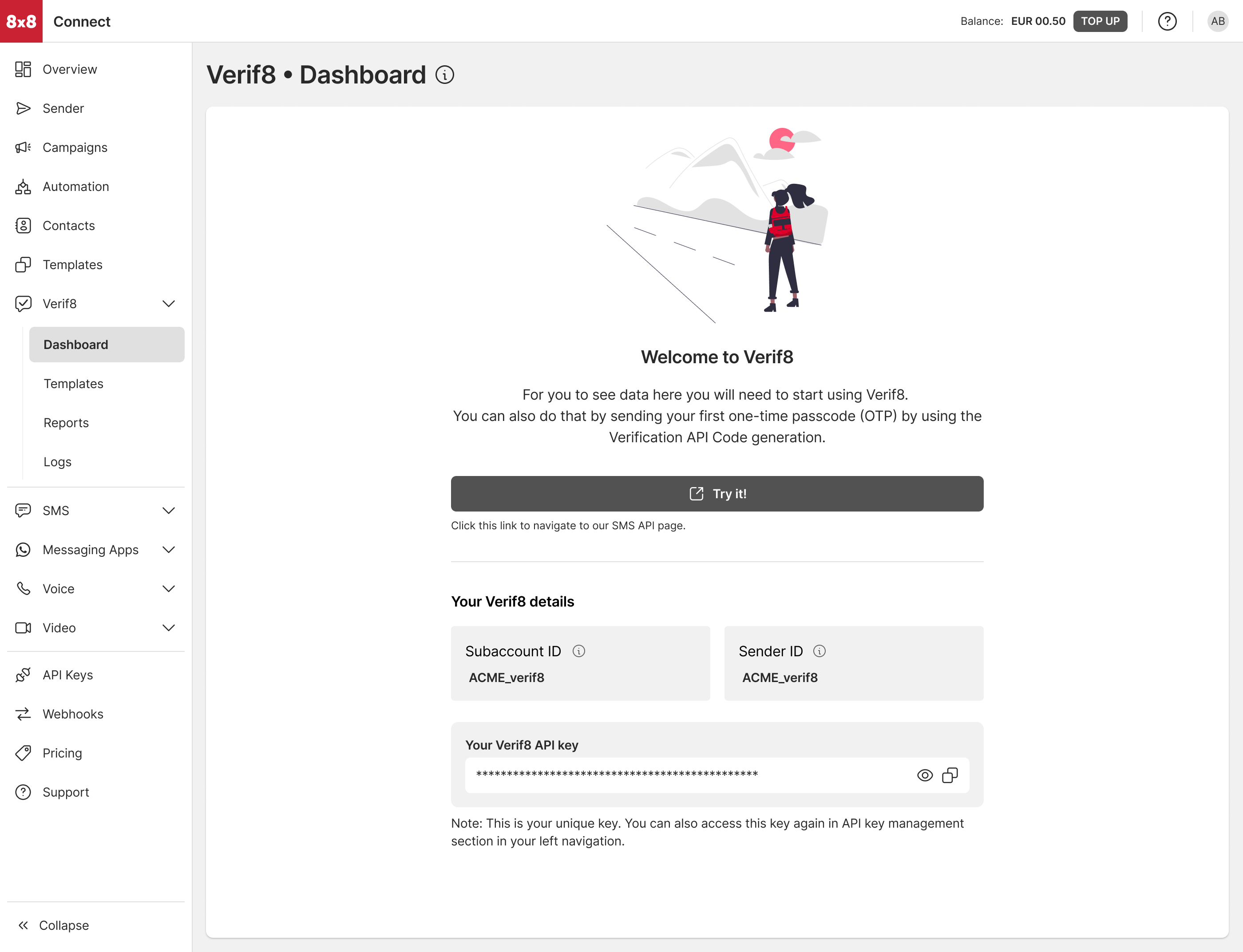
    II. Sign up for Verif8

    1. Click on "Verif8" in the main navigation list
    2. Go through the guided onboarding to create your subaccount and corresponding API keys.

    OTP dashboard empty

    You will be able to find your API keys for your Verif8 sub-account from the "API Keys" post your Verif8 onboarding.

    Integrate the Verification API into your authentication flow

    Verif8 requires you to use the Verification API instead of the standard SMS API.

    To learn more about 8×8 Verif8, explore the interactive demo or sign up for self-service onboarding.


    Source: https://developer.8x8.com/connect/docs/verif8 · 8x8 CPaaS Developer Docs. Synced for support deflection.
  • Mobile Verification

    Mobile Verification

    Tutorial: Learn how to use API for Mobile Verification Code Generation & Validation

    Introduction

    One of the most common use cases for SMS is about conveying a one-time password (OTP) to an end user's mobile phone.

    8x8 offers a dedicated API service to make SMS OTP verification process easier for you.

    In this tutorial, we are going to cover the following two methods: Mobile Verification - Code Generation and Mobile Verification - Code Validation. As their names put it, they are about generating then sending a code to a user and then verifying it.

    If you follow the different steps of this tutorial, you will get to generate a code and verify it directly from your command line utility using a simple curl command.

    Prerequisites

    • Command line interface compatible with CURL
    • 8x8 CPaaS account
    • apiKey (Bearer token)
    • 8x8 CPaaS subaccountid
    • Destination phone number
    • SMS Body
    • Brand name (SMS SenderID)

    Account and credentials

    You will need to sign up to use the API. The following steps will guide you through this process and highlight the information to keep aside.

    I. Signing-up

    1. Head to 8x8 Connect sign-up page
    2. Enter your email and follow the instructions to define your password and finalize your account (by default, API password and account password are the same, you can modify this from your account settings)
    3. Confirm your email address by clicking on the validation link you received in the activation email to activate your account.

    Signup 8x8 connect

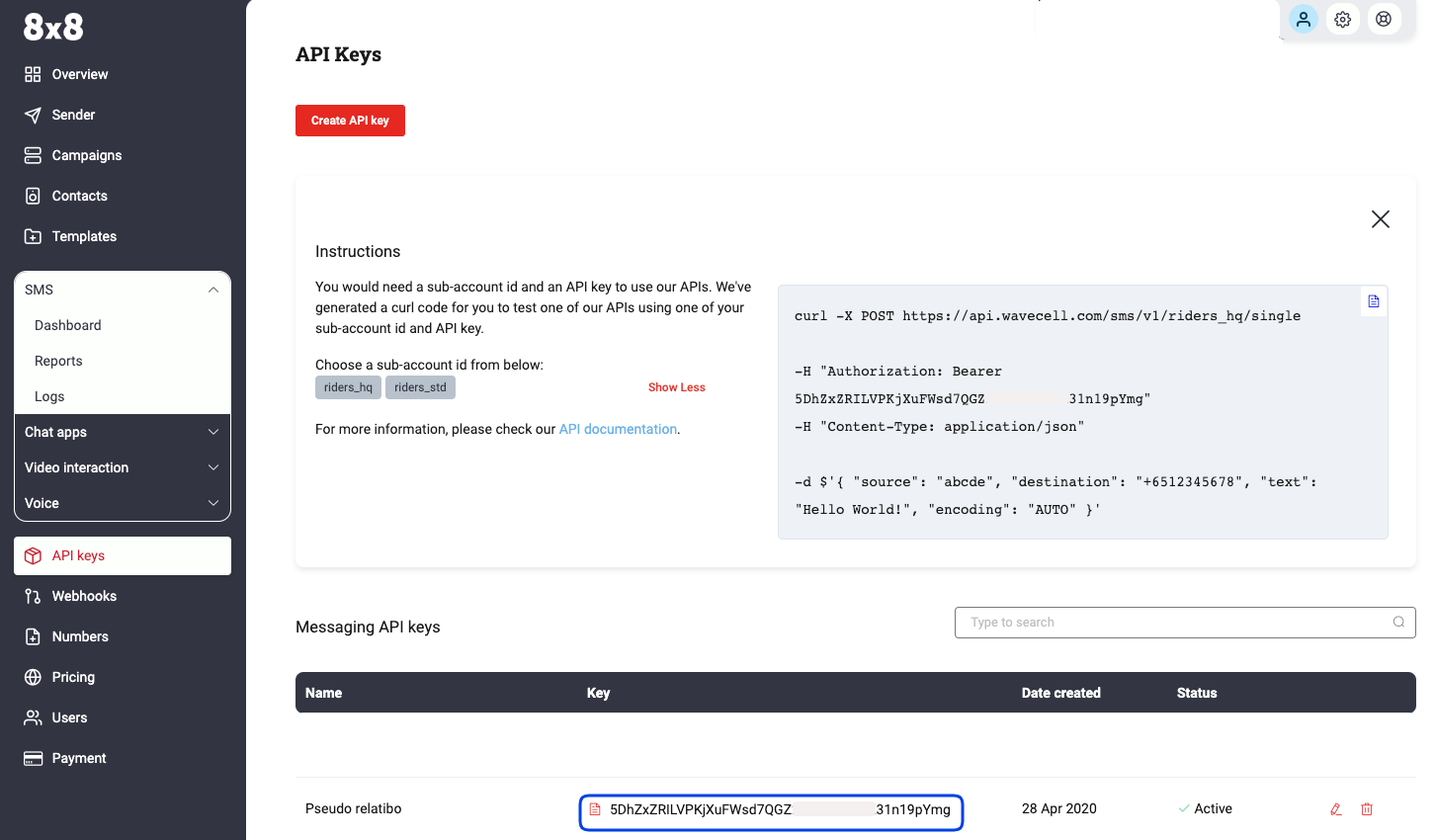
    II. Finding your apiKey token (for API authentication)

    1. Head to 8x8 Connect Login Page.
    2. Click on LOG IN.
    3. Enter your email address and password to get access to your account dashboard.
    4. Head over to the side menu > API keys section
    5. Create an API key if empty and then keep the API Key value, here: 5DhZxZRILVPKjXuFWsd7QGZ**********31n19pYmg

    image

    III. Identifying your Subaccountid

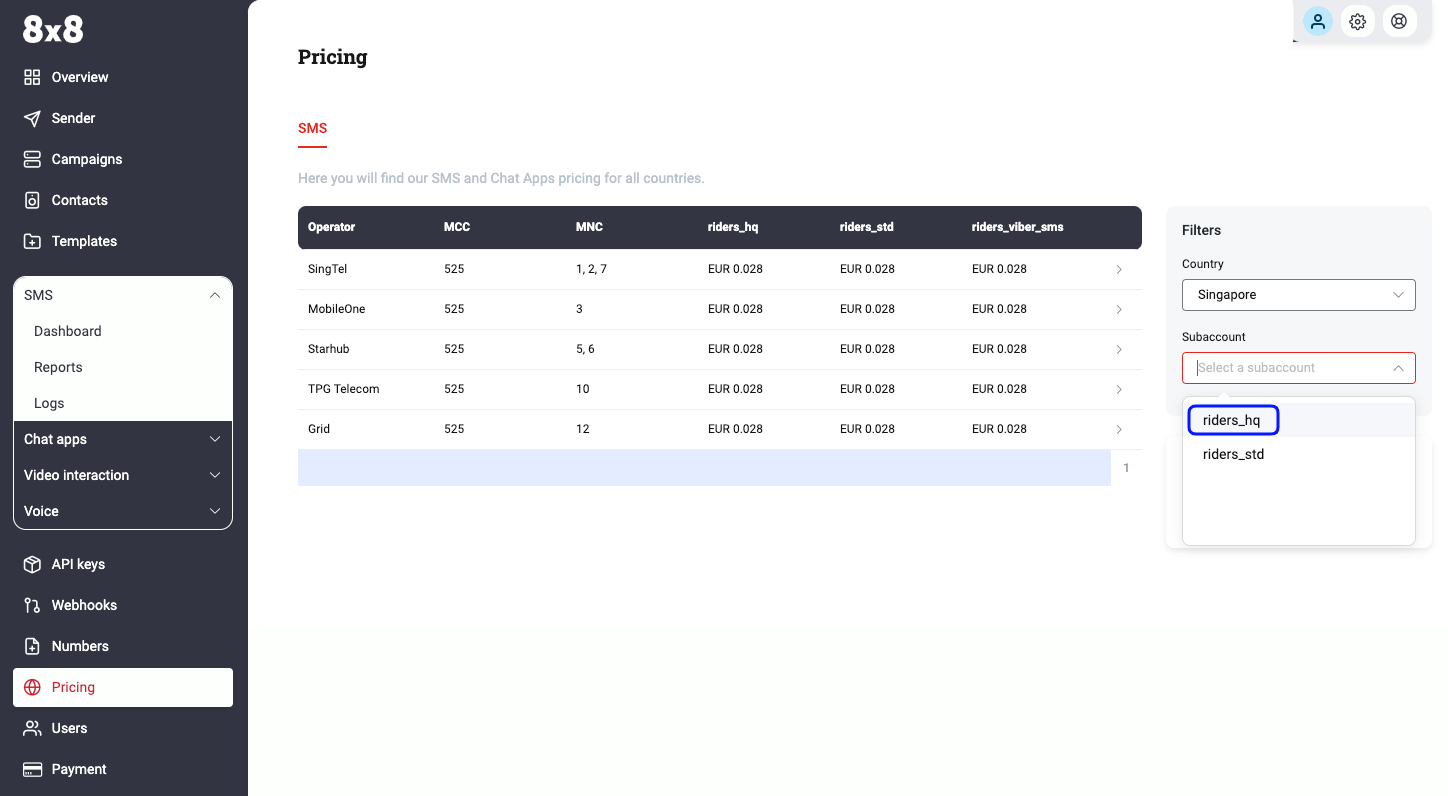
    1. Head over to the pricing section and use the subaccountid list to retrieve the subaccountid that you want to use
    2. By default, your account comes with only one subaccountid for your high-quality service. It is designated by your accountid and the suffix _hq.
    3. Note down this value, you will need it later.
    4. In that example, the subaccountid is acme_corp

    image


    Part 1: Generating and sending a code using the Mobile Verification API - Code Generation method

    The 8x8 Mobile Verification - Code Generation method expects requests sent by developers to respect a specific format.

    In the following parts, we are going to go over the different elements of the request:

    • the URL format
    • the authentication
    • the data payload.

    At the end of the section, we will generate a curl command to generate an SMS containing a one-time password directly from the command line.

    I. Preparing the request URL

    Remarks
    • We are going to send a POST request to the Mobile Verification API - Code Generation endpoint.
    • As detailed in the documentation, the URL is defined by the following pattern: https://verify.8x8.com/api/v2/subaccounts/{subAccountId}/sessions
    Tutorial URL
    • In order to create the URL to use, we are going to replace {subaccountid} in the pattern above by acme_corp, the subaccountid that we are using in this tutorial
    • In that example, the URL that we are going to send the request to is: https://verify.8x8.com/api/v2/subaccounts/acme_corp/sessions
    Platform Deployment Region
    • To ensure the use of the correct platform deployment region, it is necessary to modify the base URL to correspond with the provisioned region of your account. Refer to the table below for the appropriate base URL associated with each platform region:
    URL Region
    https://verify.8x8.com Asia Pacific (default)
    https://verify.us.8x8.com North America
    https://verify.8x8.uk Europe
    https://verify.8x8.id Indonesia
    • For more information on platform deployment regions, please visit the following page.
    curl
    • In curl, we will have to indicate that we want to do a POST request to this URL by using the following command:
    curl -i -X "POST" https://verify.8x8.com/api/v2/subaccounts/acme_corp/sessions
    • The -i flag (case-sensitive) will allow to print the request and response body and headers
    • The -X flag is used to specify the HTTP method to use for the request (POST, HEAD, PUT, GET, DELETE...) - Here we are using a POST request.

    II. Preparing the request authentication

    Remarks

    • As explained in the docs, the API authentication uses an apiKey bearer token method.

    Tutorial authentication

    • In this tutorial, the apiKey for our account is 5DhZxZRILVPKjXuFWsd7QGZ**********31n19pYmg.

    curl

    • In a curl request, bearer tokens must be passed as a header like so: -H "Authorization: Bearer {token}"
    • We just have to replace our {token} placeholder by our apiKey
    • The authorization header will then look like that: -H "Authorization: Bearer 5DhZxZRILVPKjXuFWsd7QGZ**********31n19pYmg"

    III. Preparing the request data payload

    • The API expects to receive a structured request containing the SMS data in a specific format.
    • As detailed in the documentation, the data that we have to submit should be a JSON object containing at least a destination field. Let's keep it simple and add a brand name as well as a country code since our destination phone number is in the national format (as opposed to the international format):

    Example of JSON object:

    {
    "destination":"98765432",
    "country":"SG",
    }

    curl

    • In curl, we will transmit the JSON data inline and indicate that the data payload is in JSON format using the following commands:
    -H "Content-Type: application/json" 
    -d $'{
    "destination": "98765432",
    "country": "SG"
    }'

    IV. Putting it together and posting the curl request

    • If we wrap up all the elements prepared in the steps above, we should put together the 3 elements of our request: URL + Authentication + Data Payload
    • To send the API request to 8x8 Mobile Verification - Code Generation endpoint we should use the following command in our command line utility:
    curl -i -X "POST" https://verify.8x8.com/api/v2/subaccounts/acme_corp/sessions -H "Authorization: Bearer 5DhZxZRILVPKjXuFWsd7QGZ**********31n19pYmg" -H "Content-Type: application/json" -d $'{ "destination": "6598765432", "country": "SG"}'
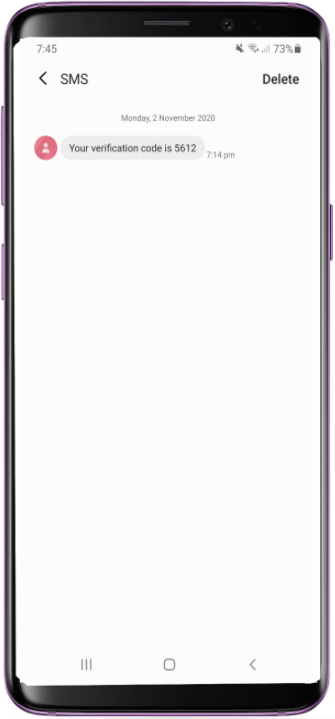
    • And that’s it! Here is the result on the destination device:

    image

    V. API response

    • When sending the curl command above from your command line utility, you notice that the 8x8 API sends back a response that shows up in your terminal, for example in this tutorial:
    {
    "sessionID":"7c1137e8fb1ceb11827c00155dc319db",
    "verifyUri":"/api/v2/subaccounts/acme_corp/sessions/",
    "destination":6598765432,
    "status":"WAITING",
    "attempt":0,
    "expiresAt":"2020-11-02T11:14:44.70Z",
    "retryAfter":"2020-11-02T11:09:54.70Z"
    }
    • The API response is used to provide feedback about the expected result of the API request (sending an SMS) and various additional information.
    • If we take some time to analyze the different elements there, we can identify the following:
      • uid: this is the unique identifier set by the API to identify this request. It will be used to check its status and the codes provided.
      • resourceUri: it indicates the uniform resource identifier within 8x8 API
      • destination: this is the phone number to which the SMS was sent.
      • status: the status of the Mobile Verification request
      • attempt: this counter shows how many unsuccessful attempts have been made to verify this code
      • expiresAt: this is the timestamp that indicates when the code will expire
      • retryAfter: this timestamp indicates when the system will allow sending another SMS if a new request is sent
    • For more information, check the dedicated section of the API documentation, in the "Response" section

    Part 2: Verifying a code received using the Mobile Verification API - Code Validation method

    So our user received successfully his SMS containing the code required to verify his mobile phone number (see [Part 1 - IV]).

    Here below are the elements from the part 1 that are going to be used in this part 2:

    • apiKey = 5DhZxZRILVPKjXuFWsd7QGZ**********31n19pYmg
    • Subaccountid = acme_corp
    • sessionId = 7c1137e8fb1ceb11827c00155dc319db
    • code = 5612

    Request URL

    According to the documentation, the 8x8 Mobile Verification - Code Validation method is much simpler to use: it simply expects a GET request sent to a URL built using 2 different parameters:

    • the subaccountid: acme_corp
    • the sessionID returned by the API during part 1: 7c1137e8fb1ceb11827c00155dc319db

    ➡ the URL where to send the GET request should follow this structure:

    https://verify.8x8.com/api/v2/subaccounts/{subAccountId}/sessions/{sessionId}

    In our example, we just have to use the parameters' values listed above to compose our URL: https://verify.8x8.com/api/v2/subaccounts/acme_corp/sessions/7c1137e8fb1ceb11827c00155dc319

    curl

    In curl, we will have to indicate that we want to do a POST request to this URL by using the following command:

    curl -i -X "GET" https://verify.8x8.com/api/v2/subaccounts/acme_corp/sessions/7c1137e8fb1ceb11827c00155dc319

    II. Preparing the request authentication

    Remarks

    • As explained in the docs, the API authentication uses an apiKey bearer token method.

    Tutorial authentication

    • In this tutorial, the apiKey for our account is 5DhZxZRILVPKjXuFWsd7QGZ**********31n19pYmg.

    curl

    • In a curl request, bearer tokens must be passed as a header like so: -H "Authorization: Bearer {token}"
    • We just have to replace our {token} placeholder by our apiKey
    • The authorization header will then look like that: -H "Authorization: Bearer 5DhZxZRILVPKjXuFWsd7QGZ**********31n19pYmg"

    III. Preparing the request data payload

    Remarks

    • Contrary to the POST request in part 1, the data here is passed using a query string: the parameters are appended directly in the URL where we send the GET request
    • This method can be used to consult the status of a request without actually verifying it: if no code value is appended in the GET request URL, then the API will respond with the status of the request without changing it.
    • To perform the validation action, a code value must be appended in the GET request URL: if the code is the right one and has not expired, the status of the request will be changed to VERIFIED. If the code is not the right one, the attempt counter will be incremented.

    Appending the code in the query string for our code validation

    • Our code value is 5612
    • A query string is appended at the end of the URL using ? as separator and then {parameter_name}={parameter_value}

    ➡ We will have to append the following query string to our URL: ?code=5612

    IV. Putting it together and posting the curl request

    • If we wrap up all the elements prepared in the steps above, we should put together the 3 elements of our request: URL + Query string appended + Authentication
    • To send the API request to 8x8 Mobile Verification - Code Validation endpoint we should use the following command in our command line utility:
    curl -X GET  'https://verify.8x8.com/api/v2/subaccounts/acme_corp/sessions/7c1137e8fb1ceb11827c00155dc319?code=5612' -H "Authorization: Bearer 5DhZxZRILVPKjXuFWsd7QGZ**********31n19pYmg"
    • And that’s it! Here is the response from our terminal:
    {
    "uid":"7c1137e8fb1ceb11827c00155dc319",
    "resourceUri":"/api/v2/subaccounts/acme_corp/sessions/7c1137e8fb1ceb11827c00155dc319",
    "destination":6598765432,
    "status":"VERIFIED",
    "attempt":0,
    "expiresAt":"2020-11-02T13:19:56.70Z",
    "nextSmsAfter":"2020-11-02T13:14:44.70Z"
    }

    You can see that the status of the request is now verified: the code provided was the right one which means that your user provided a legitimate mobile phone number where he received the code generated by the API, you can let him through!


    Source: https://developer.8x8.com/connect/docs/tutorial-mobile-verification · 8x8 CPaaS Developer Docs. Synced for support deflection.

8x8 Logo
  • 8x8 YouTube
  • 8x8 Facebook
  • 8x8 Twitter
  • 8x8 Blog
  • 8x8 LinkedIn
  • 8x8 Instagram

Company

  • About Us
  • Careers
  • Contact Us

Our Products

  • SMS
  • Chat Apps
  • Video Interaction
  • Voice
  • Pricing

Media

  • Customer Success Stories
  • News
  • Events
  • Blog

Resources

  • Documentation
  • Service Status
  • Ask for support
Privacy Policy | Terms of Use | Acceptable Use Policy
© 2025 8x8, Inc. All rights reserved.