See Details
Logo CPaaS Help Center Developer Premium Support Status
Sign in Contact Support
  1. 8x8 CPaaS Help Center
  2. Security & Compliance

Security & Compliance

  • Governance, Security & Compliance

    Governance, Security & Compliance

    This section covers the mandatory policies, security features, and compliance rules for using the 8x8 WhatsApp Business Platform. Adhering to these guidelines is essential for maintaining a healthy account, protecting your customers, and ensuring your service is not interrupted.

    Opt-in & Opt-out Policies

    Opt-In

    Before you can send any business-initiated (template) message to a user, you must obtain their explicit, affirmative consent (opt-in).

    • Clarity: The opt-in must be clear and explicit. The user must understand they are opting in to receive messages from your business on WhatsApp.

    • Context: The opt-in must clearly state the types of messages they will receive (e.g., "order updates," "appointment reminders," or "marketing promotions").

    • User Action: The opt-in must be triggered by a user action, such as checking a box, entering a phone number, or sending a specific keyword.

    • Proof: You must maintain a record of this consent (timestamp, source of opt-in) and provide it if requested.

    For detailed opt-in guidelines, see: Meta's WhatsApp Opt-In Best Practices

    Opt-Out

    You must provide a clear, easy, and free way for users to opt out of receiving messages from you.

    • 8x8 Automation Builder: The easiest way to manage this is by creating an Automation Builder workflow that listens for keywords like "STOP" or "UNSUBSCRIBE." Configure webhooks to receive inbound messages from customers.

    • Blacklist API: When a user opts out, your automation should use the 8x8 Contacts API to add their number to a "Blacklisted" contact group. This prevents 8x8 from sending further messages to that user from your account.

    • In-Message Instructions: Your templates, especially marketing-focused ones, should include instructions on how to opt out (e.g., "Reply STOP to unsubscribe").

    Content & Template Compliance (Meta Guidelines)

    Meta classifies and reviews all templates to ensure a high-quality user experience. Non-compliance can lead to template rejection, pausing, or disablement.

    • Source: User-provided "Meta template guideline" text.

    Template Categories & Content Rules

    Meta defines three strict categories. Submitting a template in the wrong category is a common reason for rejection.

    1. Marketing:

      • Use: Broad, flexible messaging to drive awareness, sales, retargeting, app promotion, or relationship-building.

      • Rule: Any template with "mixed content" (e.g., an order update that also includes a coupon), unclear content (e.g., only {{1}}), or any persuasive/promotional intent is classified as Marketing.

      • Typical Objectives: Awareness, Sales, Retargeting, App Promotion, Build relationships.

    2. Utility:

      • Use: Non-promotional messages that are specific to a user’s order, account, or transaction; are requested by the user; or are essential/critical.

      • Typical Objectives: Opt-in/opt-out confirmation, Order management (confirm/update/cancel), Account alerts/updates, Feedback surveys tied to a specific interaction, or continuing a conversation started elsewhere by user request.

      • "Essential or critical" utility also includes public safety alerts, product recalls, and legal/regulatory compliance notices, all of which must have zero promotional intent.

    3. Authentication:

      • Use: Only for identity verification with one-time passcodes (OTPs).

      • Rule: Must use Meta's Cloud API Template Library designs, include an OTP button (COPY_CODE or one-tap), and follow strict content rules: no URLs, media, or emojis are allowed. Parameters must be 15 characters or less.

    Creation, Review, and Statuses

    • Creation: You select a category; Meta validates it against guidelines.

    • Approval Timeline: Up to 24 hours. You will be alerted via email, in the WhatsApp Manager, and via the message_template_status_update webhook.

    • Template Statuses:

      • In-Review: Under review.

      • Rejected: Failed review due to policy/category violations (appealable).

      • Active (Quality: Pending/High/Medium/Low): Sendable. Quality rating (see below) impacts pausing.

      • Paused: Cannot send; requires manual or automatic unpause.

      • Disabled: Cannot send; permanently disabled after multiple Paused states.

      • Appeal Requested: An appeal for a Rejected template has been submitted.

    Parameter, Content, and Format Rules (Common Rejection Reasons)

    Your template will be REJECTED if it:

    • Has incorrect parameter formatting: Fails to use sequential {{1}}, {{2}} placeholders, or has special characters (#, $, %). Parameters cannot be at the very start or end of a template.

    • Has no sample: You must provide a valid sample value (e.g., in the examples property via API or "Add Sample" in the portal) for every variable you use.

    • Is a duplicate: The body/footer is identical to another template (this rule does not apply to AUTHENTICATION templates).

    • Violates policy: Asks for sensitive data (full credit card numbers, national IDs) or contains abusive/threatening content.

    Quality, Pacing, and Pausing

    Meta monitors template quality based on user feedback (e.g., blocks, reports).

    • Quality Rating: An Active template can have a rating of High (Green), Medium (Yellow), or Low (Red).

    • Template Pacing: New MARKETING templates are "paced" (throttled) to test user feedback. If feedback is good, held messages are released. If feedback is poor, the template is PAUSED, and held messages are dropped.

    • Auto-Pausing: If a template's quality rating drops to Low (Red), Meta will automatically pause it.

      • 1st instance: Paused for 3 hours.

      • 2nd instance: Paused for 6 hours.

      • 3rd instance: Disabled permanently.

    • Monitoring: You must subscribe to the message_template_status_update and message_template_quality_update webhooks (see Operations, Monitoring & Troubleshooting) to be alerted when a template is paused or disabled.

    • Unpausing: Templates paused due to poor quality will auto-unpause after the duration. Templates paused due to pacing must be manually unpaused via the WhatsApp Manager or API.

    Automatic Category Updates

    Meta automatically reviews approved templates and may re-categorize them.

    • Utility > Marketing: If Meta finds you are using a UTILITY template for promotion, it will be re-categorized to MARKETING. You will be notified via email and the template_category_update webhook.

    • Marketing/Utility > Authentication: If Meta determines your template should be an AUTHENTICATION template, it will be marked as REJECTED (Incorrect Category) on the first of the following month. You must create a new, compliant AUTHENTICATION template to continue.

    Practical Compliance Checklist

    • Choose the right category: Marketing for any promo; Utility for non-promo, specific requests; Authentication for OTPs only.

    • Format variables cleanly: Use {{1}}, {{2}} and provide a sample for each.

    • Respect content policies: No sensitive data requests.

    • Watch quality and pacing: Monitor your webhooks (message_template_status_update, message_template_quality_update) and be prepared to act if a template is PAUSED.

    Security & Data Protection (8x8 Platform)

    8x8 provides multiple layers of security to protect your account, your data, and your customers from fraud.

    Account & API Security

    • API Key Management: Your API Key (Bearer Token) is your master key.

      • Secure Storage: Never hard-code API keys in your application. Use environment variables.

      • Rotation: Regularly rotate your API keys, especially if you suspect a leak. You can delete old keys and generate new ones in the 8x8 Connect portal.

    • IP Whitelisting:

      • What it is: You can provide 8x8 with a specific list of your server IP addresses. We will reject any API request that claims to be from your account but does not originate from an IP on this list.

      • How to enable: Manage your IP whitelist in the 8x8 Connect portal under Developer Tools > IP Whitelisting.

    • Portal Security (2FA & SSO):

      • Two-Factor Authentication (2FA): Enforce 2FA (via Authenticator app or SMS) for all users logging into the 8x8 Connect portal to prevent unauthorized access.

      • Single Sign-On (SSO): 8x8 Connect supports SAML-based SSO, allowing you to enforce your organization's own authentication policies for portal access.

    Fraud Prevention

    • CAPTCHA: We strongly recommend implementing a CAPTCHA (like Google's reCAPTCHA) on any public-facing web form (e.g., "Sign up for updates") that triggers an 8x8 API call. This is the most effective way to prevent bots from causing fraudulent, high-volume message sends.

    • API Rate Limiting (8x8): By default, 8x8 limits your account to 1800 requests/second per subaccount and 3000 requests/second per IP. If you exceed this, you will receive an HTTP 429 Too Many Requests error.

    • Rate Limiting (Your Application): You should enforce your own rate limits.

      • By MSISDN (Phone Number): Do not allow the same phone number to request more than one message (e.g., one OTP) in a 60-second period.

      • By IP Address: Do not allow the same IP address to make more than 5-10 requests per minute.

    • PII Removal: 8x8 provides a PII Removal API that allows you to programmatically delete Personally Identifiable Information (message content, phone numbers) from 8x8's logs after a specified period to comply with your data retention policies.

    Legal & Regulatory Considerations

    • Data Residency: 8x8 operates data centers in multiple regions (e.g., Asia Pacific, Europe, North America, Indonesia). You must select the appropriate platform deployment region for your account to ensure you comply with your local data residency laws (e.g., GDPR in Europe, GR 71 in Indonesia).

    • Local Laws: You are responsible for ensuring your message content and opt-in/opt-out practices comply with all telecommunications laws in the countries where you operate.

    References and Resources

    Official WhatsApp Policies:

    • WhatsApp Business Policy - Meta's official WhatsApp Business Platform policies, including messaging guidelines, opt-in requirements, and content compliance rules

    Source: https://developer.8x8.com/connect/docs/whatsapp/governance-security · 8x8 CPaaS Developer Docs. Synced for support deflection.
  • Security

    Security

    We know that security is important to customers. We take the responsibility to ensure that the 8x8 Embeddable Communications and APIs platform is absolutely secure, private, and reliable, so customers can have peace of mind: Security Page on 8x8 Website

    Built-in security

    8x8 proactively provides application security and authentication to all our users by building security right into our software:

    • Two-Factor Authentication (2FA) to the 8x8 Connect customer portal can be achieved via the Authenticator app or SMS Verification (OTP).
    • 8x8 Connect supports single sign-on via SAML.
    • Number Lookup API: Cleans user database and steps up on anti-fraud measures by checking the validity of phone numbers and their current locations.
    • Mobile Verification API: Generates and authenticates SMS-based or phone call-based mobile verification requests.
    • Number Masking API: Enables users to connect to a phone call while keeping their phone numbers private.
    • Remove Personally Identifiable Information (PII) API: Removes PII for particular messages from 8x8 databases.

    SMS Flooding Attacks

    Overview

    For customers who expose the API endpoints publicly and route traffics to the 8x8 Embeddable Communications and APIs platform, your endpoints might be susceptible to various attacks. As attackers increasingly automate attacks, it’s easy for them to target hundreds, if not thousands of services at once.

    For these reasons, it is important to understand what are the threats and how to stop them.

    In this section, we will discuss the risk of SMS flooding attacks specifically and what are the possible mitigations to protect your business.

    1. What is an SMS flooding attack?

    An SMS flooding attack occurs when a high volume of cellular SMS messages are sent to saturate and overload the website’s backend. In your normal business activity, you may allow the user to send a request to an interface that triggers an SMS message to be sent back to the user’s phone number (e.g. verification code for sign-up or sign-in). However, if there is no defense to protect the SMS interface, attackers can leverage programs to send high-frequency requests to these interfaces and resulting in the following harms

    • Excessive SMS charges caused by malicious traffic.
    • User information leaks (bypass 2FA using brute-force against the account).
    • Performance degradation for legit users. SMS API rate limiting might be applied in extreme cases.
    • Brand reputation damage for harmed SMS recipients.

    Mitigations

    To protect your business from such attacks, we believe in a shared responsibility model between 8x8 and you as a customer. You may consider the following measures that can be leveraged for mitigating such attacks:

    1. Captcha: A CAPTCHA is a type of challenge-response test used in computing to determine whether or not the user is human. We recommend our customers implement such features on their applications.
    2. Web Application Firewall (WAF): Firewalls that protect web applications by filtering and monitoring HTTP traffic between a web application and the Internet. We recommend our customers deploy WAF(s) on their networks.
    3. Rate limiting: Rate limiting is a strategy for limiting network traffic. It puts a cap on how often someone can repeat an action within a certain timeframe. You can enforce rate-limiting in your service to prevent excessive traffic volume. Also, we offer basic rate limiting by clientIp with some endpoints in the 8x8 Embeddable Communications and APIs platform out of the box. You can leverage this feature to add a quick security defense in place. We will discuss more details in the [next section] /connect/docs/security-1#client-ip-rate-limiting

    Client IP Rate Limiting

    1. Why do we offer rate-limiting by client IP address?

    The purpose of using client IP for rate limiting is to control traffic from the same origin IP that could potentially cause harm to your service. And this is a built-in feature in some APIs offered by the 8x8 platform.

    In your business cases, you may want to implement a simple security defense to block some common automated scripting attacks. You can leverage this feature from us to gain security capability quickly in the most cost-effective way. In the meantime, as your business grows, you can consider scaling your security with more sophisticated protection and commercial security product (like WAF) as your business needs.

    2. How to use rate-limiting with client IP

    There are many ways how to apply this measure in your business context. You may want to enforce the rate limit in your service locally after obtaining the actual origin IP of end-users, or you can delegate the rate-limiting to us simply by filling up the clientIP field with that IP address. Endpoints that support rate-limiting by clientIp are:

    1. Code generation API
    2. Send SMS API
    3. Send SMS batch API

    To enable IP rate limiting to these endpoints for your service, you will need to do it in 2 steps:

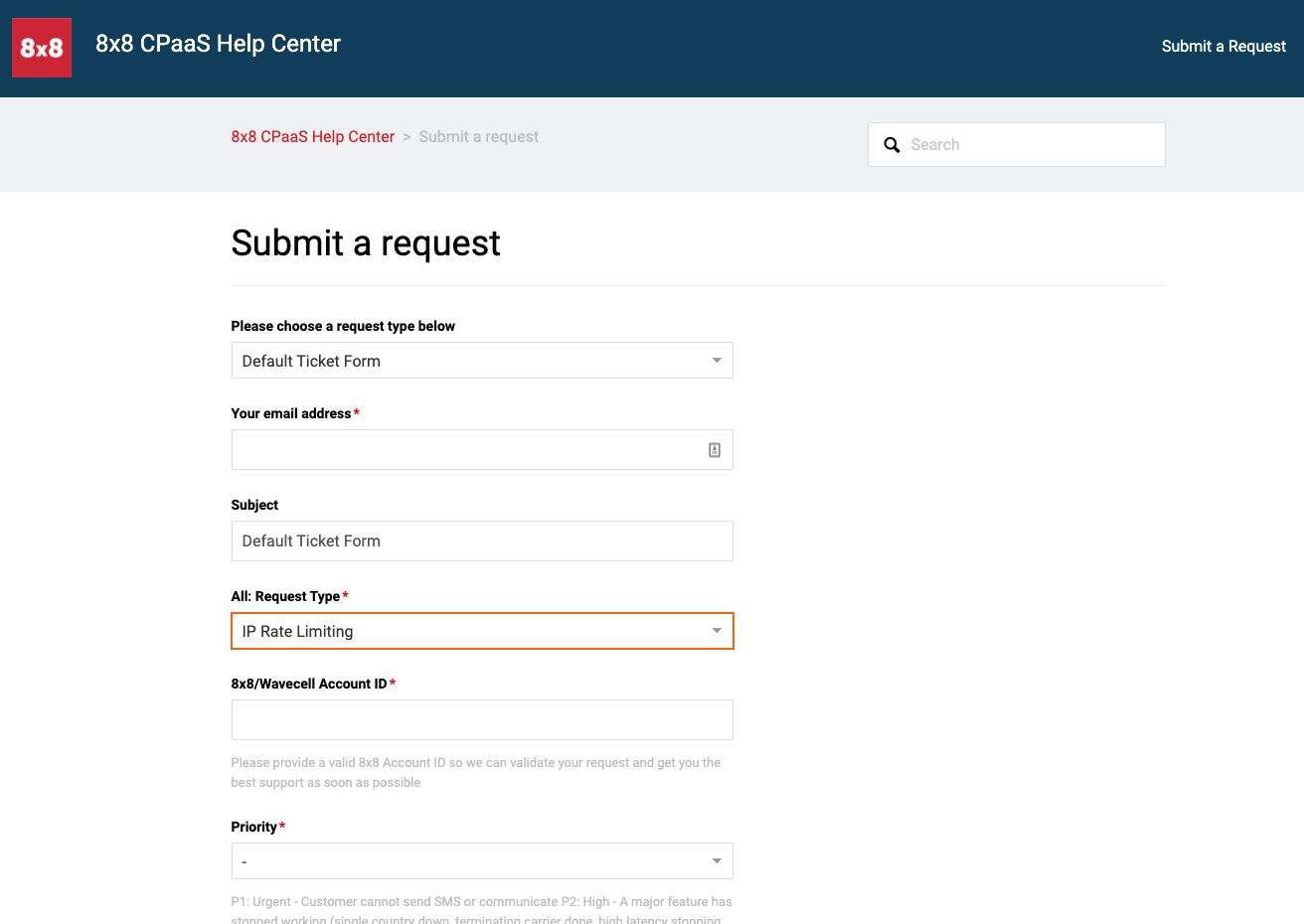
    Step 1:

    Submit the request form on the Help Center portal. The content should be similar to the following screenshot. The customer support will help you create the IP rate limiting rule specifically to your SubAccount and its related endpoint.

    1312

    Step 2:

    Fill up the clientIp field in the request with the origin client IP address and forward the request to 8x8 APIs.

    636

    3. Risk of IP spoofing vulnerability

    Please be aware that one of the common attacks to circumvent IP rate limiting is IP spoofing. Normally, an attacker sends a large amount of traffic by rotating different proxies to hide its actual origin IP. Hence, to fetch the actual origin client IP, you will need to look up the X-Forwarded-For header in the HTTP request if it is tunneled by a proxy. The X-Forwarded-For contains a list of IPs that includes proxy IP and actual origin IP addresses with the following format:

    X-Forwarded-For: <client>, <proxy1>, <proxy2>

    Examples:

    X-Forwarded-For: 2001:db8:85a3:8d3:1319:8a2e:370:7348
    X-Forwarded-For: 203.0.113.195
    X-Forwarded-For: 203.0.113.195, 70.41.3.18, 150.172.238.178

    It is important to parses the IP address correctly from this header, instead of always getting the first one from the list (cause it might be replaced to fake IP by a bad actor proxy).

    Useful Links:

    • https://developer.mozilla.org/en-US/docs/Web/HTTP/Headers/X-Forwarded-For
    • https://blog.cloudflare.com/multi-user-ip-address-detection/
    • https://www.f5.com/company/blog/security-rule-zero-a-warning-about-x-forwarded-for
    • https://www.alibabacloud.com/blog/protect-your-website-how-to-avoid-sms-traffic-flooding-attacks_65223
    • https://cloud.google.com/architecture/rate-limiting-strategies-techniques
    • https://www.cloudflare.com/learning/bots/what-is-rate-limiting/
    • https://en.wikipedia.org/wiki/CAPTCHA

    Source: https://developer.8x8.com/connect/docs/security · 8x8 CPaaS Developer Docs. Synced for support deflection.
  • Recommendations for Securing your Traffic

    Recommendations for Securing your Traffic

    This page will cover both general recommendations to secure your 8x8 traffic from fraud as well as other types of security threats. Specifically for fraud attacks, we believe in a shared responsibility model between 8x8 and you as a customer. You may consider the following measures that can be leveraged to mitigate such attacks

    General Best Practices

    • API Keys: 8x8 API Keys enable backend servers to access the 8x8 API using your account's resources. It is crucial to take steps to ensure their security.

      • Prevent Unauthorized Access: Sharing API keys publicly increases the risk of unauthorized access to your APIs and the sensitive data they protect. If API keys are exposed or leaked, malicious actors can potentially abuse them to access resources, manipulate data, or launch attacks against your systems.
      • Use Environment Variables: Store API keys and other sensitive information as environment variables rather than hardcoding them directly into your code. This practice helps prevent accidental exposure through version control or code sharing.
      • Rotate API Keys: Periodically rotate API keys to mitigate potential damage in the event of a data breach. This can be done from the 8x8 Connect Dashboard by deleting old API Keys and creating new ones.
      • Secure Key Distribution: When distributing API keys to authorized users or applications, ensure secure transmission and storage practices to prevent interception, tampering, or unauthorized access. Use encrypted channels, secure protocols, and best practices for key management to protect API keys throughout their lifecycle.
    • IP Whitelisting: 8x8 is able to whitelist specific IP Addresses that we expect your API calls to originate from. If an API call for your account originals from outside those IP addresses it will be rejected.

    The Connect Portal allows you to specify IP addresses to whitelist. Please see the IP Whitelisting section on this page for further detais.

    • Collect User Opt In / Opt Out: Enable customers to opt-in/opt-out of receiving messaging content.

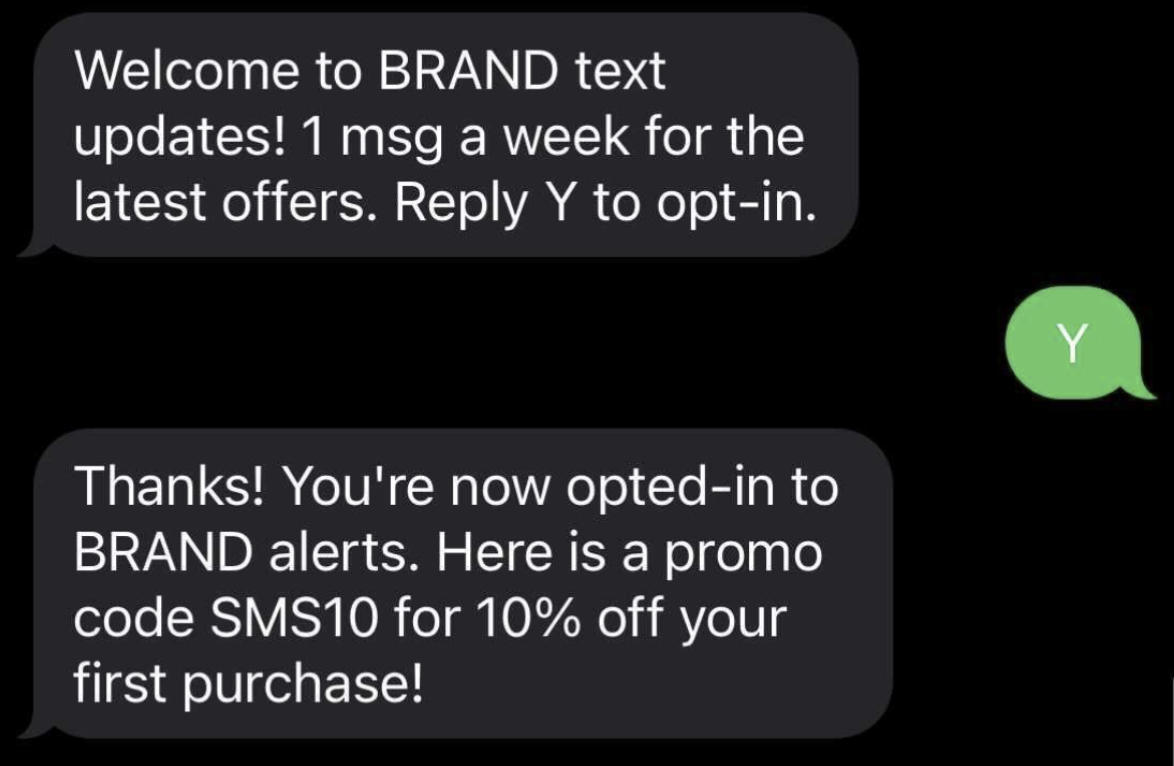
      • Optionally, you can consider implementing double opt in where the user must first input their phone number in your registration form, then they will receive an SMS to that phone number which they must respond to in order to complete the opt-in process.
      • image
    • Reconfirm number: Customer phone numbers may change, making it important to verify their current contact information periodically (example: reconfirm SMS phone number every 3/6/12 months).

    • 2FA For 8x8 Connect Dashboard: The 8x8 Connect Dashboard allows you to create/retrieve your API keys as well as send SMS directly from the Dashboard. We would recommend to use the 2FA feature of the Connect Dashboard to prevent fraudulent user access.

    AIT Fraud Prevention Practices

    • Captcha: A CAPTCHA is a type of challenge-response test used in computing to determine whether or not the user is human. We recommend our customers implement such features on their applications.

    • Web Application Firewall (WAF): Firewalls that protect web applications by filtering and monitoring HTTP traffic between a web application and the Internet. We recommend our customers deploy WAF(s) on their networks.

    • Rate Limiting: Rate limiting is a strategy for limiting network traffic. It puts a cap on how often someone can repeat an action within a certain timeframe. You can enforce rate-limiting in your service to prevent excessive traffic volume.

      • IP Rate Limiting: 8x8 offers the ability to limit how many API calls a single IP address can send with some endpoints in the 8x8 Embeddable Communications and APIs platform out of the box. You can leverage this feature to add a quick security defense in place. For more details, please see this [section] (/connect/docs/security-1#client-ip-rate-limiting)
      • MSISDN Rate Limiting: 8x8 also offers rate limiting by the destination MSISDN. This means you can set a limit on the number of SMS messages a single MSISDN can receive in a given timeframe, such as per minute/hour/day. For instance, you can set a limit so that no MSISDN can receive more than 10 SMS messages in any 30-minute window. Importantly, this rate limiting applies universally to all MSISDNs, without the need for specifying each one.

      To enable this for your account:

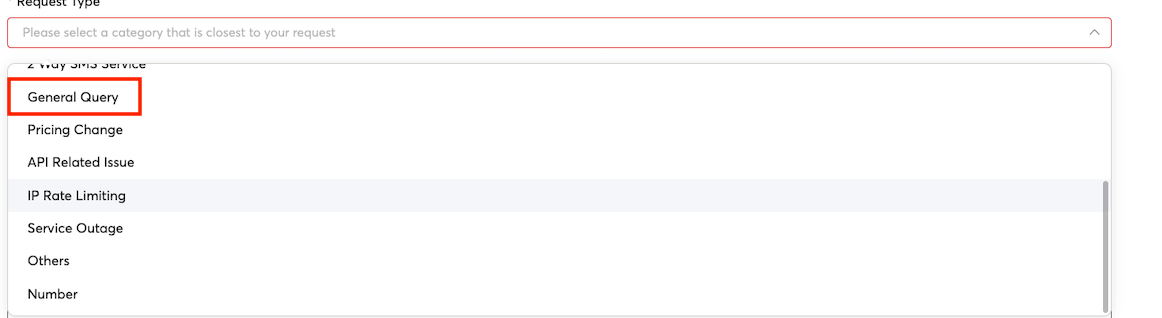
      1. Use the Support tab from the Connect Dashboard to Raise a Request.
      2. Select "General Query" for the Request Type
      3. Ask for "MSISDN Rate Limiting" in Subject and specify the details such as how many SMS messages to allow in what time period in the Additional Comments section.image
    • Exponential Delays: Implement exponential delays between failed OTP requests for the same phone number.

      • By Implementing an exponential delay, it makes it more difficult to exploit a user registration page for example to send a mass amount of fraudulent SMS OTPs from that page.

    Source: https://developer.8x8.com/connect/docs/recommendations-for-securing-your-traffic · 8x8 CPaaS Developer Docs. Synced for support deflection.
  • Compliance

    Compliance

    Required message templates

    Your agent must automatically respond to the following keywords with compliant messages. These are verified during carrier approval — missing or incorrect responses will block launch.

    CTA (Call-to-Action) / Opt-in disclosure

    Every opt-in touchpoint (web form, SMS keyword, in-app prompt) must include all of the following:

    • What the user is signing up for
    • Message and data rates disclosure
    • Message frequency disclosure
    • Instructions to reply STOP to opt out
    • A support contact (phone, email, or URL)
    • A link to your privacy policy

    Example:

    Message and data rates may apply. Message frequency varies. Reply STOP to opt-out.
    For support, visit [URL]. Privacy Policy: [URL]

    Welcome / opt-in confirmation

    Sent immediately after a user opts in. Must include:

    • Your brand name and confirmation of opt-in
    • Message frequency
    • Data rates disclosure
    • Instructions to reply HELP for help
    • Instructions to reply STOP to cancel
    • A customer care contact

    Example:

    Welcome to [Brand]! You are opted in. Msg freq varies. Msg & data rates may apply.
    Text HELP for help, STOP to unsubscribe. For support, visit [URL].

    HELP response

    Sent when a user replies HELP. Must include:

    • A direct support contact — phone, email, or URL (no "we'll get back to you")
    • A reminder that the user can reply STOP

    Example:

    For support, please visit [URL] or call [phone number]. To stop receiving messages, reply STOP.

    STOP response

    Sent when a user replies STOP. Your agent must also handle: QUIT, CANCEL, END, STOPALL, UNSUBSCRIBE. Must include:

    • Your brand name
    • Confirmation that no further messages will be sent
    • An offer to reply START to resubscribe

    Example:

    You have successfully unsubscribed from [Brand] messages.
    You will no longer receive messages. Reply START to resubscribe.
    note

    Replace [Brand], [URL], and [phone number] with your actual values before submitting for carrier approval.


    Opt-in & opt-out

    All RCS messaging must follow opt-in best practices:

    • Users must explicitly consent (opt-in) before receiving RCS messages.
    • You must document and maintain proof of consent (e.g., timestamp, source).
    • Include an option to opt-out (e.g., responding STOP) in your campaign design.
    • For interactive flows, use suggested replies for opt-out ("Stop", "Unsubscribe").

    Prohibited Content

    The RCS channel must not be used to transmit restricted or inappropriate content. The following examples represent, but do not fully encompass, the types of content that are not allowed::

    Counterfeit goods

    Products described as knock off, replica, imitation, clone, faux, fake, mirror image, or similar terms when referring to a brand name in an attempt to pass themselves off as genuine products of the brand owner.

    Dangerous products or services

    Products or services that cause damage, harm, or injury. These include, but are not limited to, illegal drugs, equipment to facilitate illegal drug use, explosive materials, fireworks, weapons, instructions for making explosives, or other harmful products.

    Products, services, or content that enable dishonest behaviors

    Products, services, or content that help users to mislead others such as fake documents, aids to pass drug tests, paper-writing or exam taking services; products, services, or instruction that enable unauthorized access to systems, devices, or property.

    Dangerous or derogatory content

    Content, products, or services that:

    • Incite hatred against, promote discrimination of, or disparage an individual or group on the basis of their race or ethnic origin, religion, disability, age, nationality, veteran status, sexual orientation, gender, gender identity, or other characteristic that is associated with systemic discrimination or marginalization
    • Harass, intimidate, or bully an individual or group of individuals
    • Threaten or advocate for harm on oneself or others
    • Seek to exploit others (e.g. blackmail, soliciting, or promoting dowries)
    • Inappropriate use of flags, national emblems, or religious icons and imagery

    Shocking content

    Content, products, or services that:

    • Contain violent language, gruesome or disgusting imagery, or graphic images or accounts of physical trauma
    • Contain gratuitous portrayal of bodily fluids or waste
    • Contain obscene or profane language
    • Likely cause shock, scare, or disgust

    Capitalizing on sensitive events

    Content which may be deemed as capitalizing on or lacking reasonable sensitivity towards a natural disaster, conflict, death, political violence, or other tragic event with no discernible benefit to the victims.

    Animal cruelty

    Content that promotes or depicts cruelty or gratuitous violence towards animals, or which may be interpreted as trading in or selling products derived from threatened or extinct species.

    Adult content

    Content, products, or services that are sexually explicit, sexually suggestive, or promote sexual themes, activities or escort services. Content promoting the sexual exploitation of minors (such as child sexual abuse imagery) is strictly prohibited.

    Tobacco

    Content, products or services that promote sales or consumption of tobacco, products containing tobacco, component parts of tobacco or products designed to simulate smoking behaviors.

    Political contentBusiness to consumer messages (e.g., RCS Business Messages) may not include content or services related to political campaigns such as those that promote or undermine a political figure or party, conduct opinion polls or political surveys, discuss election integrity, or predict election results. Any other political content that is not prohibited by this policy must comply with local laws and regulations.

    Unauthorized content

    Content, products, or services that are unauthorized to use copyrighted or trademarked content, or other legally prohibited content.

    Restricted Content

    Some types of content may be subject to additional review or compliance measures when delivered over the RCS channel. The following categories are examples of content that may require extra scrutiny, though this list is not exhaustive:

    Alcohol

    Content, products, or services that promote branding, sales, promotion, or consumption of alcoholic beverages. Content that promotes irresponsible alcohol consumption is prohibited.

    Gambling and games

    Gambling related content, products, or services, which include but are not limited to legal gambling activities such as: physical casinos, offline and online gambling activities, national or private lottery, promotional offers for gambling sites, and social casino games.


    Source: https://developer.8x8.com/connect/docs/rcs/compliance · 8x8 CPaaS Developer Docs. Synced for support deflection.

  • IP address list

    IP address list

    Messaging Products Webhooks

    🚧 IP Address List

    The following IP addresses only apply to messaging related products (SMS API, Messaging Apps API, Mobile Verification API, Automation API, Number Lookup API)

    If you need to restrict inbound traffic to your webhook endpoint, please allow requests originating from the following outbound IP addresses:

    Platform Region IP Addresses
    Asia Pacific 52.220.117.120, 52.220.109.9, 18.136.13.204
    Indonesia 34.101.157.207, 34.101.215.77, 34.34.217.244, 34.101.109.67
    Europe 34.142.20.188, 34.142.64.178, 34.39.69.103, 34.39.114.155
    North America 50.112.250.190, 100.21.170.42, 52.10.10.63

    This list was updated on: October 13th, 2025.

    Programmable Voice

    For detailed Voice IP address information, see the Voice IP Addresses page.

    If you need to restrict inbound traffic to your webhook endpoints, please allow requests originating from the following outbound IP addresses:

    Platform Region IP Addresses
    Asia Pacific (Singapore) 18.140.80.2, 52.220.253.234, 54.255.116.8, 52.74.232.241

    These IPs are used for webhook deliveries from Voice products:

    • Number Masking - Voice Call Action webhook, Voice Session Summary webhook, Voice Call Status webhook, Voice Recording Uploaded webhook, Virtual Number Updated webhook
    • Voice Messaging - Voice Session Summary webhook
    • Interactive Voice Response - Voice Call Action webhook, Voice Session Summary webhook

    This list was updated on: January 1st, 2026.


    Source: https://developer.8x8.com/connect/docs/ip-address-list · 8x8 CPaaS Developer Docs. Synced for support deflection.

  • Security (SSO)

    Security (SSO)

    Single Sign-On (SSO)

    This assumes that you already have an SSO application that will be used to configure your SSO. If you do not have one yet, you might want to check these popular SSO services like OKTA and OneLogin

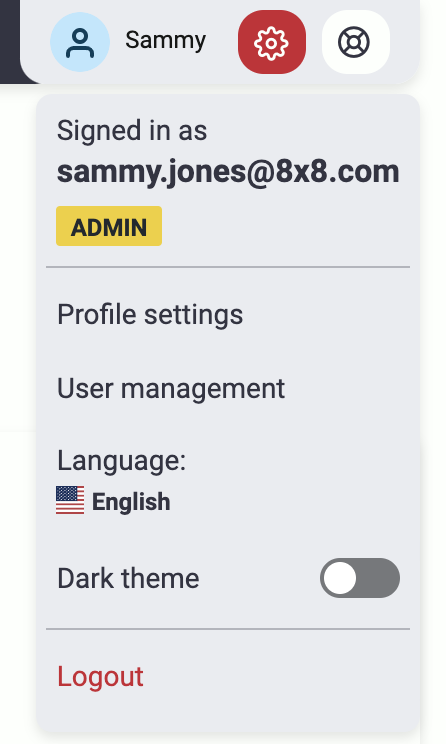
    Only users with “admin” access are allowed to configure SSO. If you do not have “admin” access, please contact your system administrator or any user from your account that has “admin” access to the customer portal (8x8 Connect).

    SSO is only available to enterprise customers. If you want to check your account, please contact our support team cpaas-support@8x8.com or get in touch with your account manager.

    Steps

    1. Login to the customer portal with an admin role
    2. Click the upper-right gear icon and select “User management”

    user management

    1. Once you are inside the user management page, click the “Configure Single Sign-On” button.

    image 4. An overlay SSO configuration page will appear where you will need to fill different information needed.
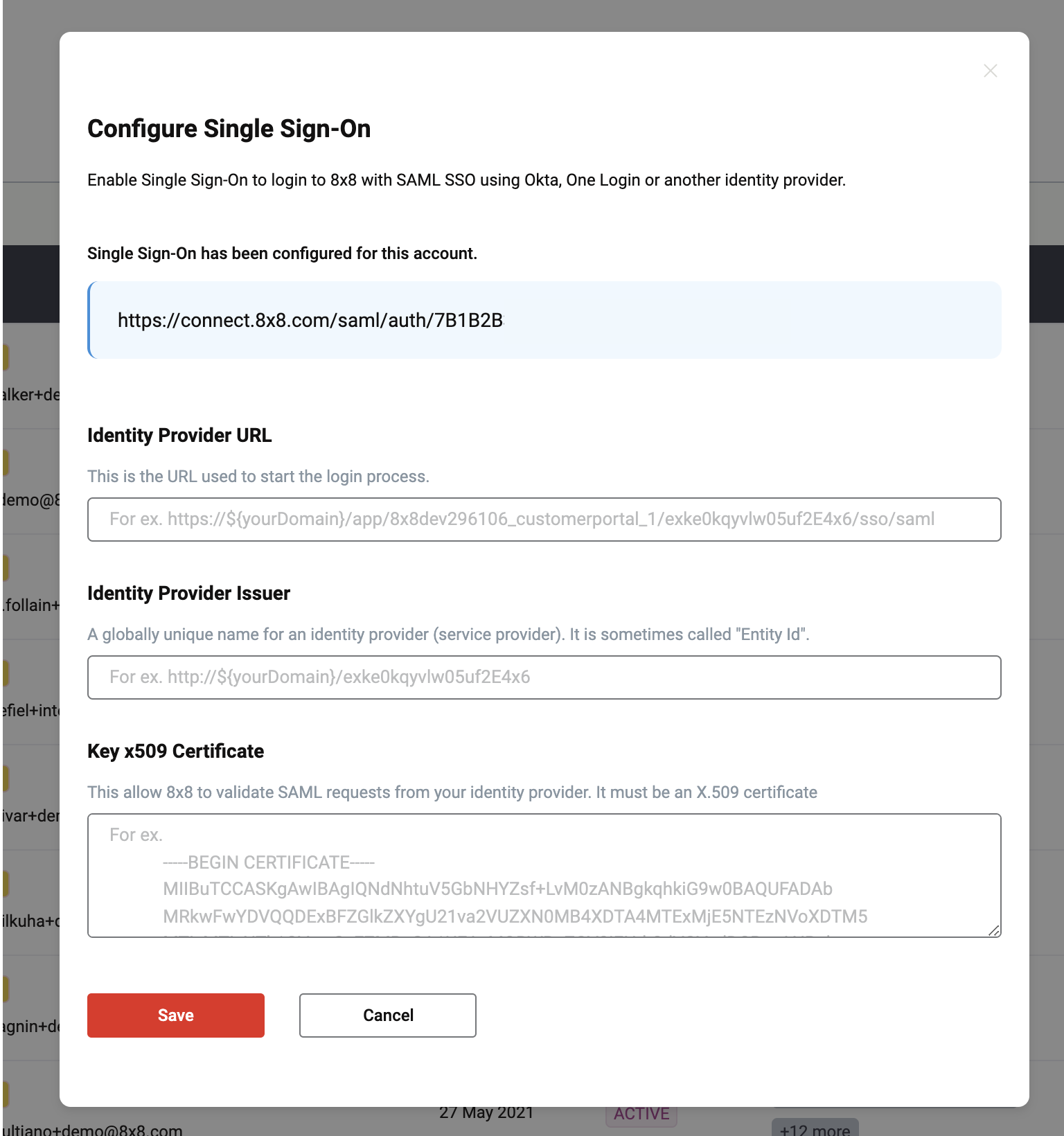
    image 5. Login to your SSO application that you are using and go to your identity provider SAML settings. Copy the url we’ve generated for you and paste it into the Single Sign-On URL
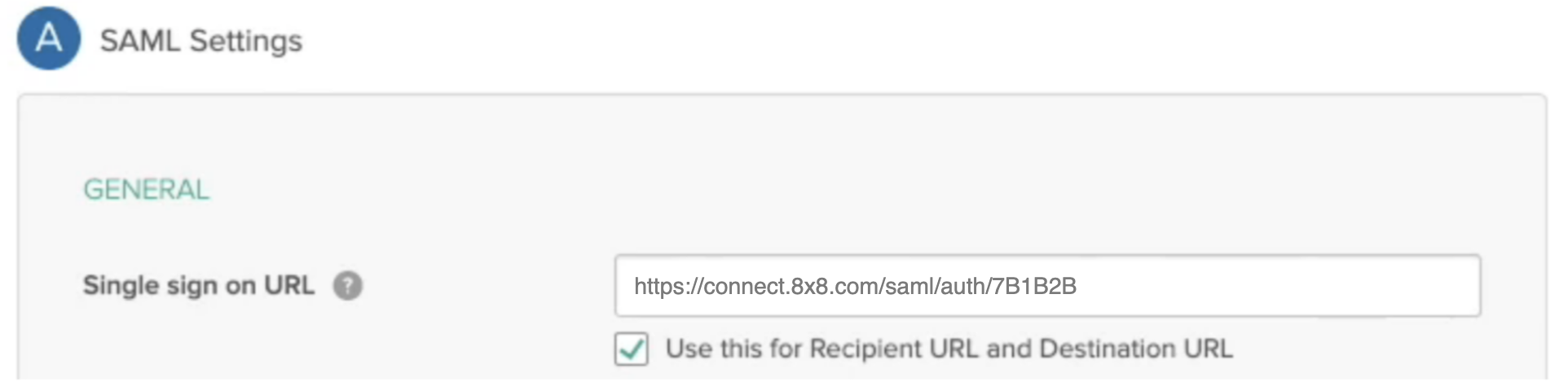
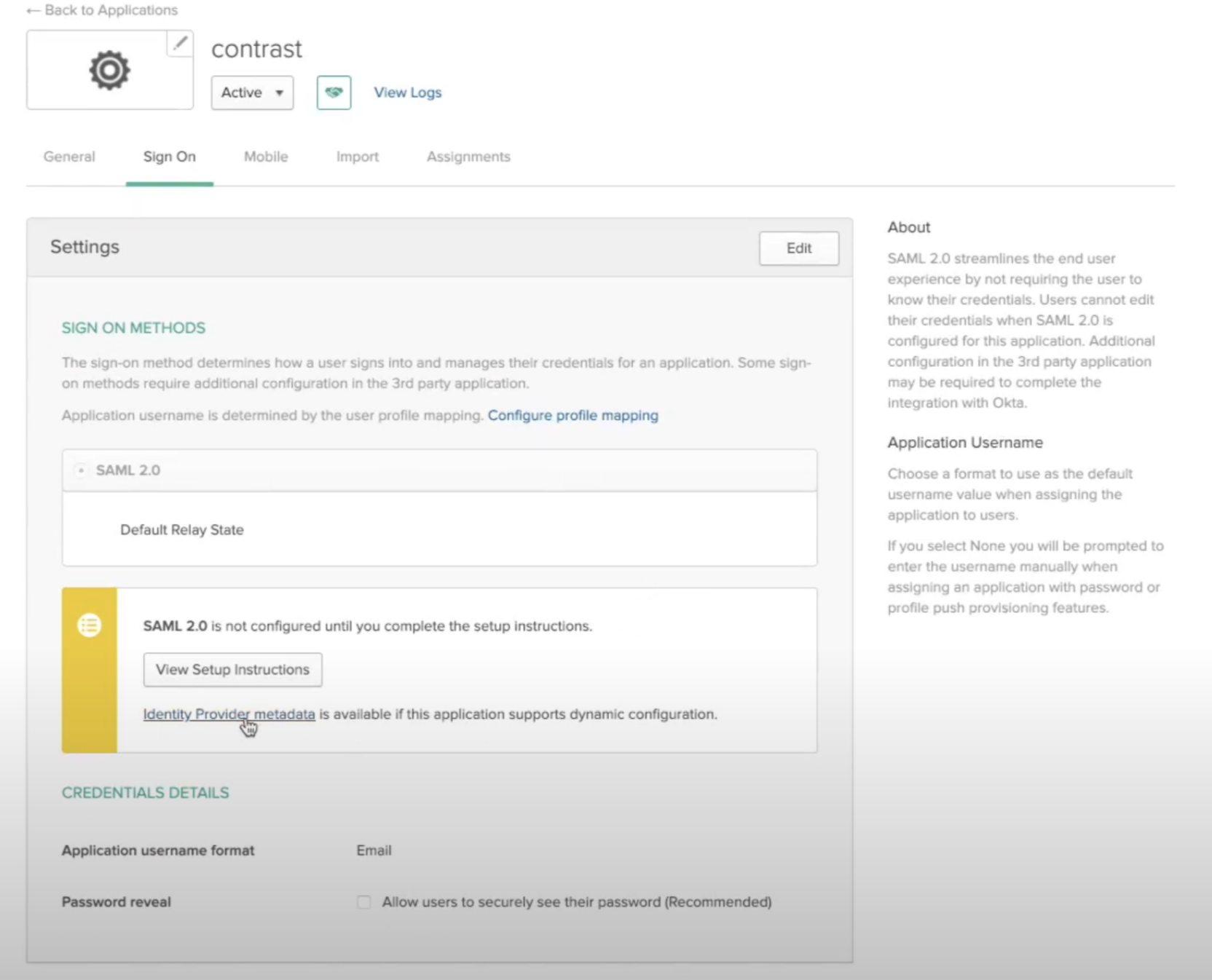
    As an example, here I pasted the value under OKTA SAML settingsAs an example, here I pasted the value under OKTA SAML settings


    1. Next copy the identity provider url which is basically your SAML endpoint from your SSO application. Paste it on the “Identity Provider URL” input field.

    image

    1. Next copy the provider issuer id or “entity id” from your SSO application and paste it on the “Identity Provider Issuer” input field.

    image

    Most SSO applications generate and provide these information. On OKTA they are provided by clicking Identity provider metadata

    OKTA Provider MetadataOKTA Provider Metadata

    Result after clicking metadataResult after clicking metadata

    The url itself is your Identity provider URL while an XML key called entityID is your Identity Provider issuer

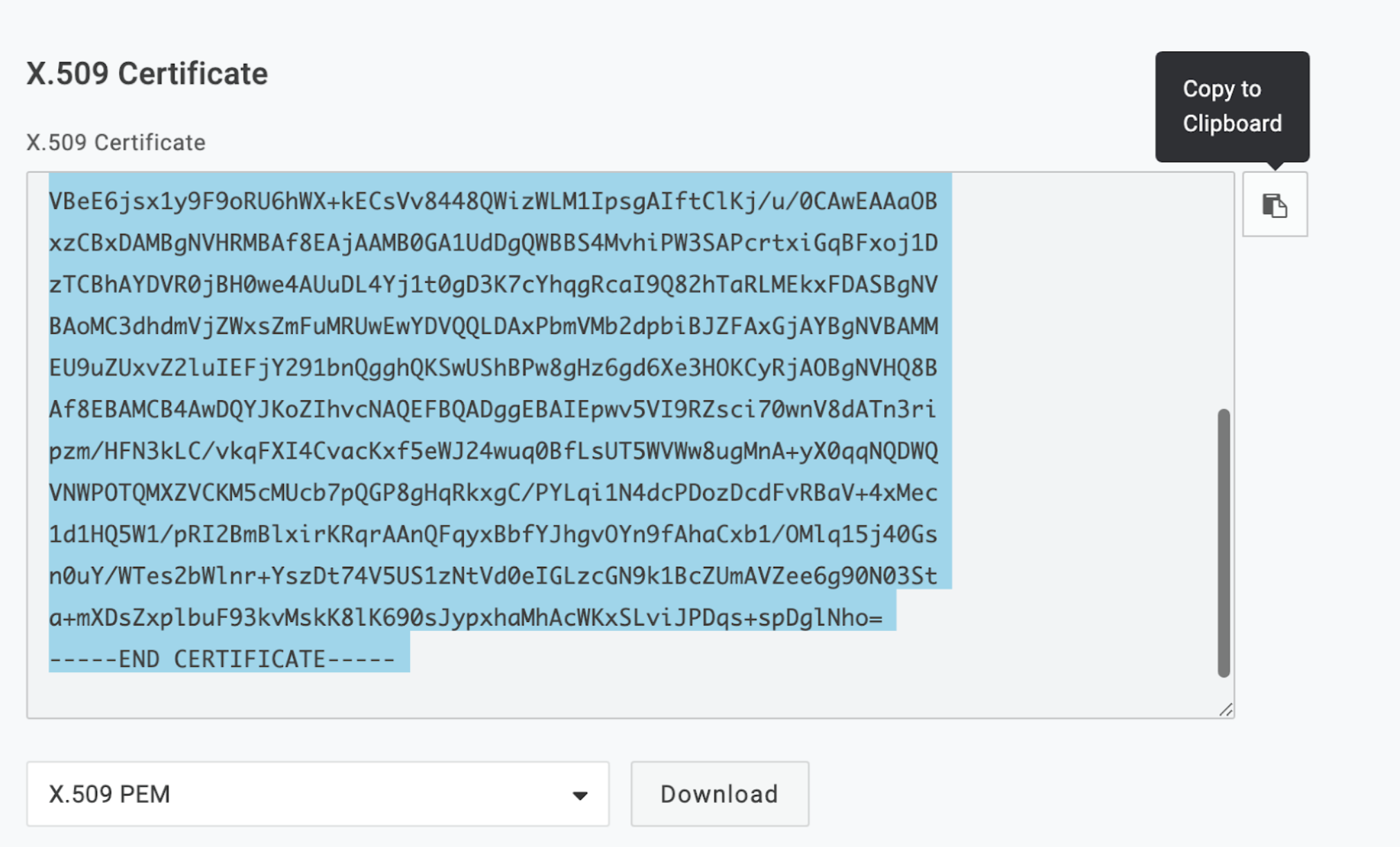
    1. Most SSO apps provide x509 certificates, just copy the contents of this certificate which looks something like this image below and paste it on the “Key x509 certificate” text area field.

    image 9. Once everything has been filled up, click “Save”

    image

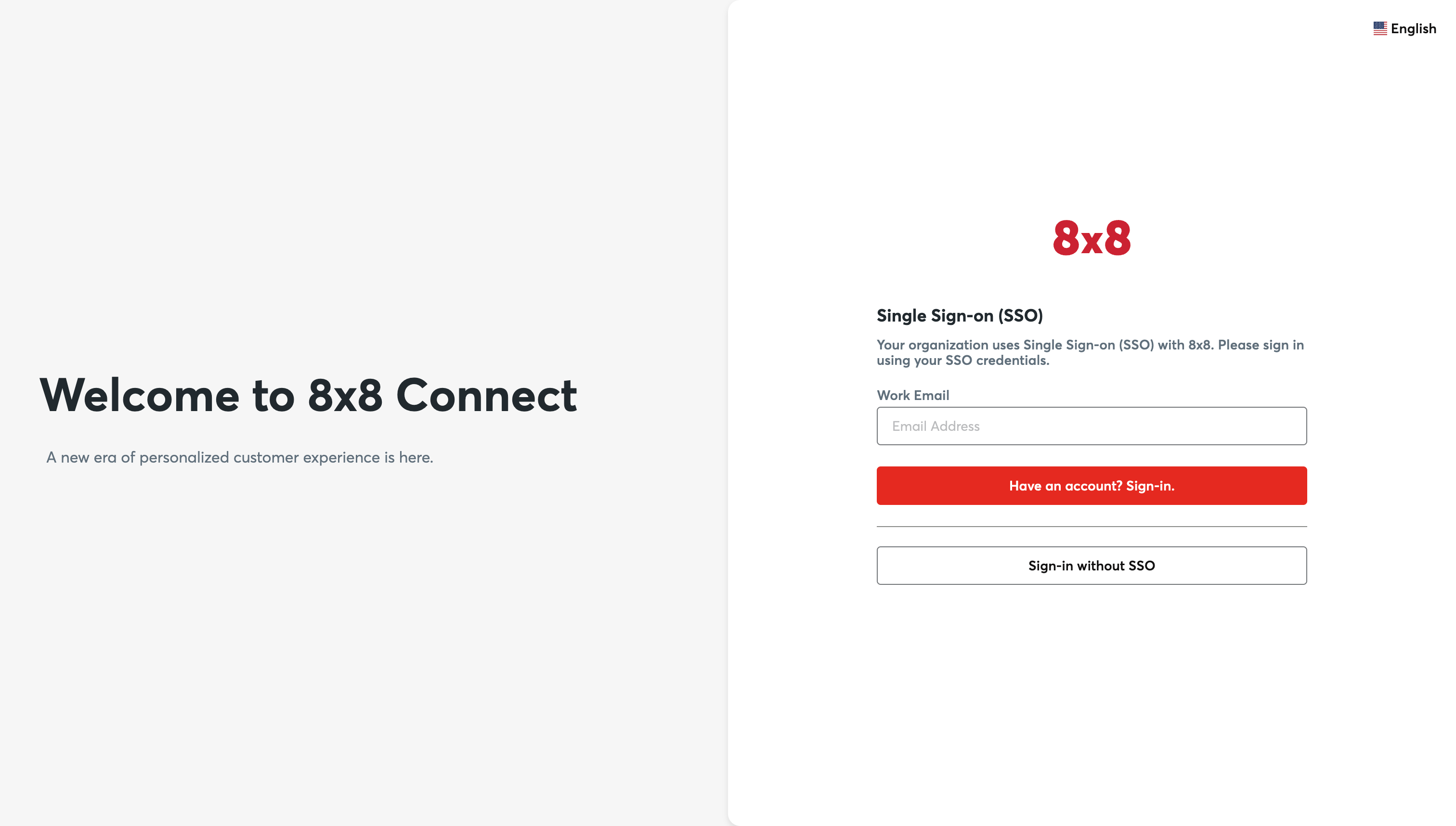
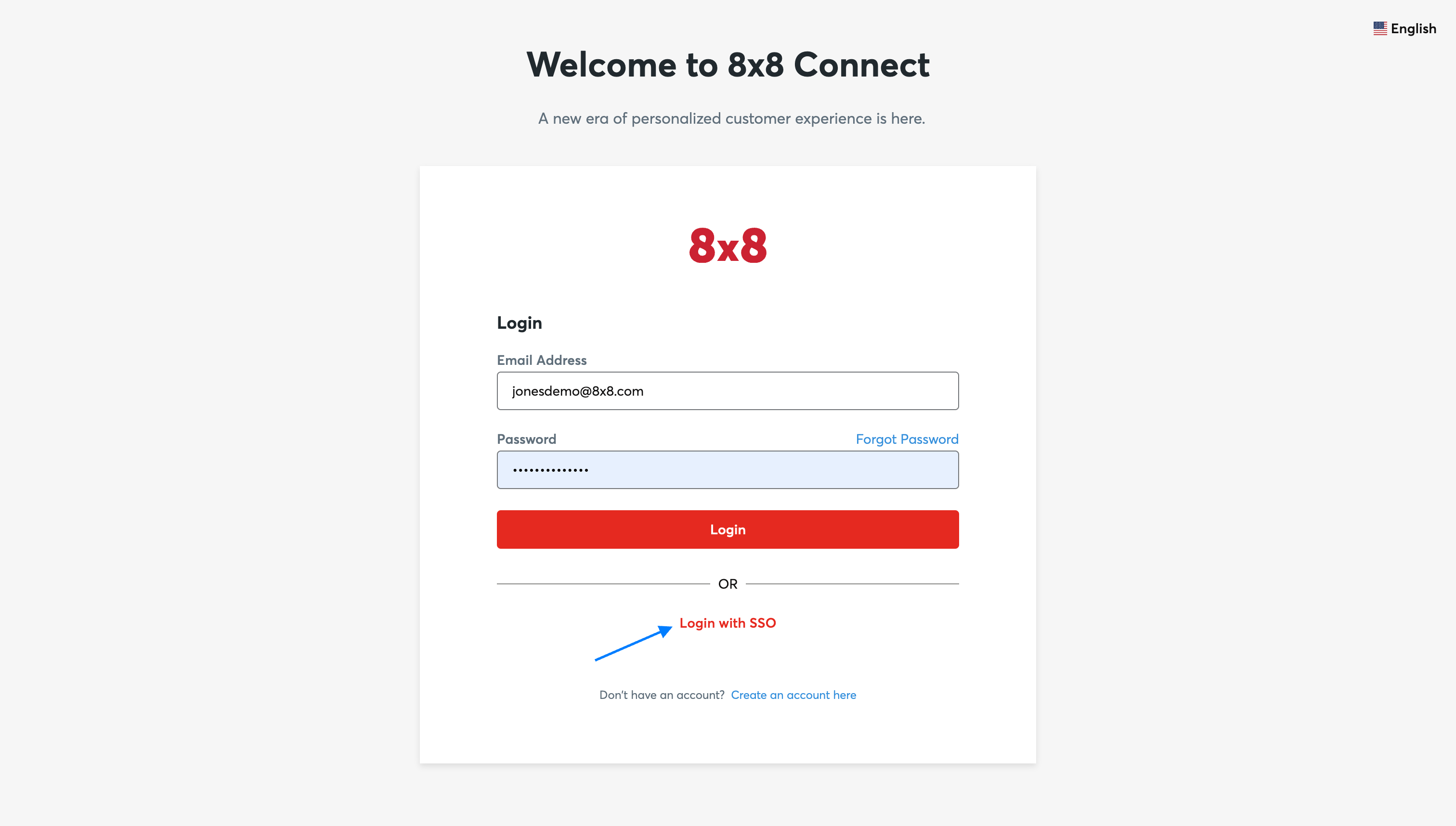
    1. Log out of the customer portal and now try to log in using SSO.

    image image Notes when logging in using SSO:

    By default, all users without “admin”(administrator) access will be forced to login via SSO once it is configured. Forl users with “admin” access, they can choose to use the normal login using a username/password combination or via SSO.


    Source: https://developer.8x8.com/connect/docs/connect-security · 8x8 CPaaS Developer Docs. Synced for support deflection.

8x8 Logo
  • 8x8 YouTube
  • 8x8 Facebook
  • 8x8 Twitter
  • 8x8 Blog
  • 8x8 LinkedIn
  • 8x8 Instagram

Company

  • About Us
  • Careers
  • Contact Us

Our Products

  • SMS
  • Chat Apps
  • Video Interaction
  • Voice
  • Pricing

Media

  • Customer Success Stories
  • News
  • Events
  • Blog

Resources

  • Documentation
  • Service Status
  • Ask for support
Privacy Policy | Terms of Use | Acceptable Use Policy
© 2025 8x8, Inc. All rights reserved.