See Details
Logo CPaaS Help Center Developer Premium Support Status
Sign in Contact Support
  1. 8x8 CPaaS Help Center
  2. Getting Started & Auth

Getting Started & Auth

  • Token creation

    Token creation

    POST https://video-agent.8x8.com//api/v1/tokens

    This API endpoint allows the creation of a bearer token. The API endpoint can also be used to create a new room, once a room is created, participants can join it, creating a conference. Once a room is created, the validity period is 15 minutes. More example on this API usages can be found here.

    Authentication:

    • 8x8 Video Interaction API utilizes an 8x8 API Key for authentication.
      • You can create a API key directly from the Connect Portal. The process to create an API key is documented here and a direct link to the API Keys page can be found here.
      • You need to include the following header in your requests: Authorization: Bearer {API key}
    • NB: (replace the {API key} placeholder with your API key from Connect)

    Request

    Header Parameters

      Content-Type stringrequired
      Default value: application/json
      authorization stringrequired
      Default value: Bearer {YourApiKey}

    Body

    This API endpoint can be used in multiple ways:

    • An empty request body will generate a token that can be used to log in an Agent using the iFrame mechanism but without creating a room.
    • With a request body (see below) you are getting a token and creating a room. This will allow you to log in the agents later on and to have a room already created after log in.

    If you provide a phone number, we will send the link via SMS to the phone number, when an agent logins with the token. If you want to send the link yourself, do not provide a phone number (you can still provide a Call Reference).

      create_roomboolean

      "create_room" is an optional parameter, default is false. If you want to create a room while getting the token, you need to set this parameter to ‘true’.

      Example: true
      phone_numberstring

      “phone_number” is an optional parameter, it should be an international phone number

      Example: +6512345678
      call_referencestring

      “call_reference” is an optional parameter, it should be a string of min 8 characters and max 20 characters.

      Example: 123abcde

    Here is an example of successful response:

    Schema

      string
    {
    "":"string"
    }

    Schema

    {
    "auth_token":"[...]E5B87qPWXyNNDHBx_LftaHarc"
    }

    Source: https://developer.8x8.com/connect/reference/management-api · 8x8 CPaaS Developer Docs. Synced for support deflection.

  • Introduction

    Introduction

    Introducing the 8x8 Video Interaction product

    8x8 Video Interaction product is an enterprise tool designed to elevate customer engagement. It focuses on the one-to-one interactions through an out-of-the-box solution.

    In many situations, emails, chat, and phone calls are not the most efficient way to assist customers. In other situations, sending an employee on-site is a costly, time-consuming, and inefficient use of time.

    8x8 Video Interaction product helps enterprises tackle these challenges, by providing a better customer experience, optimized process, and decreased operational costs.

    8x8 Video Interaction product allows ‘Agents’ to interact via video with ‘Guests’(customers).

    1280


    Source: https://developer.8x8.com/connect/docs/vi-introduction · 8x8 CPaaS Developer Docs. Synced for support deflection.

  • Token example creation

    Token example creation

    The Token Creation API can be used to create a token or to create a room, here are few examples:

    Sample 1 - Token creation:

    curl -X POST https://video-agent.8x8.com/api/v1/tokens \
    -H "Content-Type: application/json" \
    -H 'authorization: Bearer YourAPIKey' \

    Sample Response 1:

    {
    "auth_token":"[...]eyJiJIUzI1NiME5B87.qPWXyNNDHBx_LftaH"
    }

    In the sample 1, you are only getting a token and not creating a room. This will allow you to login agents later on and to use the agent console as per usual.

    Sample 2 - Room Creation:

    curl -X POST https://video-agent.8x8.com/api/v1/tokens \
    -H "Content-Type: application/json" \
    -H 'authorization: Bearer YourAPIKey' \
    -d '{"create_room": true, "phone_number":"+6590893208",
    "call_reference":"123abcde"}'

    "create_room" is an optional parameter, default is false. If you want to create a room while getting the token, you need to set this parameter to ‘true’. "phone_number" is an optional parameter, it should be an international phone number. "call_reference" is an optional parameter, it should be a string of min 8 characters and max 20 characters.

    Sample Response 2:

    {
    "call_reference":"123abcde",
    "guest_link":"https://www.video-interaction.com/guest/Y56IiyJMxx",
    "auth_token":"[...]eyJiJIUzI1NiME5B87.qPWXyNNDHBx_LftaHa"
    }

    In the sample 2, you are getting a token and creating a room. This will allow you to login the agents later on and to have a room already created after login.

    If you provide a phone number, 8x8 will send the link via SMS to the phone number, when an agent logs with the token. If you want to send the link yourself, do not provide a phone number (you can still provide a Call Reference).


    Source: https://developer.8x8.com/connect/docs/token-example-creation · 8x8 CPaaS Developer Docs. Synced for support deflection.

  • Omni Shield

    Omni Shield

    Overview

    Omni Shield is 8x8's solution to protect enterprises and their customers from fraudulent SMS activities, such as toll or international revenue share fraud.

    The Omni Shield solution offers comprehensive monitoring, real-time traffic analysis, and automatic detection and cancellation of messages from known fraudulent numbers.

    Its benefits include reducing Artificial Inflation of Traffic (AIT) attacks, decreasing monthly messaging expenses, and providing real-time alerts and automatic detection of potential fraud.

    How Omni Shield Works?

    Omni Shield Consists of two primary components:

    • Traffic Anomaly Detector: Analyse live traffic on abnormal trends using machine learning
    • Phone Number Intelligence (Launching Soon): Verify that a number is valid and responsive before sending an SMS

    The diagram below adds more context into how Omni Shield fits within the context of sending SMS traffic:

    Omnishield

    Recommendations To Mitigate SMS Fraud Attacks

    While Omni Shield can help prevent fraud attacks, we believe in a shared responsibility model between 8x8 and you as a customer.

    Please see the following page for recommendations that should be implemented on your end to mitigate fraud attacks.

    Glossary

    Operator Share: A metric based on the known distribution of mobile subscribers across different carriers within a country. Each mobile operator typically maintains a relatively stable percentage of the total mobile market in their country. For example, if an operator normally handles 30% of a country's mobile traffic but suddenly accounts for 60% of your application's traffic, this deviation from the expected operator share may indicate an AIT attack.

    Country Share: The distribution of your SMS traffic across different countries, which typically follows consistent patterns based on your user base and business operations. Unless you've recently expanded into new markets, significant changes in the proportion of traffic from a specific country can signal potential AIT attacks, as fraudsters often target one geographic region at a time.

    Volume Spike: An anomalous increase in SMS traffic to a specific mobile operator compared to typical patterns for that day and time of week. These spikes are analyzed in context of historical traffic patterns, taking into account normal variations due to time of day, day of week, and seasonal factors.

    Conversion Rate: The percentage of sent OTP (One-Time Password) messages that are successfully verified by users. A typical legitimate user flow involves requesting an OTP and then entering it to verify their identity. During AIT attacks, fraudsters often trigger large volumes of OTP messages without completing the verification step, resulting in an unusually low conversion rate compared to normal user behavior. This metric serves as a key indicator of potential fraudulent activity.

    PNI (Phone Number Intelligence): 8x8 collects OTP Conversion history of a number and also checks to see if the number is flagged as suspicious by 3rd party.

    Managing Traffic Suspensions

    When Omni Shield detects suspicious patterns indicating an AIT attack targeting a specific operator, you can temporarily suspend message delivery to prevent further fraudulent activity. This immediate response helps protect against mounting costs while minimizing disruption to legitimate users.

    Key Suspension Guidelines:

    • Every suspension executed from 8x8 Connect has a defined expiration period to prevent accidental permanent traffic blocks
    • Work with our service team to analyze patterns, identify fraud sources, and develop preventive measures
    • Before lifting a suspension, verify the fraud source has been removed and traffic patterns have normalized
    • Remove the suspension promptly once resolved to restore service to legitimate users

    FAQ

    Question Answer
    How do I enable Omni Shield? Omni Shield is for existing Verificaition API Customers. If you would like to enable it for your 8x8 subaccount, reach out to your account manager. Verif8 traffic has Omni Shield enabled by default.
    Does Omni Shield work only for OTP traffic? Yes, Omni Shield is typically enabled to detect AIT attacks in OTP traffic only. This is because OTP traffic comprises of the overwhelming majority of AIT attacks.
    Does Omni Shield automatically block messages? Only when the service team has been given permission in advance.
    Otherwise, you will be notified by e-mail, and you can decide whether to block the traffic on the operator level on 8x8 Connect.
    How does Omni Shield use historical data to determine the risk of a number (and whether to block) Omni Shield uses a few data points including:
    - How often an OTP converts from said number (across our platform, which means it could be coming from various brands)
    - 3rd party data source on how risky the number
    Can we see information about messages banned by Omni Shield on the dashboard? This is planned within 1H 2024. For customer who need the stats today, they can be derived from the log with message status & error code.
    Can Omni Shield Protect Against all SMS Fraud? Omni Shield is designed to curb AIT fraud specifically, but it is a shared responsibility between 8x8 and our customers using our APIs to send SMS traffic.
    We strongly advise you to see our section below on what you can do to prevent SMS fraud for advice to secure your platform against Fraud attacks.
    What error code is sent in an API call if a message is blocked? Will a webhook also be sent? The message status will be "Rejected by 8x8", the error code is 99.
    In the case of number porting from one operator to another will blocking still happen? Once a number is ported the likelihood of it being part of AIT decreases so chances are we won't block it.

    Source: https://developer.8x8.com/connect/docs/omnishield-overview · 8x8 CPaaS Developer Docs. Synced for support deflection.

  • Getting started with Messaging API

    Getting started with Messaging API

    Before you get started, please contact your account manager to ensure that your account has access to this product and that the following points have been managed:

    • You will need a new sub-account id to use this API endpoint - it can’t be an existing SMS SubAccount.
    • In order to use your existing channels such as WhatsApp, Viber, Zalo, Line, etc, we will have to configure them for you.
    • The fallback mechanism has to be set up by the 8x8 team. You have to define which channels you want to use (and in which order) and the time between each channel is triggered.

    📘 Downloading Messaging APIs (OAS File)

    You can download the OAS File - Click Here

    _ Please do take note that the file provides all the Messaging APIs so please look through the .OAS file and select the specific Messaging API(s) required._

    🚧 WhatsApp Message Validity Period (TTL)

    The message Time-To-Live (TTL) for WhatsApp Utility/Authentication templates is now customizable. To avoid duplicate messages, ensure your fallback duration exceeds the template's configured TTL. See our guide on configuring TTL. Contact your account manager or our support team for further optimization help.

    Once this is done, you can use Messaging API. The API key is available in the Customer Portal.

    Authentication

    • 8x8 Messaging API accepts an ApiKey Bearer Token authentication method.
    • You can generate tokens from your customer portal https://connect.8x8.com/
    • You need to include the following header in your requests: Authorization: Bearer {apiKey}

    📘

    Replace the {apiKey} placeholder with the key generated from the customer portal.


    If you haven't created your account yet, please go to 8x8 website https://connect.8x8.com to sign up.

    URL

    The 8x8 subAccountId to use is defined in the URL where you send your request as shown below:
    https://chatapps.8x8.com/api/v1/subaccounts/{subAccountId}/messages

    📘

    You must replace {subAccountId} in the URL above with the sub-account id that you want to use.

    Server Regions

    To ensure the use of the correct platform deployment region, it is necessary to modify the base URL to correspond with the provisioned region of your account. Refer to the table below for the appropriate base URL associated with each platform region.

    For more information on platform regions, please visit the following page.

    List of server URLs:

    API Region Base URL
    Asia (default) https://chatapps.8x8.com
    Europe https://chatapps.8x8.uk
    North America https://chatapps.us.8x8.com
    Indonesia https://chatapps.8x8.id

    Source: https://developer.8x8.com/connect/docs/messaging-apps-api-get-started · 8x8 CPaaS Developer Docs. Synced for support deflection.

  • Getting Started

    Getting Started

    In object-oriented programming, we use objects with attributes to organize our programs and build our applications. 8x8 SMS API uses the same organization and the SMS you send are also objects with their set of attributes.

    Let’s have a closer look to understand better how it works:

    • The object below represents a message as expected by most common 8x8 SMS API endpoint https://sms.8x8.com/api/v1/{subAccountId}/single. We can see that it is composed of the following attributes:
    {
    "source":"Developer",
    "destination":"+6512345678",
    "clientMessageId":"MyBd00001",
    "text":"Hello, World!",
    "encoding":"AUTO",
    }
    • We can see that it is composed of the following attributes:

      • source
      • destination
      • clientMessageId
      • text
      • encoding
    • Each of those attributes is linked to the standard parameters used in the telecommunications industry and are understood and expected by mobile carriers around the World.

    Let’s go over the different attributes of an SMS one by one!

    1. Source: SMS senderID

    • What is a senderID?

    Also called TPOA (Transmission Path Origin Address), this parameter carries the SMS sender’s number or designation. Depending on the local constraints enforced by the mobile operators, different types of senderIDs may or may not be available on mobile networks across the World.

    What types of senderIDs are available?

    A) Numeric SenderIDs

    • They can be made of up to 16 digits usually representing a phone number in the cases when the SMS invites the user to respond or to call back.
    • According to the length and format of the numeric senderIDs, they can be segmented in 3 sub-types.
    • The 3 different types of numeric senderIDs:
    Short-code
    • Example: 123

    • 3 to 7 digits in length according to the countries

    • They are digit sequences shorter than telephone numbers that have been designated to be memorable.

    • They are usually used for SMS notifications or value added service based on 2-Way SMS interactions (polls, challenges, information requests, unsubscriptions, etc.).##### Local long-code

    • Ex: 91046180 (Local to Singapore)

    • Their format varies according to the countries, but are usually between 7 and 12 digits in length.

    • They are digit sequences that represent telephone numbers without the international prefix.

    • They are usually used in the cases when the senderID must be identified as an active phone number that can be called and messaged (ex: sending SMS notifications with the support phone number of your company).##### International long-code

    • Ex: +6591056180 (Singaporean international long code)

    • They can be made of up to 15 digits and should start by a “+” sign.

    • They are telephone number in the international format (starting with the international prefix and followed by the local long code stripped from its leading 0).

    • They have the same purpose as the local long-code but can be used in an international context and the replies will be routed back correctly to the telephone number even from a different country.

    B) Alphanumeric SenderIDs

    • Ex: cpaas
    • They can be made of a combination of up to 11 digits and uppercase of lowercase letters and spaces.
    • They are used for identifying your service name or brand name to your users and consumers receiving the message: the recipient will see the message as coming from your brand name as if he had registered a name for a number in his phone contacts.
    • It is not possible to reply to an alphanumeric senderID, the response will not be routed back to any telephone number. Considering this, alphanumeric senderIDs should be only used with opt-in users who have been given a means to opt-out of your SMS notifications. It is recommended to include a means to opt-out at the end of your message.

    To check the availability of a specific kind of senderID in a country or for a mobile network, please contact cpaas-support@8x8.com to find out more.

    2. Destination: the recipient's phone number

    • The destination of an SMS is the phone number it’s being sent to.
    • 8x8 CpaaS enables sending SMS to mobile phone numbers in all the countries across the world.
    • What should be the destination format?
      • A destination phone number is made of an international prefix (ex: +65 for Singapore) and a local phone number (ex: 91046180) concatenated together (ex: +6591046180).
      • Nb: 8x8 API accept both international and national formats (for national you have to specify the country in the dedicated country field in the API).

    3. clientMessageId: the SMS identification code

    • MessageIDs formats and rules will differ from one messaging provider to another but they will almost always be used to associate a specific single message with a unique reference that you can store retrieve information about this message later.
    • What kind of messageids are being used on 8x8 CPaaS?

    A) 8x8 CPaaS messageids (automatically generated)

    • By default, for each message, 8x8 will generate a messageid also referred as UMID (unique message ID). These “internal” messageids allow 8x8 to manage the millions of messages that are processed every hour while helping you troubleshoot your integration and routing issues. 8x8 messageids / UMID are the universal message references when using 8x8.

    B) clientMessageId (personalized ids)

    • You have the ability to use your own messageids and that is the purpose of the clientMessageId parameter that you can find in the message object.

    4. Text and encoding: the message contents

    A) The message text (what you send)

    • The message text is the content of your SMS that is being sent to your recipient.

    How long can the message text be?

    • If your text is being sent with the encoding GSM7bit and is smaller or equal to 160 characters then it accounts for one message part and you will be billed for one message.

    • If your text is being sent with the encoding UNICODE and is smaller or equal to 70 characters then it accounts for one message part and you will be billed for one message.

    • According to the local constraints that apply to the country where you are sending your messages to, it might be possible to send messages longer than the limits mentioned above by concatenating several parts of message in one message. If this is available you have nothing to do: 8x8 CPaaS platform will automatically splits your long message into smaller chunks that will be sent to the recipient handset with a special parameter that allows to reassemble them. This is called SMS concatenation.

    • You can send up to 10 parts of messages in one SMS.

    Consideration about multiparty SMS and lengths:

    • According to the encoding of the SMS, the number of SMS accounted per message will be proportional to the length of the text:

    • For GMS7 messages:

    • If the total length of the message is inferior or equal to 160 characters then the first and only message part can accomodate 160 characters.

    • If the total length is superior to 160 characters then each message part can contain 153 characters (less characters can be fit into one part as extra data space is taken to concatenate the SMS on the destination handset)

    • For Unicode messages:

    • If the total length of the message is inferior or equal to 70 characters then the first and only message part can accomodate 70 characters.

    • If the total length is superior to 70 characters then each message part can contain 67 characters (less characters can be fit into one part as extra data space is taken to concatenate the SMS on the destination handset)

    • If you send a message with a length equal to x parts of message, you will be billed for x SMS.

    B) The message encoding (which character set to use)

    Which message encoding formats are supported?

    8x8 API supports two different encoding formats: GSM7bit and UNICODE (UCS2).

    How do you select the message encoding to apply?

    • When submitting requests to the API to send messages you have a choice between letting 8x8 platform automatically detect the encoding format that should be used for your message or forcing the platform to use one of the two encoding formats above (7-bit GSM or UNICODE).
    • Although 8x8 automatic encoding format detection is convenient and will do a great job at ensuring that your contents are delivered to your recipients in an efficient and readable manner, it is a good thing to understand why SMS platforms such as 8x8 allows you to use different encoding formats.

    About the 7-bit GSM encoding format

    • 7-bit GSM is a lightweight but limited encoding format.
    • A character is stored in 7 bits which allows for a maximum of 128 distinct combinations.
    • The advantage is that 7-bit GSM allows more characters per message part (up to 160 as detailed above).
    • The drawback is that the character set is quite limited and will works quite well for plain English content but for example cannot be used for Chinese or Arabic characters.

    About the Unicode encoding format

    • The Unicode encoding format has a much larger character-set (more than 128,000) spread across various languages scripts and symbols sets.
    • A character is stored in 16 bits.
    • You would want to use the Unicode encoding format when sending messages containing Chinese, Thai or Arabic characters for example.
    • The drawback of the Unicode encoding format is that it is much heavier than the 7-bit GSM. Since each character takes 9 more bits, the message parts containing Unicode encoded data are limited to 70 characters versus 160 for 7-bits GSM

    Source: https://developer.8x8.com/connect/docs/getting-started · 8x8 CPaaS Developer Docs. Synced for support deflection.

  • Developer Tools

    Developer Tools

    8x8 Connect allows developers to manage their API Keys, Webhook endpoints, and IP Whitelisting easily through their respective pages.

    API Keys

    This page allows to see, create and manage any API keys associated to your account.

    API keys are used to authenticate with all 8x8 APIs, more information can be found here.

    Webhooks

    This page allows you to see, create and manage your webhooks.

    Webhooks are used for 8x8 to automatically send you information such as delivery receipt and incoming messages. You can find more informations on webhooks here .

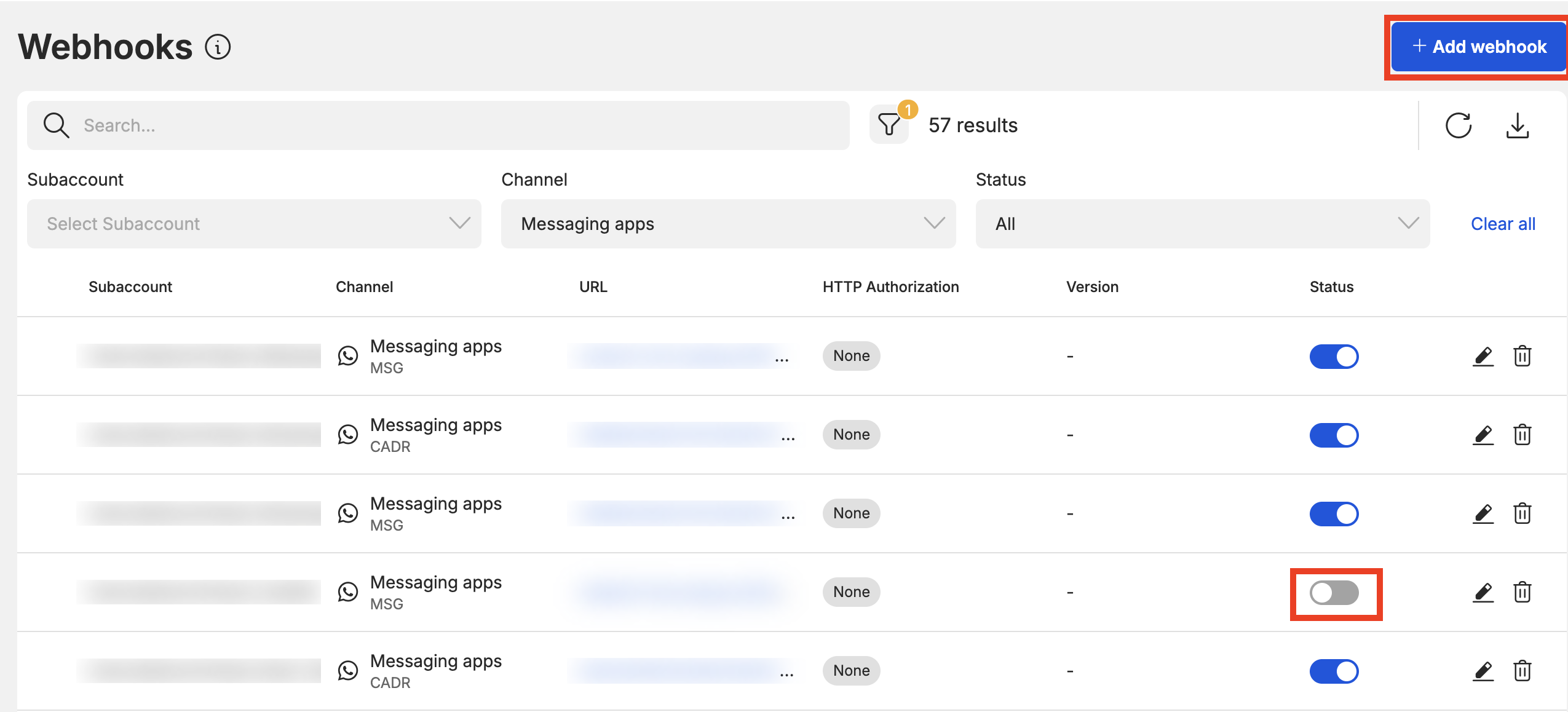
    The webhook list will show you information such as:

    • Subaccount: The subaccount the webhook is attached to.
    • Type: The type of webhook which relates to the API it is tied to (Chat Apps, SMS).
    • URL: The URL the webhooks are being sent.
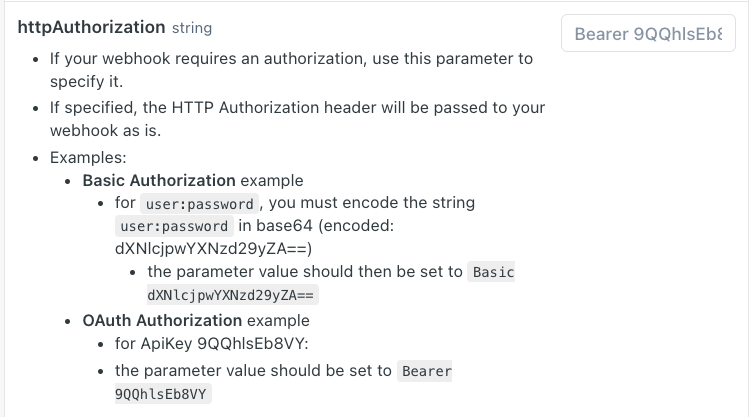
    • HTTP Authorization: The HTTP Authorization (if any) that is being used. For now the HTTP Authorization is a string that is added to the header that your server can use to authenticate the webhook.
      • You can find more information on the parameter here under the Body Params Object.
    • image
    • Content Type (Deprecated): No longer used in newer webhooks.
    • Status: Whether the webhook is enabled/disabled

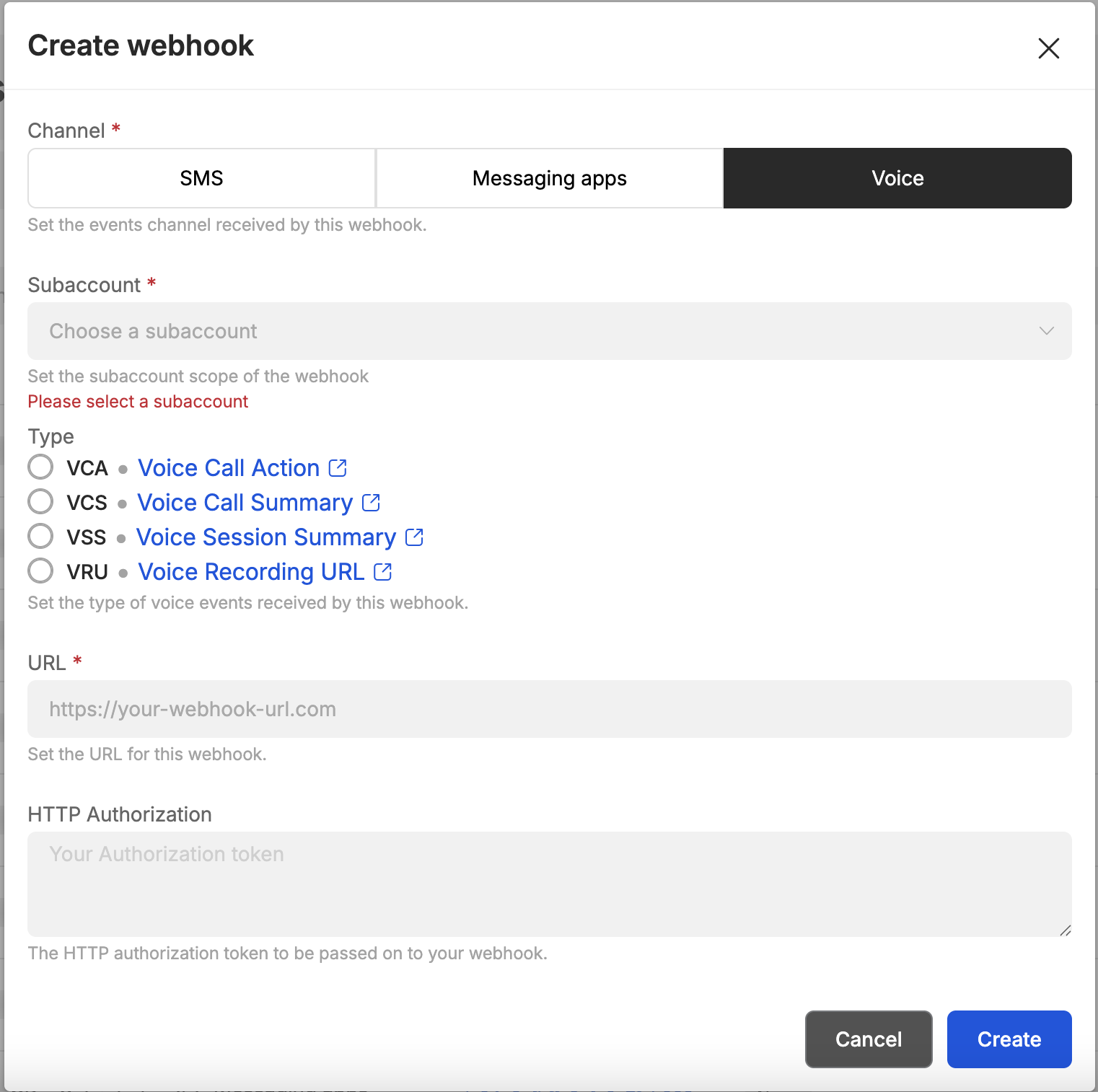
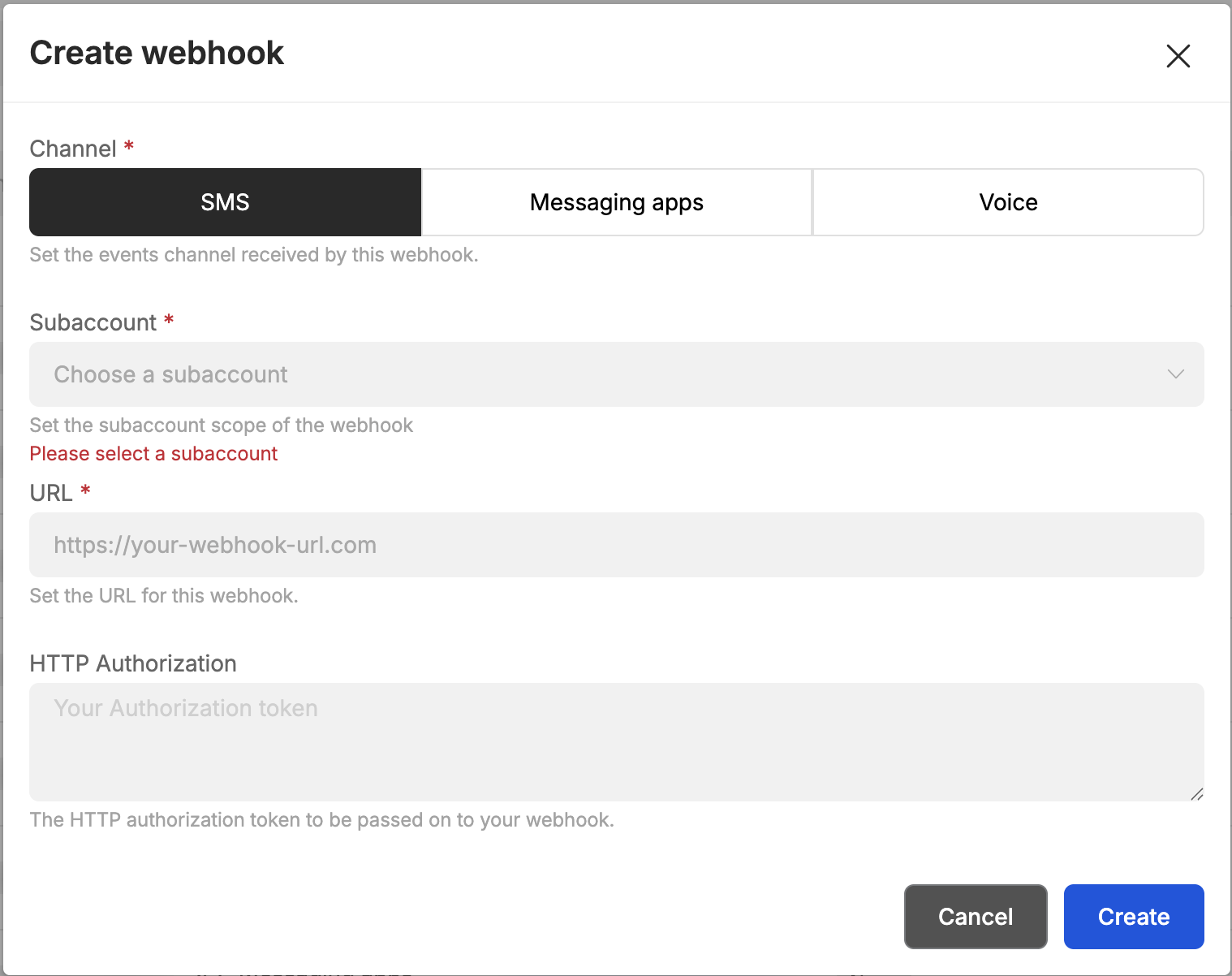
    image When you click on the Add webhook button, you will see this pop up.
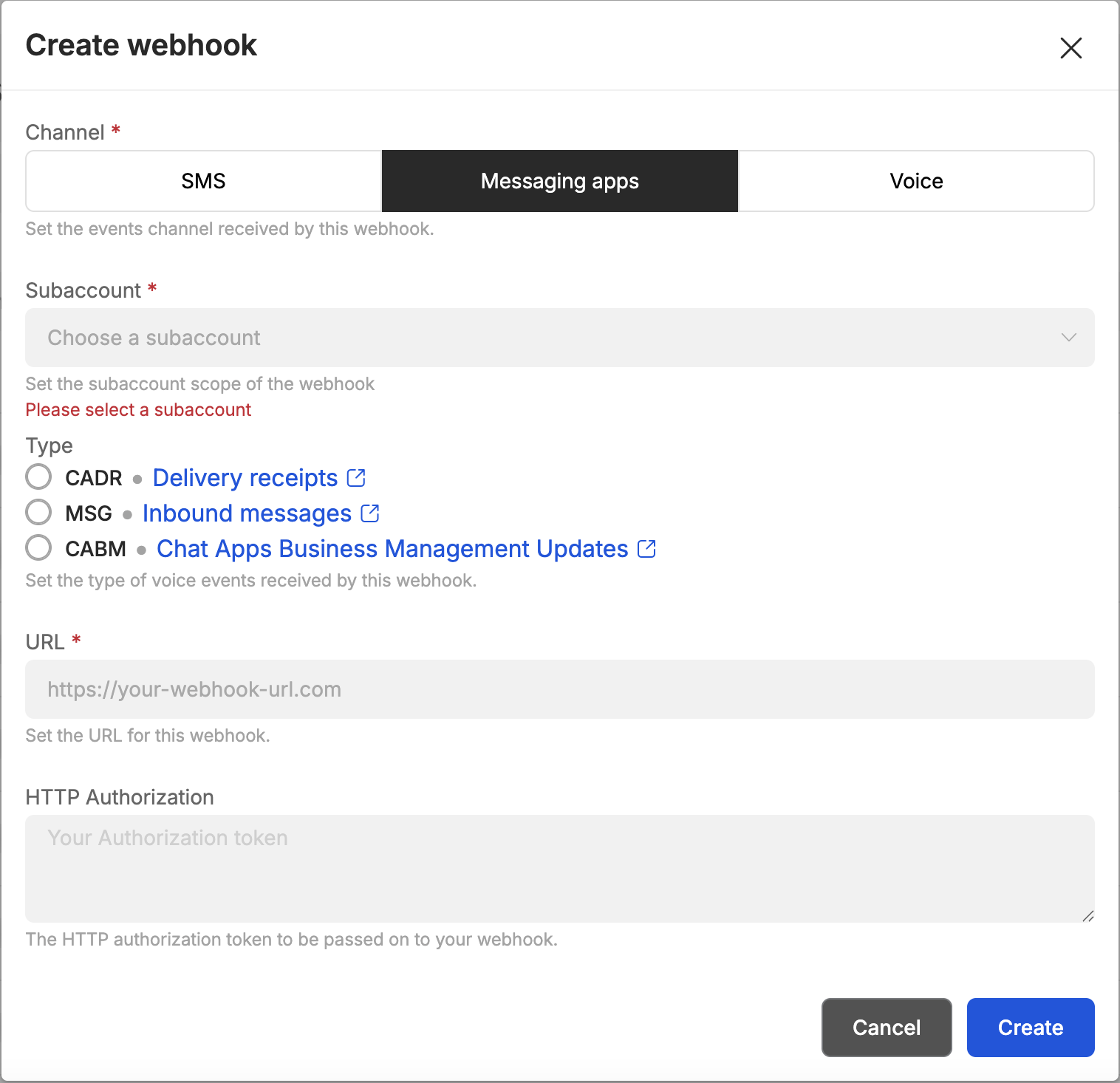
    image

    The popup above allows you to create new webhooks, it can be enabled for all sub-accounts or for a specific one only.

    You can then select if you want to setup this webhook for SMS, Messaging Apps, or Voice. If you select SMS you will receive both incoming SMS and SMS delivery information on this webhook.

    For Messaging Apps and Voice, you can customize your configuration for each type of webhook.

    image image The HTTP Authorization field is an optional parameter, in case your webhook requires authentication.
    Webhooks can also be managed via API, here for ChatApps and here for SMS, and here for Voice.

    IP Whitelisting

    With 8x8, your communication is secure, even in the unlikely event that someone gets hold of your API key. That's because only authorised devices from your approved locations (whitelisted IPs) can access our platform.

    You can set this up using your 8x8 Connect portal here.

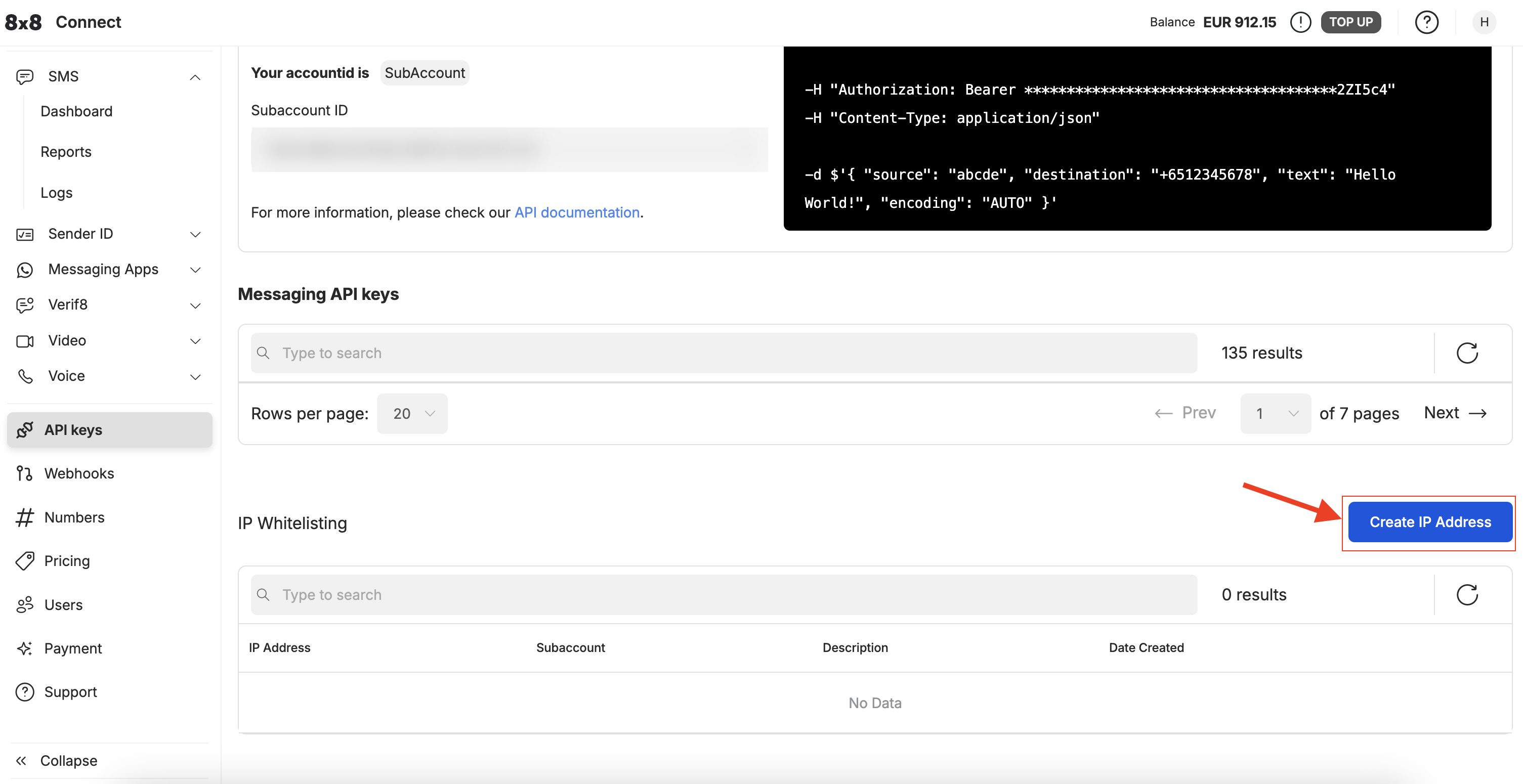
    Under IP Whitelisting section. You may click the Create IP Address button.

    image You will be prompted to input the IP Address and SubAccount. If you do not input a SubAccount, the IP Address will be whitelisted for all SubAccounts. Click SAVE once done.
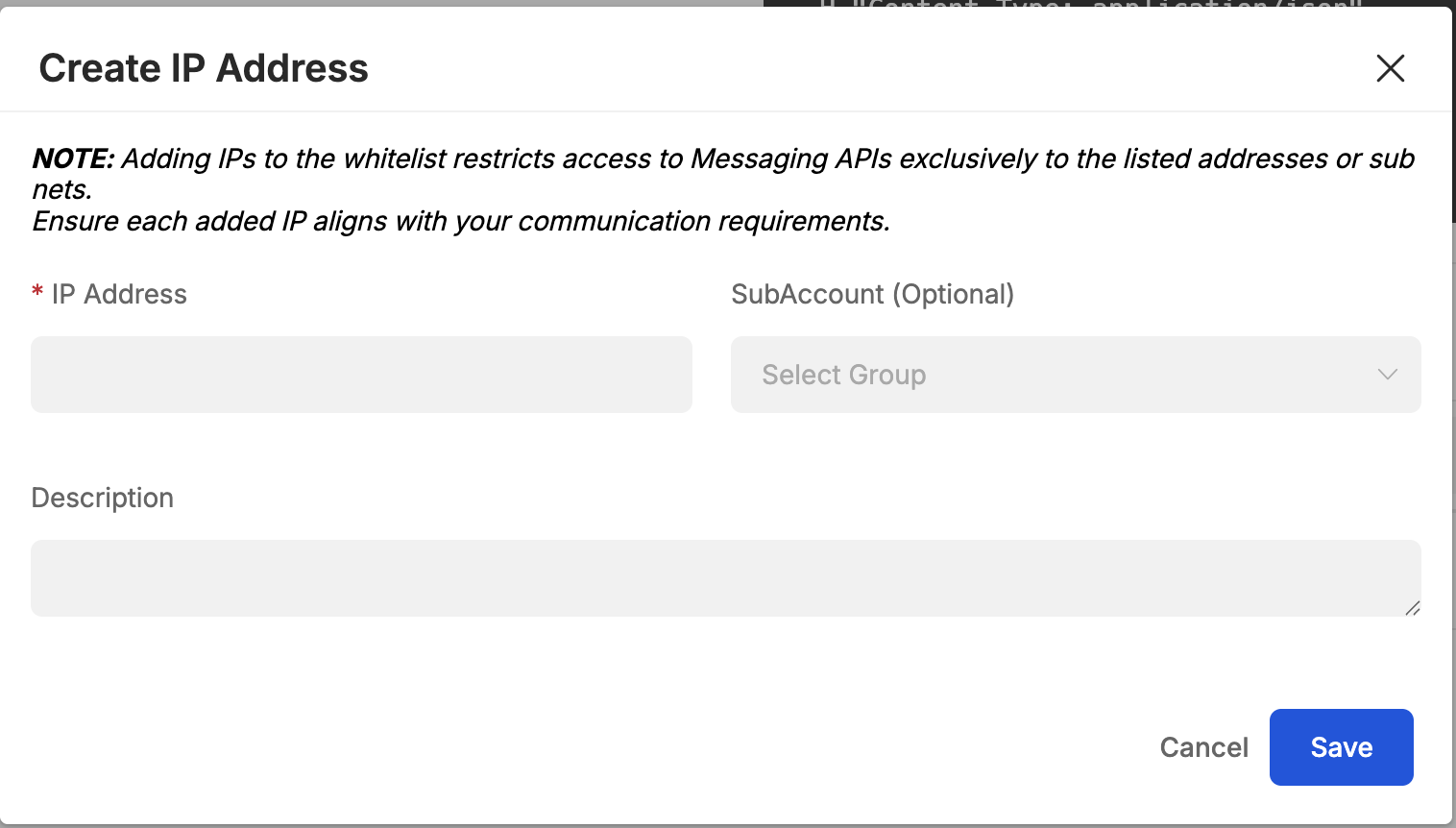
    image


    Source: https://developer.8x8.com/connect/docs/developer-tools · 8x8 CPaaS Developer Docs. Synced for support deflection.

  • 8x8 Converse - Overview

    8x8 Converse - Overview

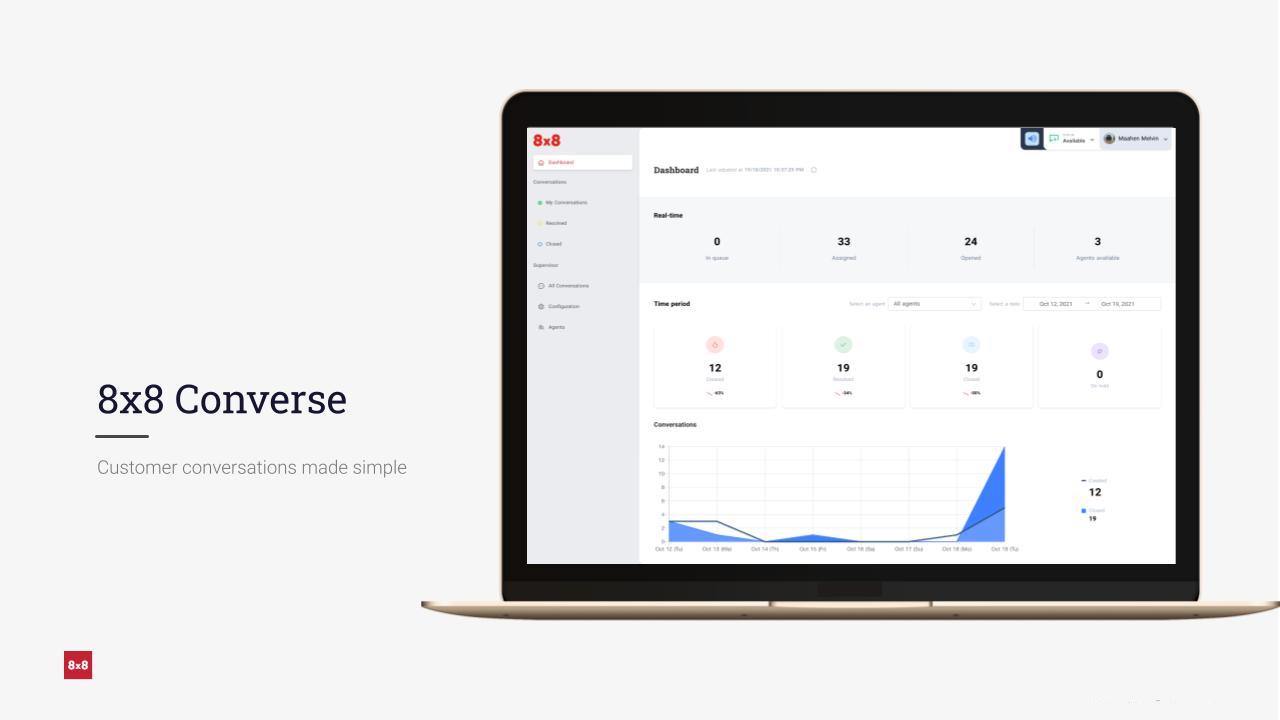
    1280 8x8 Converse is a chat-based customer service platform that supports all the Chat Apps channels out of the box! Engage with your customers over WhatsApp, Viber, WeChat, Zalo and more, easily and instantly.
    To get access to 8x8 Converse, please reach out to your account manager (cpaas-sales@8x8.com).

    • Dashboard
    • My conversations
    • All conversations
    • Configurations
    • Agents management

    Source: https://developer.8x8.com/connect/docs/converse-overview · 8x8 CPaaS Developer Docs. Synced for support deflection.

  • Overview

    Overview

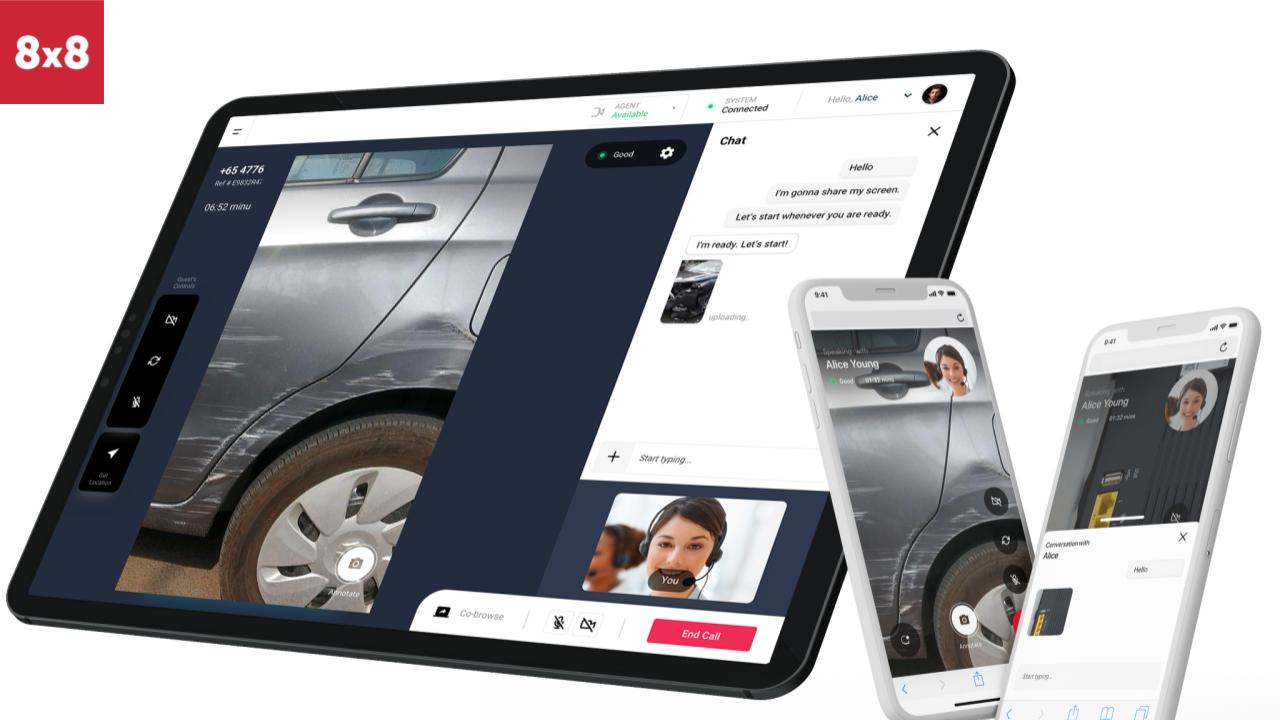
    image

    Introduction

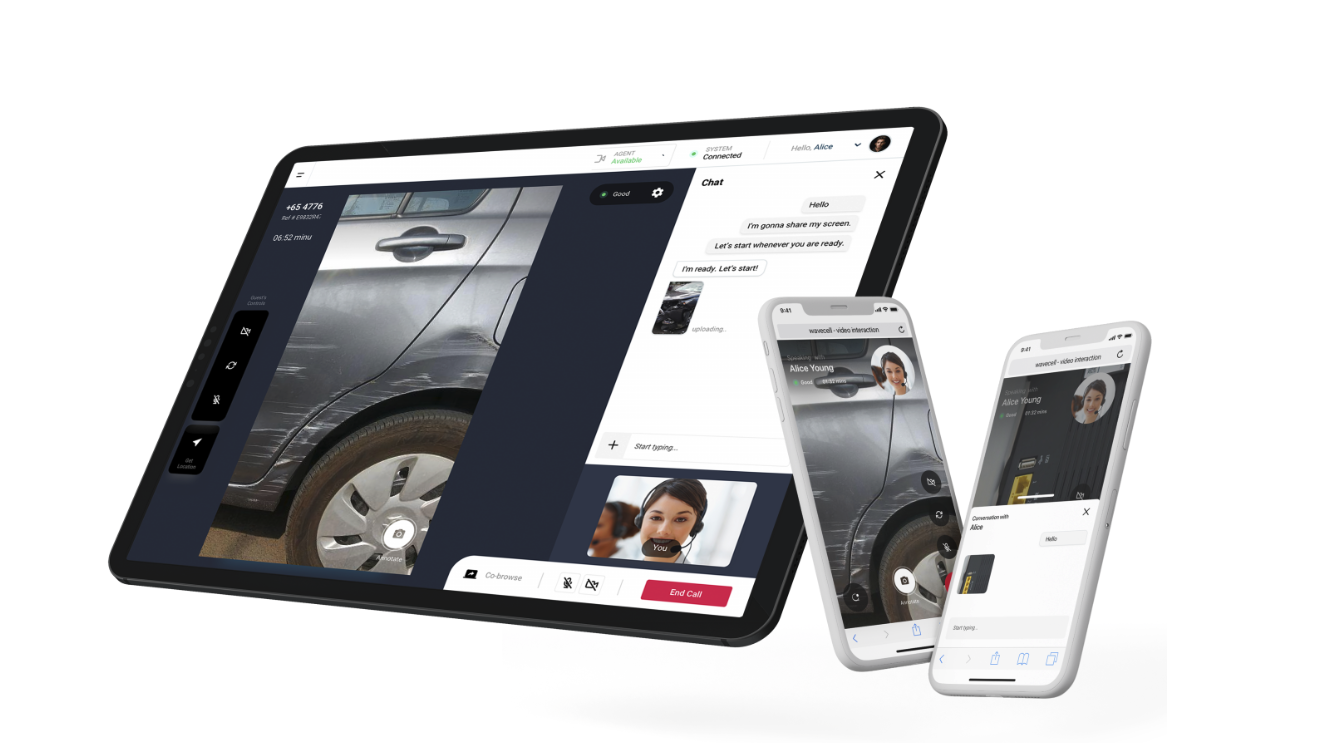
    Video Interaction simplifies the process of initiating video calls between customers and agents with minimal setup required. Most importantly, it eliminates the need for customers to download any additional apps; they can access the service directly from their smartphones. Here's how it works:

    1. An invitation is sent to the customer via SMS.
    2. The customer clicks on the invitation link.
    3. The link initiates a video call directly in the customer's mobile browser, without requiring any app downloads.
    4. The agent is able to join the call from their browser, connecting to the customer within seconds.

    Video Overview

    For a overview of video interaction, please see this video which will take you through the major features of Video Interaction and an example of an outbound call to a customer.

    API Docs

    For detailed information on Video Interaction's supporting API, please refer to this link.


    Source: https://developer.8x8.com/connect/docs/vi-overview · 8x8 CPaaS Developer Docs. Synced for support deflection.

  • Authentication - API Keys

    Authentication - API Keys

    Overview

    8x8 APIs accepts an ApiKey Bearer Token authentication method.

    • You can generate tokens from your customer portal 8x8 Connect
    • You need to include the following header in your requests: Authorization: Bearer {apiKey}
    • NB: (replace the {apiKey} placeholder with the key generated from the customer portal)

    If you have not created your account yet, please head to 8x8 Connect sign-up page

    API Key Management

    API Key Creation

    Step 1: View the API Keys Section of the Connect Dashboard. This may be accessed here.

    image

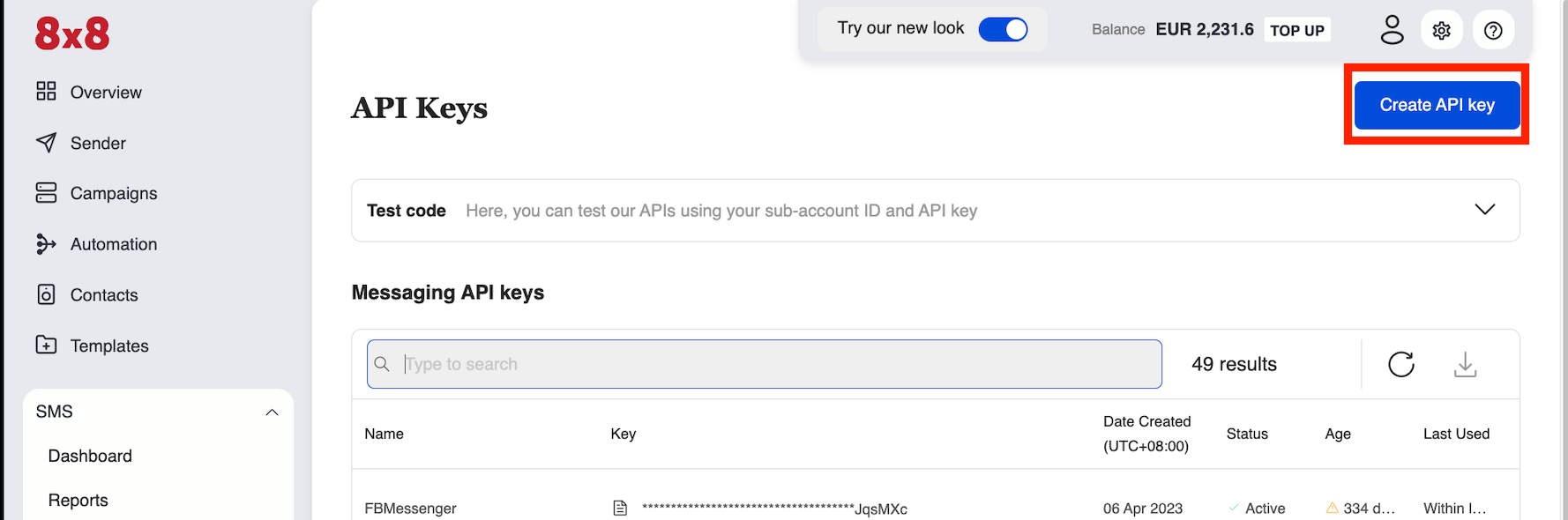
    Step 2: Click the "Create API Key" button.

    image

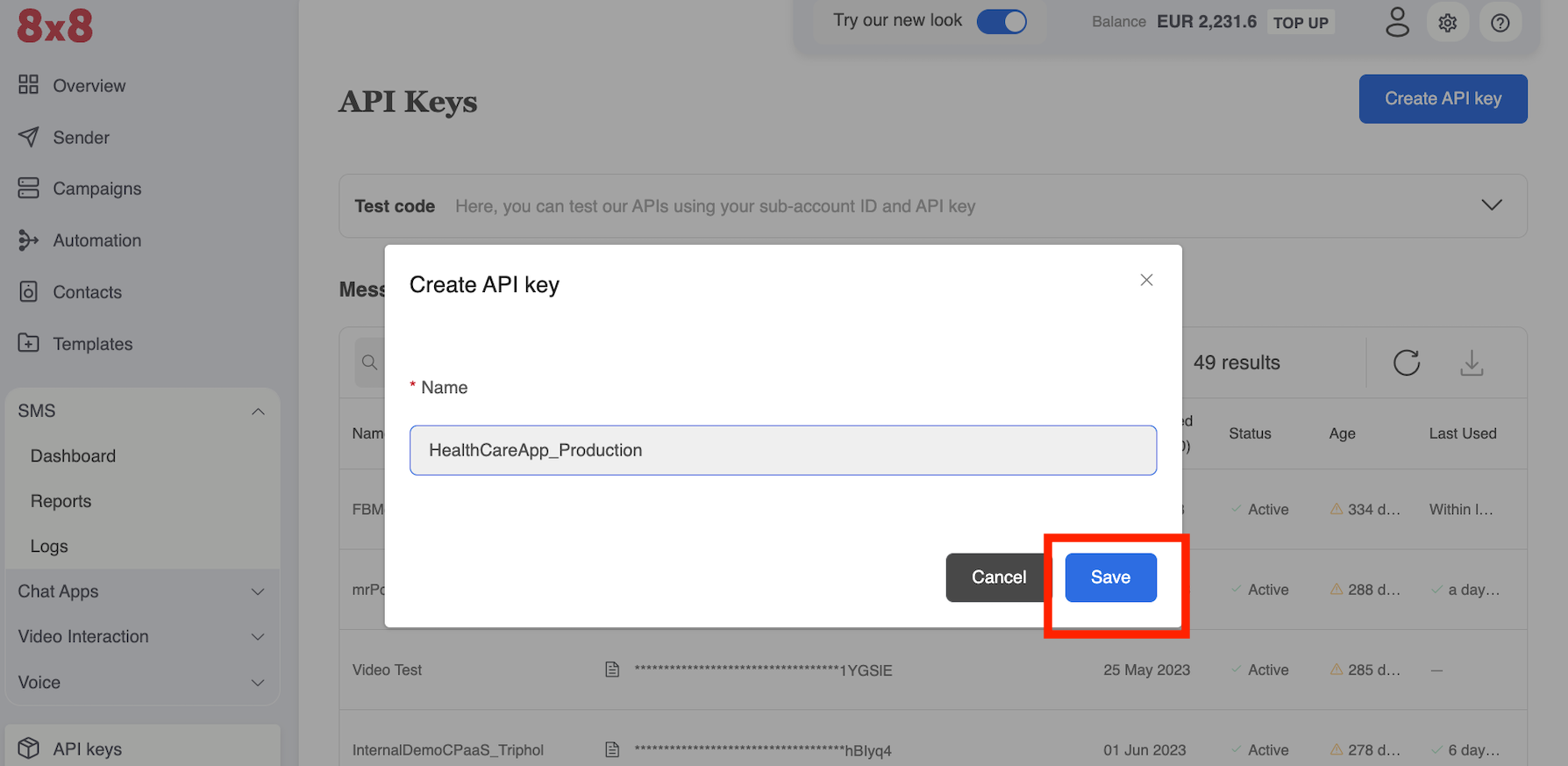
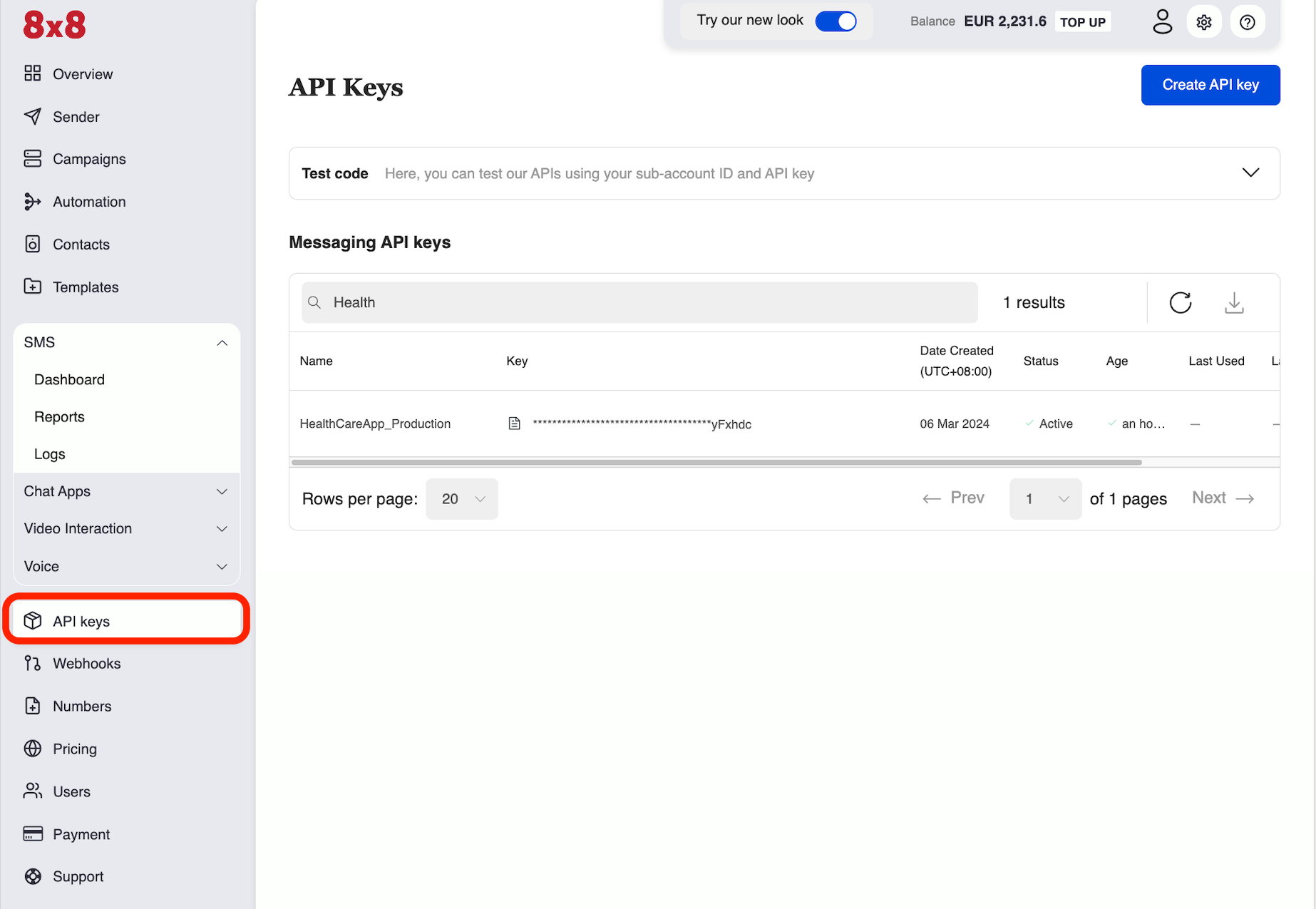
    Step 3: Name the API Key in the Pop Up, this can be any value. We recommend using a memorable name related to the API key's intended purpose such as "HealthCareApp_Production". Once the value is entered in, click save.

    image

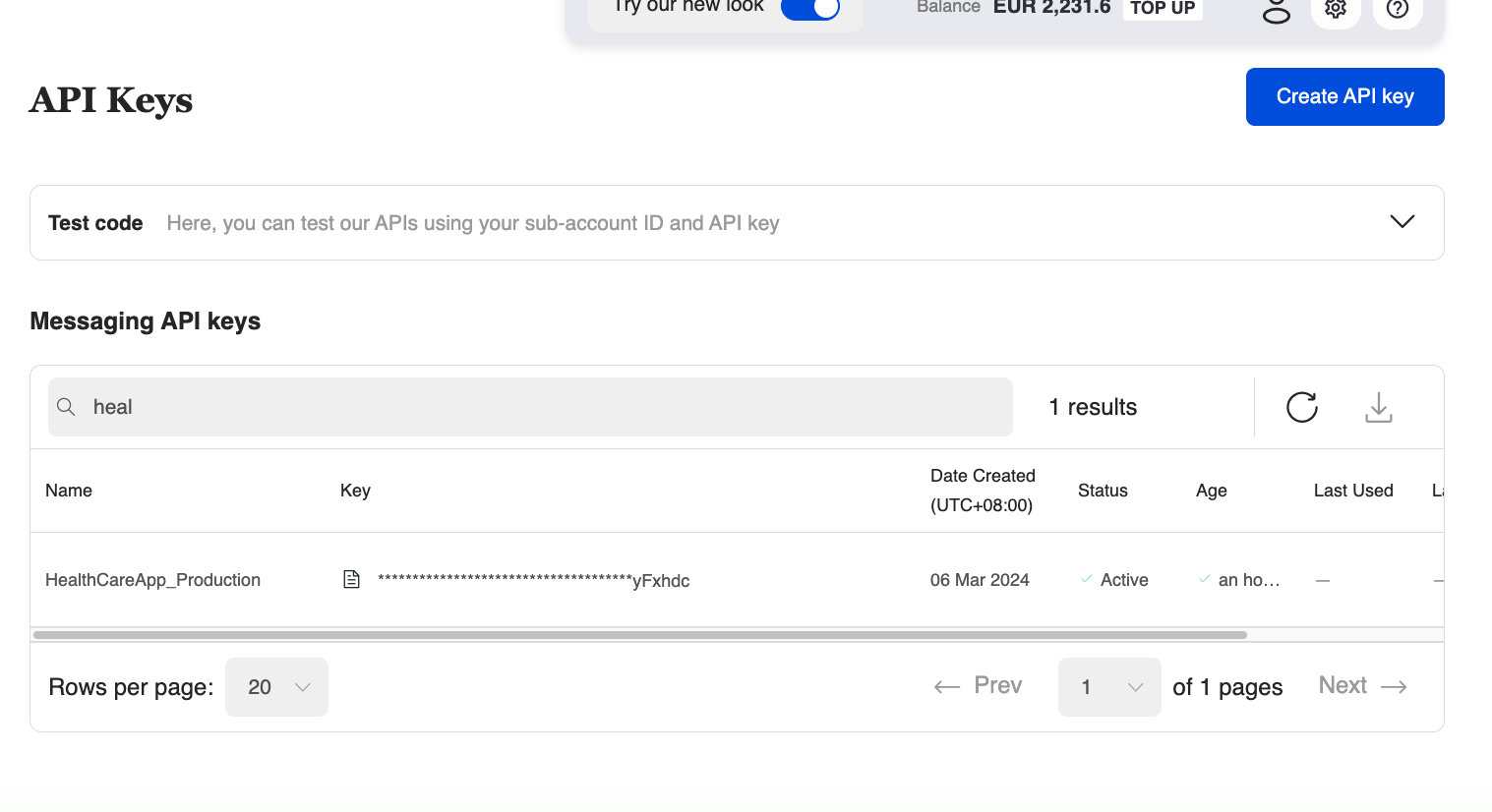
    Step 4: The new API key should now be located in the list, you can perform a partial search at the top for the name. Only the last 6 characters will be shown, click the document button highlighted in red to reveal the entire API key. You can return to this page to retrieve the API key's value at any time.

    image

    API Key Delete/Disable

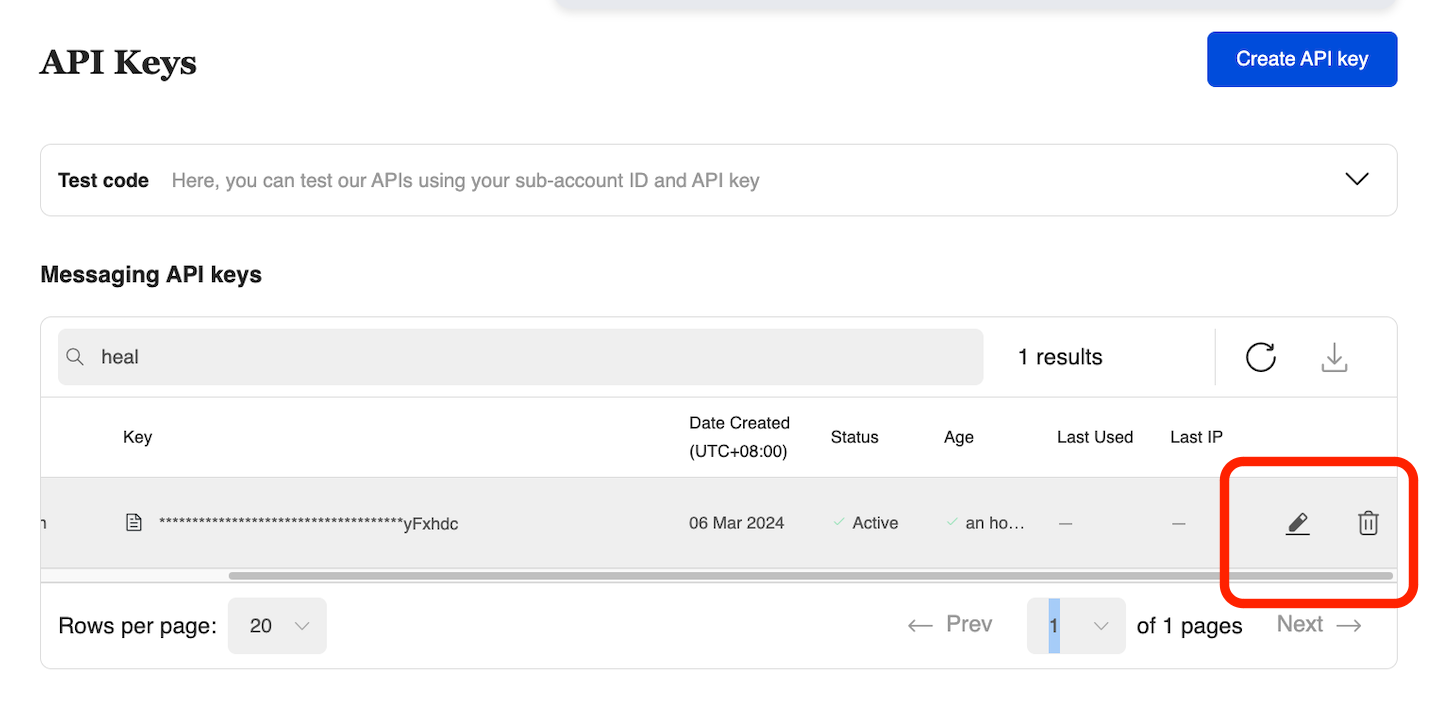
    You can disable or even delete an API key if needed and create a new one. This may be useful if the API key has been compromised in some way or if you plan to regularly rotate the API key.

    The Pen or the Trash Can button in the picture shown below would grant you access to either enable/disable the API key or permanently delete it.

    image


    Source: https://developer.8x8.com/connect/docs/authentication · 8x8 CPaaS Developer Docs. Synced for support deflection.

  • Auth0

    Auth0

    Auth0 integration

    About Auth0

    Auth0 is an identity management platform that let applications developers easily implement authentication and authorisation logic into their applications.

    Coupled with 8x8 SMS connectivity, it allows developers to send one-time passwords via the Auth0 platform to their users all over the World.

    Integrating Auth0 with 8x8 SMS API

    To leverage SMS API to send OTP codes to your users, you will be using the hook feature in Auth0.

    More specifically, you will be using the "Send a phone message" hook and adapt it to send requests to 8x8 SMS API.

    Prerequisites

    • Auth0 account
    • 8x8 CPaaS subaccount
    • 8x8 CPaaS apikey

    Steps

    1. In your Auth0 portal, go to the Auth pipeline > Hooks section.
    2. Select "Create a hook" in the top right corner.
    3. You can call it by any name, let's call it "8x8".
    4. Select type "Send phone message" and click on "Create".
    5. Scroll down on the Hooks page to the "Send phone message" section and click on the pencil/edit button to edit the hook you just created.
    6. Click on the wrench icon (settings) and select "Secrets".
    7. Select "Add Secret" and input for secret key: subaccount and for secret value, your 8x8 SMS subaccount (can be obtained in 8x8 Connect portal - API Keys section).

    8.Select "Add Secret" and input for secret key: apikey and for secret value, your 8x8 SMS apikey (can be obtained in 8x8 Connect portal - API Keys section). 8. Close the secrets and settings section. 9. Copy and paste this code in the code section of the hook in place of the code already there:

    module.exports=function(recipient, text, context, cb){
    const axios =require("axios").default,
    API_KEY= context.webtask.secrets.apikey,
    SUBACCOUNT= context.webtask.secrets.subaccount,
    BASE_URL="https://sms.8x8.com/api/v1/";
    let instance = axios.create({
    baseURL:BASE_URL,
    headers:{
    "Authorization":`Bearer ${API_KEY}`,
    "Accept":"application/json",
    "Content-Type":"application/json"
    },
    });
    instance({
    method:"post",
    url:`subaccounts/${SUBACCOUNT}/messages`,
    data:{
    "encoding":"AUTO",
    "destination": recipient,
    "text": text
    }
    })
    .then((response)=>{
    cb(null,{});
    })
    .catch((error)=>{
    cb(error);
    });
    };
    1. Save the code.
    2. Click the play button to open the runner.
    3. Wait for the logs stream to load.
    4. Press the run button (Bottom right) .
    5. Check that you have no errors in the hook log stream and the response has a status code of 200.
    6. Check 8x8 Connect logs and verify that you Auth0 submitted an SMS to the test number with your account.
    7. You're all set! You can now use this hook in your Auth pipeline!

    Video steps


    Source: https://developer.8x8.com/connect/docs/auth0 · 8x8 CPaaS Developer Docs. Synced for support deflection.

  • API Endpoint migration guide

    API Endpoint migration guide

    This outlines the changes to our API endpoints and provides guidance for migrating your applications to use the updated endpoints. We're introducing these changes to improve consistency, reliability, and functionality across our services.

    These endpoint changes include updates to both SMS and Messaging Apps services. Please review all changes carefully to ensure a smooth endpoint transition.

    Key Changes

    • SMS endpoints: Several endpoints have been consolidated for improved efficiency.
    • Response format standardization across Messaging Apps endpoints.
    • Parameter handling changes in certain endpoints.

    What To Do

    • Migrate to the New Endpoint URL and corresponding payload/response updates.
    • Contact support for any clarification.

    SMS API Endpoints

    📘

    The SMS endpoint payload and response remain consistent with the previous version and remain unchanged.

    Migrate and update your API calls to use the new endpoint URL, as listed in the New Endpoint column.

    Old Endpoint New Endpoint
    POST
    /sms/v1/{subAccountId}/single
    Send SMS Single
    POST
    /sms/v1/{subAccountId}/many
    Send Many SMS
    POST
    /sms/v1/{subAccountId}/many/compact
    Send Many SMS
    DELETE
    /sms/v1/{subAccountId}/single/{umid}
    Cancel Scheduled Message
    DELETE
    /sms/v1/{subAccountId}/many/{batchId}
    Cancel Many SMS Messages

    Messaging Apps API Endpoints

    📘

    Migrate to the new endpoint (see New Endpoint column).

    There are updates in the payload and response structures; refer to the New Endpoint column for documentation to update corresponding payload/response properties.


    Old Endpoint New Endpoint Payload/Response Changes
    POST
    /chatapps/v1/{subAccountId}/message/read
    Mark Message Read Payload Changes:
    - Payload is removed.

    - umid is passed directly in the path of new endpoint.
    POST
    /ipm/v1/{subAccountId}/message/single
    Send Message Response Changes:
    - Status property

    Old Success Response:
    "status": {
    "code": "QUEUED",
    "description": "Message is accepted and queued for processing"
    }

    New Success Response:
    "status": {
    "state": "queued",
    "timestamp": "2021-01-04T08:19:45.99Z"
    }
    POST
    /chatapps/v1/{subAccountId}/message/single
    Send Message same, as for POST
    /ipm/v1/{subAccountId}/message/single
    POST
    /ipm/v1/{subAccountId}/message/many
    Send Message Many same, as for POST
    /ipm/v1/{subAccountId}/message/single
    POST
    /chatapps/v1/{subAccountId}/message/many
    Send Message Many same, as for POST
    /ipm/v1/{subAccountId}/message/single

    Source: https://developer.8x8.com/connect/docs/api-endpoint-migration-guide · 8x8 CPaaS Developer Docs. Synced for support deflection.

  • API Rate Limiting

    API Rate Limiting

    To protect the platform from being overloaded and maintain a high quality of service to all customers, 8x8 enforces API rate limits for its SMS API.

    The default request rate limit is 1800 HTTP requests per second per sub-account (can be adjusted upon request), and 3000 requests per second per IP address with no maximum daily quota.

    All requests exceeding this quota will be rejected by the API with 429 Too Many Requests HTTP Status.

    The API will also return the Retry-After HTTP header with the value indicating when the client can retry the request.

    Retry-After header example

    Retry-After: 1

    In this example, you can retry the request after 1 second.

    👍 Hint

    If you need to submit a higher volume of messages in bulk, please ensure to use the Send SMS batch API that allows you to submit up to 10,000 messages in a single API request, which currently is roughly equivalent to 25 000 messages per second.


    Source: https://developer.8x8.com/connect/docs/api-rate-limiting · 8x8 CPaaS Developer Docs. Synced for support deflection.

8x8 Logo
  • 8x8 YouTube
  • 8x8 Facebook
  • 8x8 Twitter
  • 8x8 Blog
  • 8x8 LinkedIn
  • 8x8 Instagram

Company

  • About Us
  • Careers
  • Contact Us

Our Products

  • SMS
  • Chat Apps
  • Video Interaction
  • Voice
  • Pricing

Media

  • Customer Success Stories
  • News
  • Events
  • Blog

Resources

  • Documentation
  • Service Status
  • Ask for support
Privacy Policy | Terms of Use | Acceptable Use Policy
© 2025 8x8, Inc. All rights reserved.